Answer first: A good AI customer research platform does four jobs you can test before you sign: it helps you write a sound study, it asks real follow-up questions in the participant's language, it ties every theme in the report to the exact words people said, and it keeps your participants' data where your legal team expects it. Everything else (dashboards, integrations, the price page) matters less than those four. Below is the checklist we would use ourselves, the questions to put to each vendor, and a two-week pilot that shows you the answers with your own study instead of a demo.
This page is for market research and consumer insights teams choosing a platform that designs, moderates and analyses interviews with AI. Koji is one of these tools and we publish this page, so our own product sits in a clearly labelled section near the end and is not ranked against anyone.
Why the checklist matters more than the shortlist
Most insights teams already use AI somewhere. Maze's Future of User Research Report 2026, a survey of nearly 500 researchers, designers and product people, found that 69% use AI in at least some of their research projects, 19% more than a year earlier. Qualtrics' 2026 market research trends study of more than 3,000 market research professionals in 14 countries found that 53% use AI regularly and nearly nine in ten have tried it.
The trouble is that using AI and trusting what it produces are different things. In a QuestDIY and Harris Poll survey of 219 US insights professionals in August 2025, 98% said they use AI and 72% use it daily, yet 39% said they now rely on technology that sometimes produces errors and 31% said AI has added validation work. That validation work is what a platform should cut, and it is what a sales demo never shows.
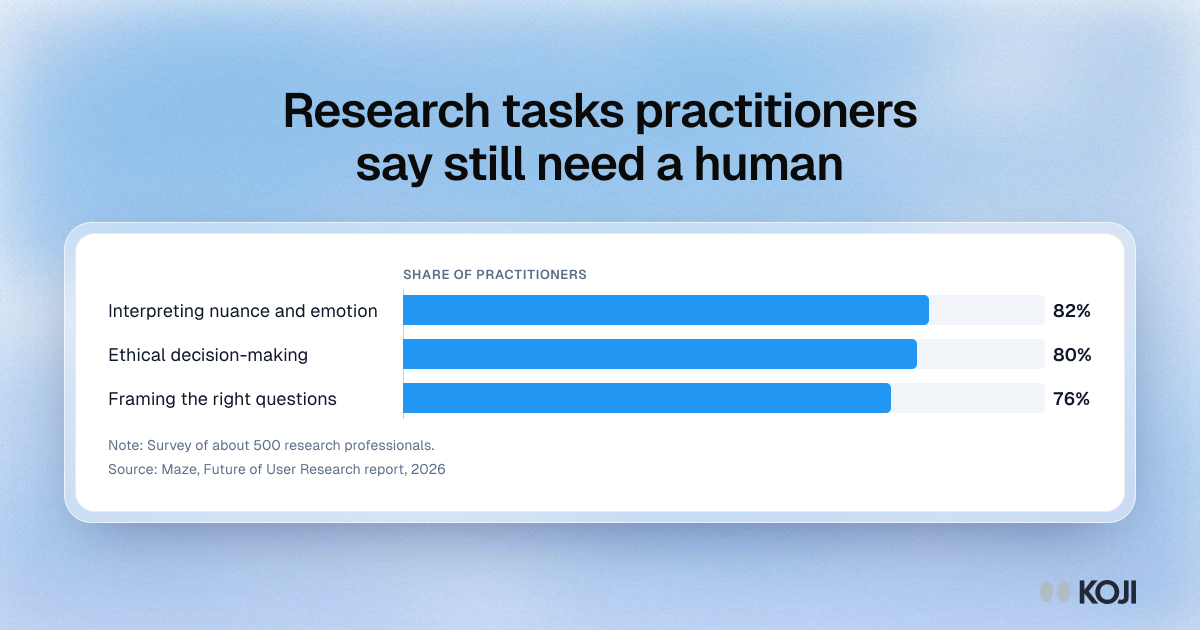
Practitioners are also clear about where they still want people in charge. In the same Maze survey, 82% said interpreting nuance and emotion needs human judgment, 80% said ethical decisions do and 76% said framing the right research questions does.
So the right question is not "which tool has the most AI". It is "which tool lets my team check the AI's work quickly, and hands the judgment calls back to us".
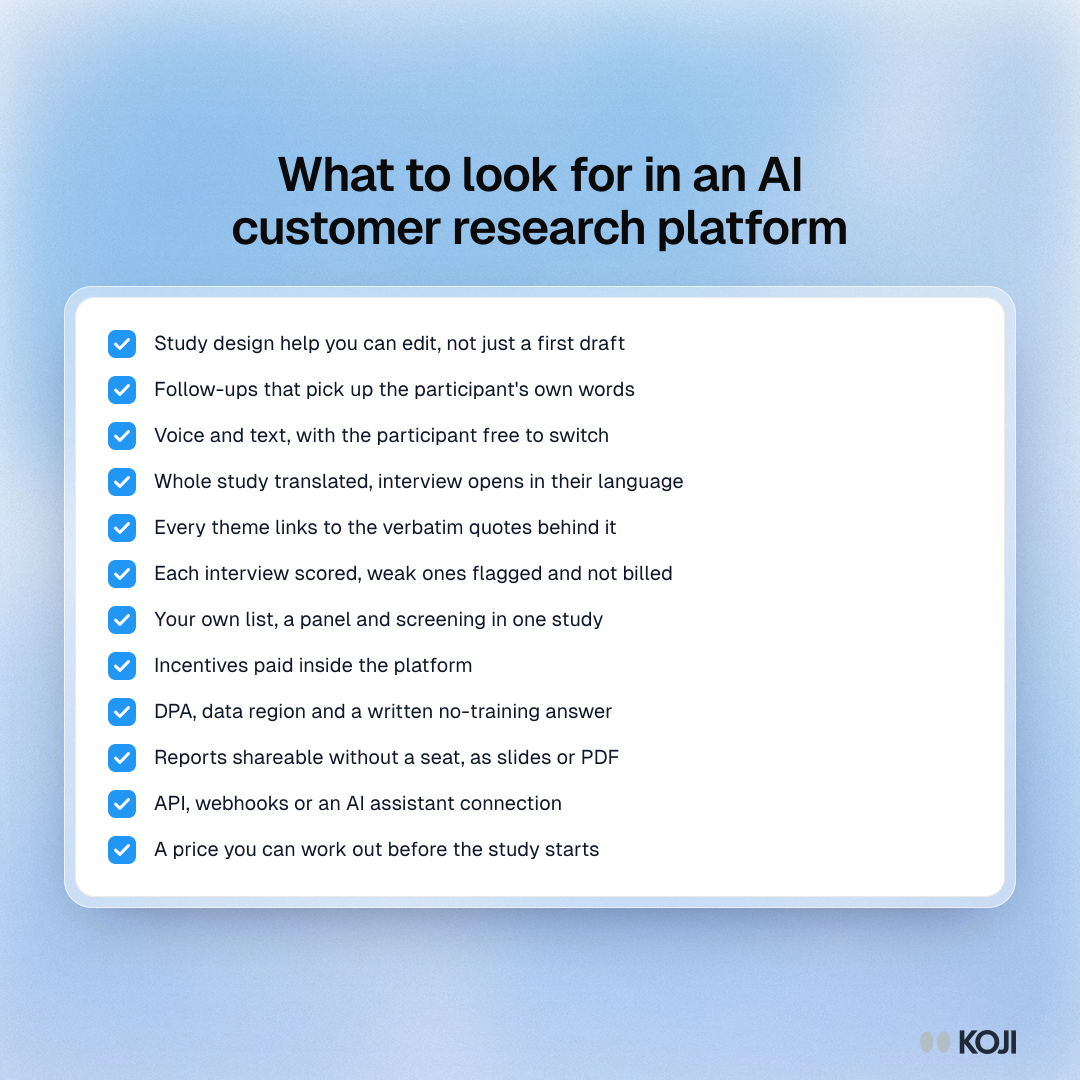
The checklist: 12 things to look for
Work through these in order. The first six decide whether the research is any good; the last six decide whether you can run it at your company.
1. Study design help you can edit
Ask the platform to draft a study from one sentence of your brief. A useful draft names a research goal, proposes open questions and structured ones (scales, single choice, ranking) and suggests screening questions. Then change something: add a segment, cut a question, ask for deeper follow-ups. If every change means starting over, your researchers will stop using the assistant after a week.
2. Follow-up questions that respond to the answer
This is where AI moderation earns its keep or doesn't. Read three real transcripts, not the vendor's best one. Good follow-ups pick up a specific word the participant used ("you said the setup was messy, what happened?"). Weak ones are generic ("can you tell me more?") or ask the next scripted question no matter what was said. Check whether you can set how deep the follow-ups go per question, so a warm-up question doesn't get five probes.
3. Voice and text, and the participant's choice
Some people talk more freely out loud, others won't speak to a machine at all. A platform that offers both voice and text, and lets the participant switch, loses fewer people halfway. Phone interviews matter if your audience is older, mobile-first or not at a desk.
4. Languages, done properly
Count the languages, then test one you can read. Three things to look for: the whole study is translated (answer options and scale labels too, not just the questions), the interview opens in the participant's language automatically, and the analysis can be written in your team's language while the quotes stay in the participant's own words. If you run multi-market work, our list of multilingual research tools goes deeper.
5. Every theme traceable to quotes
This is the item most teams undervalue until a stakeholder asks "who said that?". In the report, click any theme or finding. You should land on the verbatim quotes behind it, with how many participants it rests on. If the platform gives you a summary with no path back to the transcripts, you will end up re-reading every interview to defend it, which is exactly the work you were paying to avoid. We wrote a whole guide on keeping verbatim quotes tied to themes at scale.
6. A quality check on each interview
Some interviews will be thin: one-word answers, a participant who rushed, a bot. Ask how the platform scores each interview and whether low-quality ones are flagged, excluded from the report, and excluded from what you pay. Nelson Recruiting reports that over 30% of respondents across sample sources were flagged as suspicious or fraudulent in 2025, so this is not an edge case.
7. Recruitment: your list, a panel, or both
Can you invite your own customers with personal links and reminders? Can you buy participants from a panel inside the tool, and see the cost and feasibility before you launch? Can you screen people out before the interview starts, and route different people to different questions? Agencies usually need all of these on the same study.
8. Incentives
Paying participants through the platform saves an admin job per study. Check which reward types it supports, the range of amounts, and who handles tax and fraud checks.
9. Privacy, security and where data lives
Ask for the data processing agreement, the list of sub-processors and the region where interview data is stored. Ask whether personal details (names, emails, employers) can be removed from transcripts automatically. Ask, in writing, whether your interview data is used to train AI models. And ask for the actual status of certifications such as SOC 2 or ISO 27001: "in progress" is a fair answer, but you want it stated plainly. Our AI interview data privacy guide lists the follow-up questions for your security review.
10. Sharing and exports your stakeholders will use
Findings that stay in a tool don't get used. Check that you can share a report with people who don't have a seat, download it as slides or a PDF, and export transcripts and structured answers as CSV for your own analysis.
11. Integrations
If you plan to trigger interviews from your CRM or product, or pull results into your own systems, ask for API documentation and webhooks. If your team works in AI assistants, ask whether the platform can be driven from one (over MCP, for example).
12. A pricing model you can forecast
Per-seat, per-interview, per-minute and annual-contract models all exist. What matters is whether you can say, before a study starts, what it will cost. Ask what happens to bad interviews (do you pay for them?), whether a voice interview costs more than a text one, what panel participants cost on top, and what the minimum commitment is.
Questions to ask every vendor
Send the same questions to every vendor on your shortlist, in writing, and compare the answers side by side. Vague answers are an answer too.
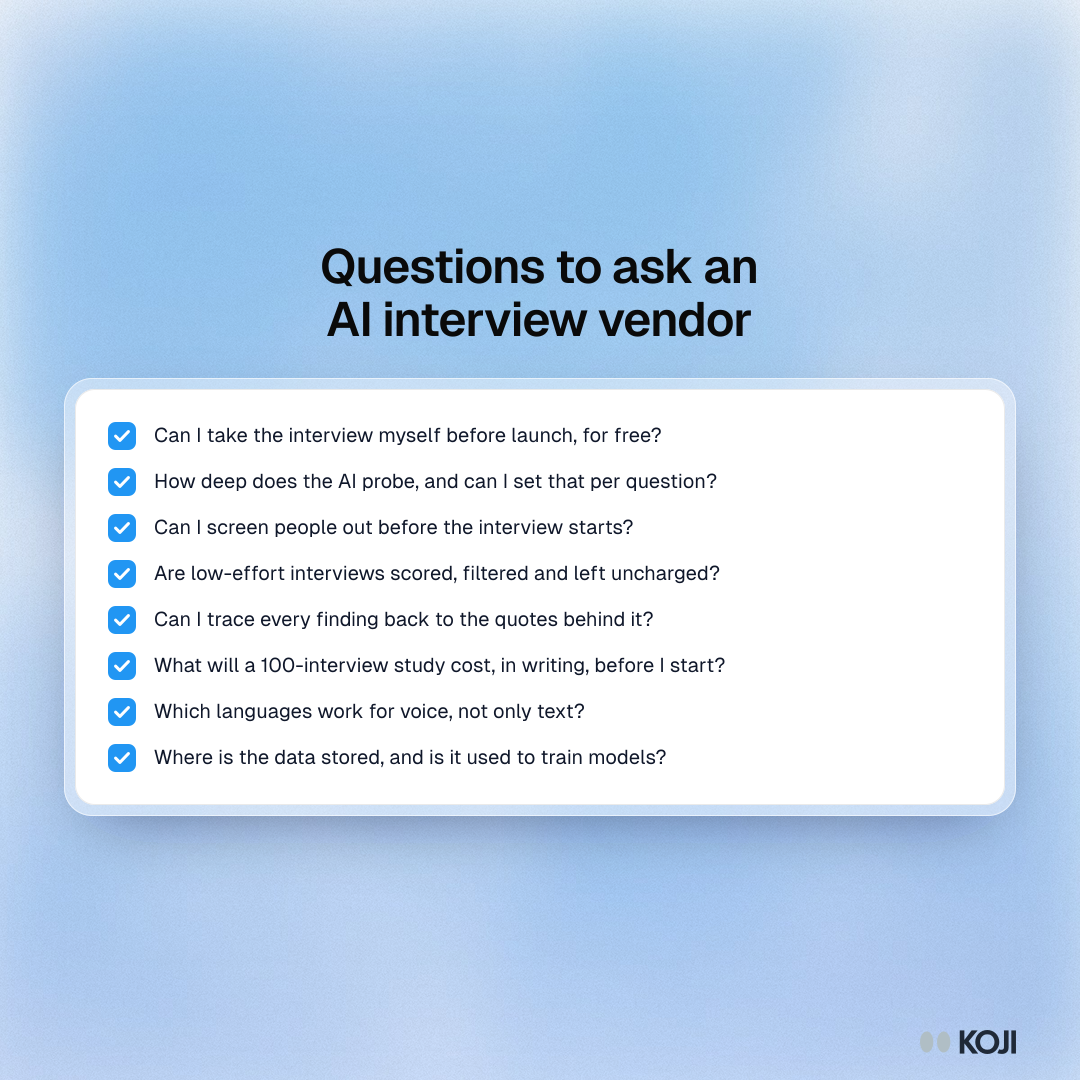
The ones that separate vendors fastest are about evidence and cost:
- "Show me a finding in a real report and click through to every quote behind it." If it takes a support ticket, that's what your team's week will look like.
- "What did this pilot study cost, line by line, and what would 200 interviews in three markets cost?" Ask for the incentive and panel cost separately from the software.
- "What happens to an interview where the participant gave one-word answers?" You want to hear that it's flagged and that you don't pay for it.
- "Is any of our data used to train models, yours or a third party's?" Get the answer in the contract.
- "Can I take the interview myself before launch, without paying for it?" You should hear exactly what your participants will hear.
- "Which languages work in voice, not only in text?" Language lists often mix the two.
Run a two-week pilot instead of a long trial
A demo shows the vendor's best study. A pilot shows yours. Here is a plan that fits in two weeks:
- Pick a study you've already run with human moderators, so you have something to compare against. Fifteen to twenty interviews is enough.
- Write the brief in the platform using its assistant, then edit it to match your original guide.
- Recruit the same kind of people: your own customers if you used them before, or a panel with the same screening.
- Read five transcripts in full and mark every follow-up question as useful, generic or off-track.
- Check three findings in the report against the quotes and against your original study's conclusions.
- Cost it: what did the pilot cost in total, and what would your usual study size cost?
If you want a fuller method for testing an AI moderator against your own team, our AI moderator pilot playbook has the scoring sheet. For a broader view of the vendors, see our comparison of AI-moderated interview platforms, and for the method itself, how AI-moderated interviews work.
Red flags
- The vendor won't let you read full transcripts during the pilot.
- Findings in the report have no quote counts and no link to the source.
- The price depends on "talking to sales" for every study size, including small ones.
- There's no written answer on data storage region or model training.
- Follow-up questions in the transcripts are the same three phrases on repeat.
Where Koji fits (our product)
Koji publishes this page, so here is how our own tool measures up against the checklist, including where it falls short.
Koji runs AI-moderated interviews by voice, text or phone. You type a research question and the research assistant drafts a brief (goal, questions, screening) that you can then change by asking for edits. You set the follow-up depth per question, add images to questions for concept tests, and use branching so each participant only gets the questions that fit their earlier answers. Studies run in more than 30 languages: Koji translates every question, answer option and scale label when you publish, opens the interview in each participant's language, and can write the report in a different language while quotes stay in the participant's words.
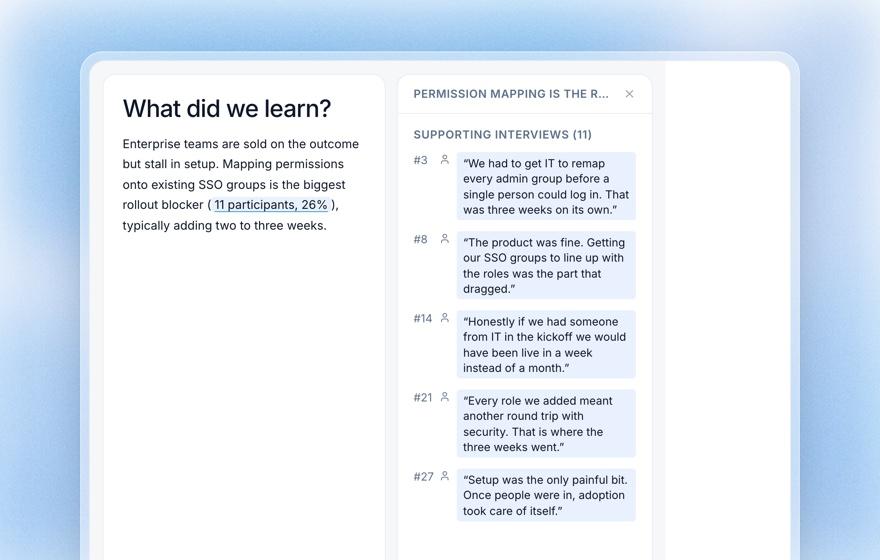
Every interview gets a quality rating, and only interviews that pass the quality check use credits. In the report, each finding shows how many participants it rests on, and you can open the supporting quotes next to it.
For recruitment, you can invite your own list by recruitment email on paid plans (personal invite links come with Interviews and Enterprise), or recruit from Koji's research panel in 130+ countries on paid plans, and pay incentives through Koji. Reports download as an editable PowerPoint deck or a PDF. On data: Koji is built for GDPR with EU data residency, can remove personal details from transcripts per study, publishes its DPA and sub-processor list on its compliance pages, and commits contractually never to train models on customer interview data. Its SOC 2 audit is pending, and Koji does not claim SOC 2 attestation until the report is issued.
What it costs (checked November 2026): a free account comes with 10 credits and no card. Paid plans are Insights at €29 a month and Interviews at €79 a month, with Enterprise on a contract (SSO, white-label and audit logs are Enterprise features). A text interview uses 1 credit and a voice interview 3, at €1 a credit. The API and MCP server come with Interviews and Enterprise. Current details are on the pricing page.
When Koji is the wrong choice: if you need live, human-moderated video sessions with clients watching from a backroom, or long-running insight communities where the same people post over weeks, Koji isn't built for that. It also doesn't replace a full-service agency's recruitment of very hard-to-reach B2B audiences.
Market research and insights teams can see how Koji fits their work on the page for researchers, or start a free study and run the two-week pilot above on your own brief.