An AI interview question generator turns a research goal into questions in under a minute. The routes differ in what you get back. A free generator gives you a list of questions or a guide document. A general chatbot gives you whatever you ask for, including your own assumptions phrased as questions. A research assistant inside an interview platform gives you a whole study: who to talk to, how to screen them, how deep to probe, and then it runs the interviews. If you only need a starting list, any of them will do. If the questions are going to real customers this week, pick the route that keeps working after the first draft.
This guide takes one research goal, sets out what each of six routes hands back for it, based on what each tool documents, and says where Koji is not the right pick.
Try it on your own goal: create a free Koji account, describe what you want to learn in one sentence, and the research assistant drafts the full brief. Then compare it against the other routes below.
Why the choice of generator matters more than it used to
AI is now part of most research work. In User Interviews' State of User Research 2025 survey of 485 researchers, 80% said they use AI in their research, up 24 points on the year before. The same survey found that 91% worry about the accuracy of AI output and about hallucinations (User Interviews, 2025).

Photo by Sanni Sahil on Unsplash
That worry applies to questions as much as to analysis. A question generator does not know your product, your customers or the decision you are trying to make unless you tell it. When it guesses, it tends to write questions that sound reasonable and quietly assume the answer: "How much time would this feature save you?" assumes it saves time.
Checking the output is also harder than it looks. In a study of 118 draft survey questions, researchers at the University of Lausanne and the University of Essex found that a large language model was notably less likely than an expert coder to flag some data quality risks, especially social desirability bias (Survey Futures working paper 22). So an AI that writes your questions is not a reliable judge of them either. Whichever route you pick, a person still reads every question.
The setup: one goal, six routes
The goal:
We run a project management tool for small agencies. Trials that sign up but never invite a teammate almost never convert. We want to know why they stop before inviting anyone, so we can decide whether to change onboarding or the trial length.
It makes a good test because it has a decision in it (onboarding or trial length), a clear audience (trial users who never invited anyone) and a behaviour to ask about (stopping before the invite). A good generator should use all three.
The six routes:
- A general chatbot, asked "write interview questions for this goal"
- A saved prompt template you paste into a chatbot every time
- Innerview's free User Interview Question Generator
- Marvin's free Customer Interview Guide Generator
- UserCall's free AI Interview Script Generator
- Koji's research assistant, which drafts the study's brief in the Studio chat
What each route gives you
1. A general chatbot
You get questions in seconds, and a lot of them. The quality depends almost entirely on how you ask. Given our goal as written, a chatbot will usually produce a tidy list, and some of the questions will carry the founder's theory along with them: "Was the invite step confusing?" is a guess dressed as a question.
What you do not get: a screener to find trial users who never invited anyone, any guidance on how many people to talk to, or a way to run the interviews. You copy the list into a document, a form or a call script and carry on from there. Our longer piece on ChatGPT for user research covers where it helps and where it breaks.
Who it is for: someone who needs a first list to react to and will edit it by hand.
2. A saved prompt template
A good prompt fixes most of the chatbot's habits. Ask for questions about past behaviour, not future intentions. Ask it to flag any question that assumes an answer. Ask for a screener and a follow-up for each question. You get much better output, and it is free.
The cost is upkeep. The template lives in a doc, it drifts as people edit it, and you still paste the result somewhere else to run it.
Who it is for: a researcher who wants control and already has a way to run interviews.
3. Innerview's question generator
Innerview offers a free User Interview Question Generator that writes questions tailored to your research goal, your product and your audience (Innerview). Innerview's main product sits after the interviews: you record them and it pulls out themes, insights and action items.
So the generator gives you questions; you run the interviews yourself and bring the recordings back for analysis.
Who it is for: teams that run their own calls and want help with the analysis afterwards.
4. Marvin's interview guide generator
Marvin's free generator asks six questions about your research and builds a full guide around the participants you describe, for B2B or B2C work. You give a name and work email and the guide arrives by email. You can download it or use it inside Marvin, and launch it as an AI-moderated study there when you are ready (Marvin).
That makes it more than a question list: it is a structured guide with a path to running it. We cover the platform itself in Marvin pricing and Koji vs Marvin.
Who it is for: teams already in Marvin, or anyone who wants a full guide document from a short form.
5. UserCall's script generator
UserCall's free AI Interview Script Generator produces 5 to 10 questions tailored to your research goal, aimed at uses such as churn interviews and product discovery (UserCall). UserCall's paid platform runs AI-moderated voice interviews, and its site lists self-serve plans from $89 a month. We compared the two platforms in Koji vs UserCall.
Who it is for: someone who wants a short, focused question set quickly, and possibly voice interviews after.
6. Koji's research assistant
Koji's research assistant is not a separate generator page. You describe what you want to learn in the Studio chat and it drafts the study's brief: the problem, the decision the research should inform, who to interview, the behaviour you care about, what is out of scope, a recommended number of participants, topics, guardrails, how to open and close the conversation, and the questions.
For our goal, the brief should hold open questions about the last trial they started and a screening question that only lets through people who started a trial and never invited a teammate. If the first draft has no screener, ask for one. A screener is a single or multiple choice question, and every option says whether it qualifies or disqualifies someone.
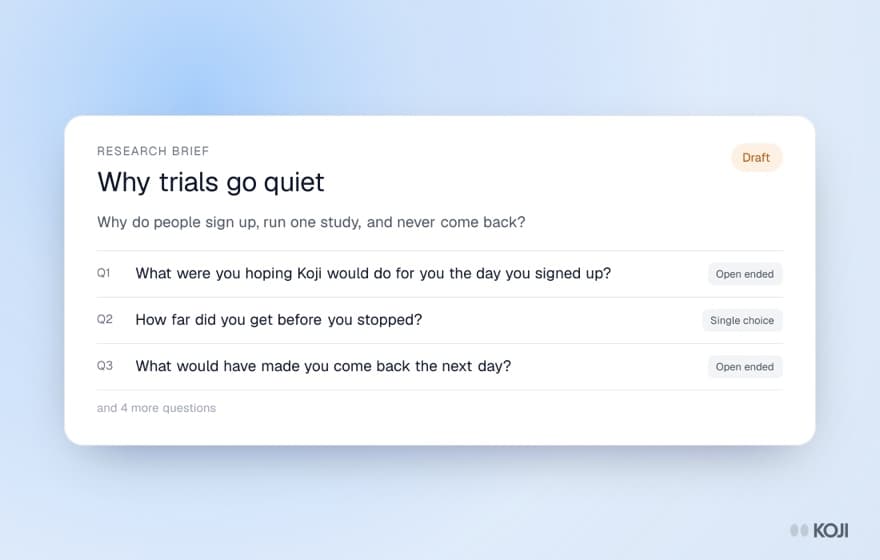
The difference shows up on the second message. You can ask it to change any part of the study and it edits only what you name:
- "Make question 3 less leading" rewrites that one question and leaves the rest alone.
- "Probe harder on the first question" sets how many follow-ups the interviewer may ask after it, from none to three. The default is one.
- "Turn the team size question into a single choice with five bands" changes the question type. Types include open ended, scale, single choice, multiple choice, yes or no, ranking and a price test.
- "Shuffle the options" shows choice options in a different order to each participant, so the first ones are not favoured.
It tells you what it changed, and asking it a question about the brief does not rewrite anything. You can also upload context files, such as an onboarding spec or support tickets. The assistant reads them when drafting; the interviewer never sees them, so nothing in them reaches participants.
Then you run it. Share one link, and Koji interviews each person by voice or text, asks the follow-ups you set and builds the report with quotes behind each finding. The assistant is on every plan, Free included.
What it does not do: write usability task questions for you (it keeps ones you already have), or replace your judgement on whether the questions fit the decision.
Who it is for: a PM, founder or researcher who wants the questions, the screener and the interviews in one place, and wants to keep editing the study after the first draft.
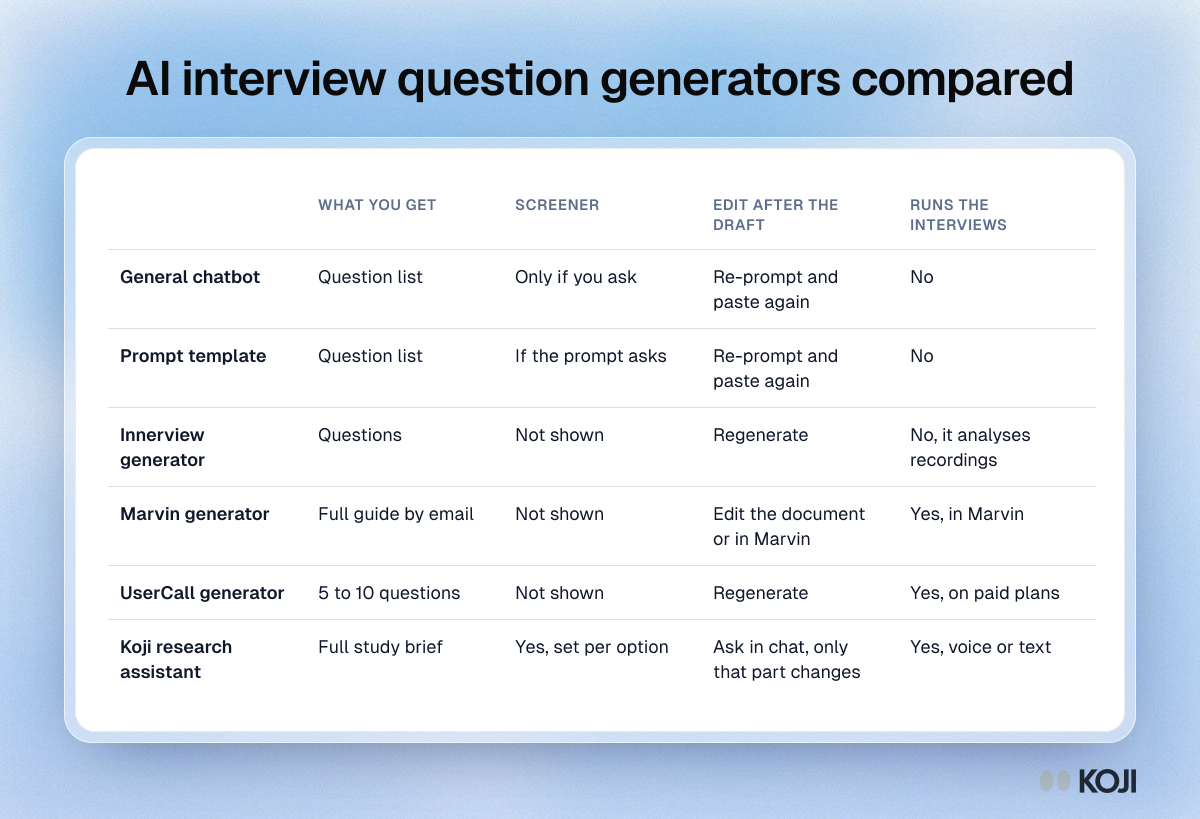
Side by side
| Output | Screener | Follow-up depth | Edit after the draft | Runs the interviews | Cost to try | |
|---|---|---|---|---|---|---|
| General chatbot | Question list | Only if you ask | Not set | Re-prompt and paste again | No | Free tier |
| Prompt template | Question list | If the prompt asks | If the prompt asks | Re-prompt and paste again | No | Free tier |
| Innerview generator | Questions | Not shown | Not shown | Regenerate | No, analyses recordings | Free |
| Marvin generator | Full guide by email | Not shown | Not shown | Edit the document or in Marvin | Yes, in Marvin | Free, needs work email |
| UserCall generator | 5 to 10 questions | Not shown | Not shown | Regenerate | Yes, on paid plans | Free |
| Koji research assistant | Full study brief | Yes, qualify or disqualify per option | 0 to 3 per question | Ask in chat, only that part changes | Yes, voice or text | Free plan |
"Not shown" means the free tool's own page does not describe it; the paid product may differ.
How to pick a route
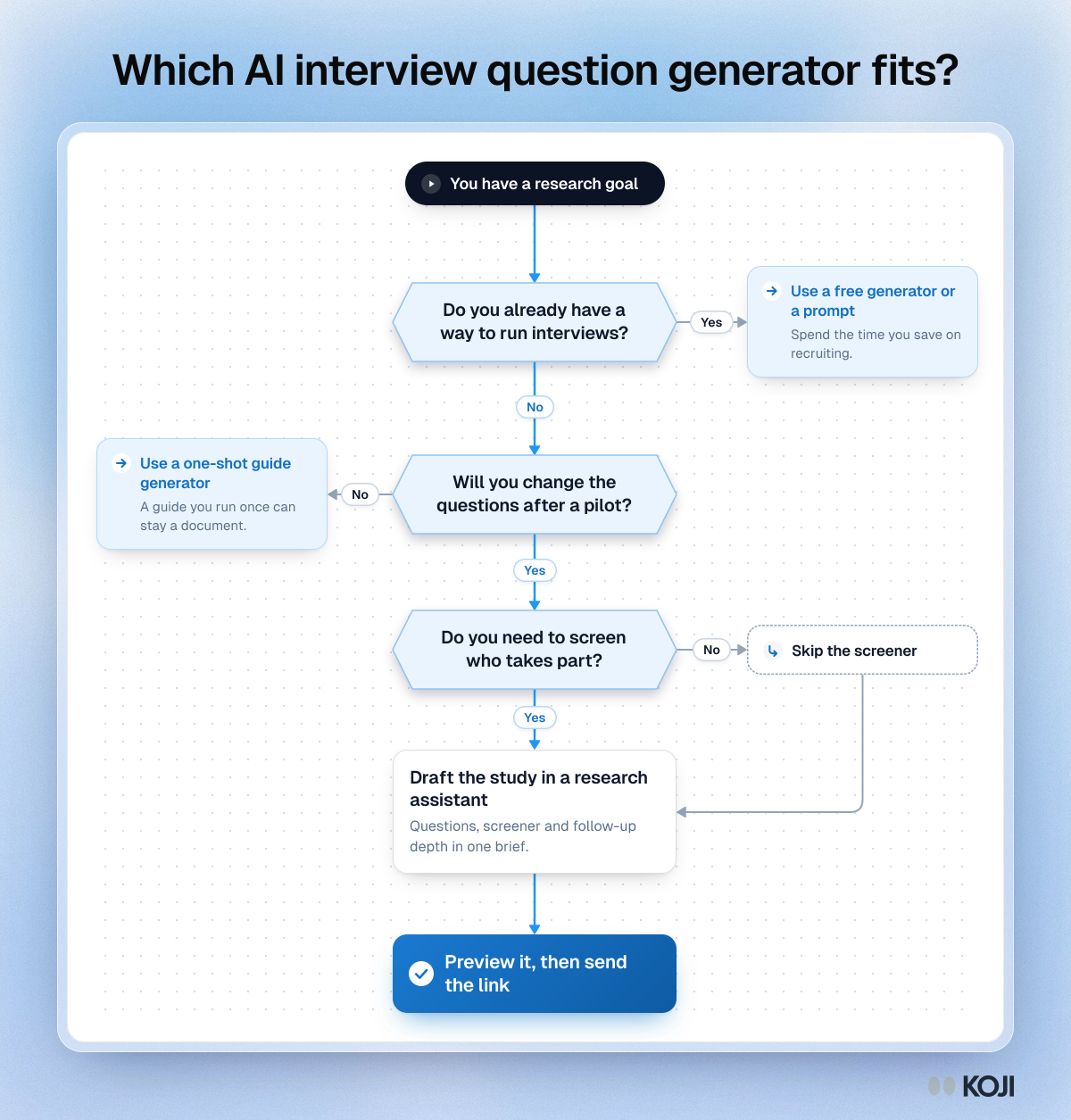
Three questions settle it for most teams.
Do you already have a way to run interviews? If you book calls yourself and have a note-taker you like, a free generator or a prompt template is enough. Spend the time you save on recruiting.
Will you change the questions after the first draft? Almost everyone does: a pilot interview shows that one question confuses people, or a stakeholder adds a topic. With a one-shot generator, you regenerate and lose your edits, or you edit a document by hand. With an assistant attached to the study, you ask for the change and only that part moves.
Do you need to screen who takes part? For our trial goal, talking to someone who did invite a teammate wastes the interview. If the generator does not write a screener, you will need to write one yourself. Our guide to screener questions shows how.
If you need a way to run interviews, expect to change the questions and need a screener, an assistant attached to the study saves the most work. If you will not change the questions, a one-shot guide from Marvin or UserCall may be enough.
Whatever you use, check these before anyone answers
The route matters less than the review. Before a single participant sees the questions:

Photo by LinkedIn Sales Solutions on Unsplash
- Read each question against the decision. If an answer would not move you towards changing onboarding or trial length, cut the question.
- Ask about the past, not the future. "Tell me about the last time you set up a new tool for the team" beats "Would you invite teammates if...". Our doc on hypothetical questions explains why.
- Hunt for the assumption. Any question that names your theory ("was it confusing?") is leading. See avoiding leading questions.
- Split double questions. "How did you find setup and pricing?" is two questions.
- Preview the interview yourself. In Koji, a preview runs the real interview and is not counted as a response.
How many people to talk to? For a narrow question with a similar group of people, Guest, Bunce and Johnson found that 73% of the codes in their study had appeared within the first 6 interviews and 92% within 12 (Field Methods, 2006). Plan for at least a dozen per segment and keep going while new reasons still appear. Our doc on data saturation covers when to stop.
Where each route falls short
No route writes your research for you. Chatbots and free generators know nothing about your customers beyond what you type. Marvin, UserCall and Koji all run interviews, so you are choosing a platform as much as a generator, and you should compare them on the interviews and the report, not just the first draft. Koji is the wrong fit if you only need a list of questions for calls you will run in person, or if your study is mostly usability tasks you want written for you.
Start with your own goal
The fastest way to compare is to paste the same goal into two routes and read both outputs side by side. In Koji, type your goal in the Studio chat, read the draft brief, ask for one change, and preview the interview. All of that works on the free plan, and if the questions hold up you can send the link the same day.
For the method behind it, read how to write a research brief, and if you lead product, Koji for product managers shows how PMs run studies like this one.