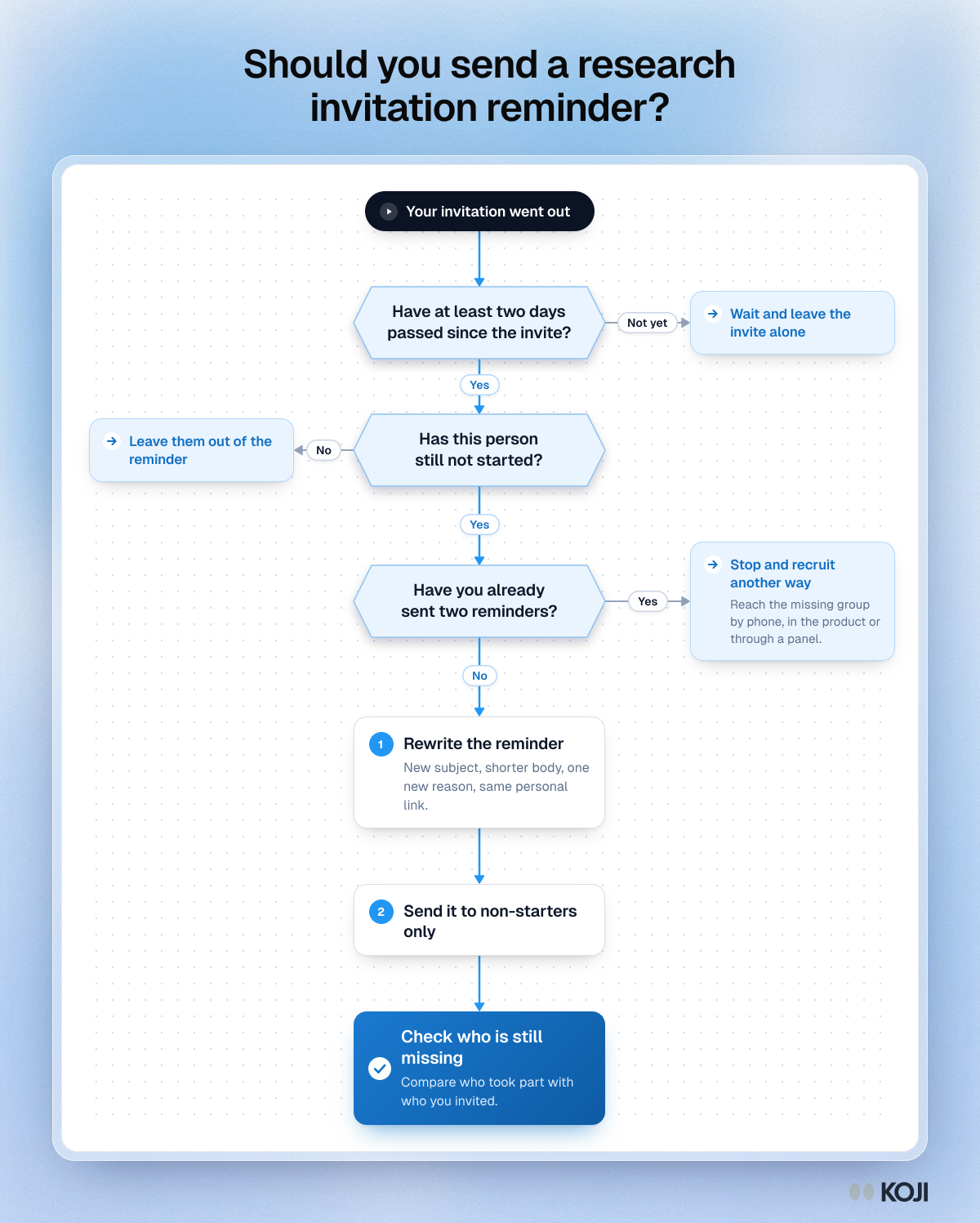
In short: Send one reminder, two to five days after the invitation, only to people who have not started. Write it fresh: a new subject line, a shorter body and a new reason to take part, with the same personal link. Send a second reminder only when the study needs the extra people, and stop there. In a large experiment on survey contact design, with more than 24,000 participants, changing the wording of reminders raised the odds of responding by over 30%, while moving the send day or hour made no significant difference (Sauermann and Roach, 2013).
Most people who take part in a research interview do not do it the first time you ask. They see the email on a phone between meetings, mean to come back to it, and forget. A reminder is how you catch them. It is also the easiest message to get wrong: send it too soon and it feels like pressure, send the same text twice and it is ignored twice, send four and you burn the list for the next study.
This guide covers when to send a research invitation reminder, what to change in it, who should get it and when to stop, with three templates you can copy. It applies to user interviews, customer interviews and AI-moderated interviews alike.
What the research says about reminders
The best evidence on reminders comes from survey methodology, where researchers have run large randomised experiments on how contacts are designed. Interview invitations are not surveys, but the decision a person makes is the same: is this worth ten minutes of my time, now?
Sauermann and Roach (2013), "Increasing web survey response rates in innovation research: An experimental study of static and dynamic contact design features" (Research Policy, 42(1), 273 to 286), surveyed more than 24,000 early-career scientists and engineers and randomly varied several features of the invitations and reminders at once. Their published abstract reports that:
- Personalising contacts raised the odds of responding by as much as 48%.
- Changing the wording of reminders over the life of the survey, rather than resending the same text, raised the odds by over 30%.
- A lottery incentive with a large prize and a small chance of winning raised the odds by about 30%.
- Changing the day of the week or hour of the day contacts were sent brought no significant benefit.
- The higher response did not come at the cost of lower data quality.
These are changes in the odds of responding, not percentage points, so a 48% rise in odds from a low base is a smaller change in the response rate than it first sounds. It is still large for something that costs nothing.
Van Mol (2017), "Improving web survey efficiency: the impact of an extra reminder and reminder content on web survey response" (International Journal of Social Research Methodology, 20(4), 317 to 327), ran an experiment with 15,651 students at the University of Antwerp. An extra reminder raised the response rate, but it did not diversify the sample: the people who answered late looked much like the people who answered early.
Cook, Heath and Thompson (2000), a meta-analysis of response rates in web surveys (Educational and Psychological Measurement, 60(6), 821 to 836), found that the number of contacts, personalised contacts and pre-contacts were the factors most associated with higher response.
Put together: reminders work, rewritten and personal reminders work better, the send time matters less than people think, and more reminders bring in more of the same people rather than the people you were missing.
Why people ignore the first email
Silence after an invitation is rarely a no. Most people who did not reply fall into one of four groups, and a good reminder is written for them:

Photo by John Tuesday on Unsplash
- They never saw it. It went to a promotions tab or got buried under the day's mail.
- They saw it at the wrong moment. On a phone, in a queue, with no time to talk. They meant to come back.
- They were not sure it was worth it. The ask was vague, the time was unclear, or it was not obvious why their view mattered.
- They do not want to. That is a real answer, and the reminder should make it easy to say.
The first two groups only need the email in front of them again, at a different moment. The third needs a different reason. The fourth needs a polite way out. Resending the original text serves only the first group, which is why a rewritten reminder does better.
When to send the reminder
There is no single best day. The experiment that tested day and hour found no significant effect, so do not spend your effort choosing Tuesday at 10am. What matters is the gap between the invitation and the reminder, and the window your study has.
- Two to three days later suits a short study with a deadline this week, or a list of active users who check their email daily.
- Five to seven days later suits busy professionals, B2B contacts, churned customers who no longer open your product emails, and anyone you invited just before a weekend or a holiday.
- Send at a different time from the invitation. Not because one hour is better, but because the person who was in a meeting at 9am may be free at 4pm. You are giving them a second moment, not a better one.
If the study needs a second reminder, leave a similar or longer gap again and treat it as the last one.
Who should get it
Remind only the people who have not started. Reminding someone who already took part wastes their goodwill and makes your research look careless. That means each person needs their own link, so you can tell who has and has not responded. A single public link cannot tell you who is still missing. (We compare the options in one survey link or a unique link per respondent.)
Also leave out anyone who unsubscribed, bounced or wrote back to say no. Check the rules on contacting people for research in your country before you send: our guide to the laws on emailing and texting people for research covers CAN-SPAM, CASL and PECR. It is not legal advice.
What to change in the reminder
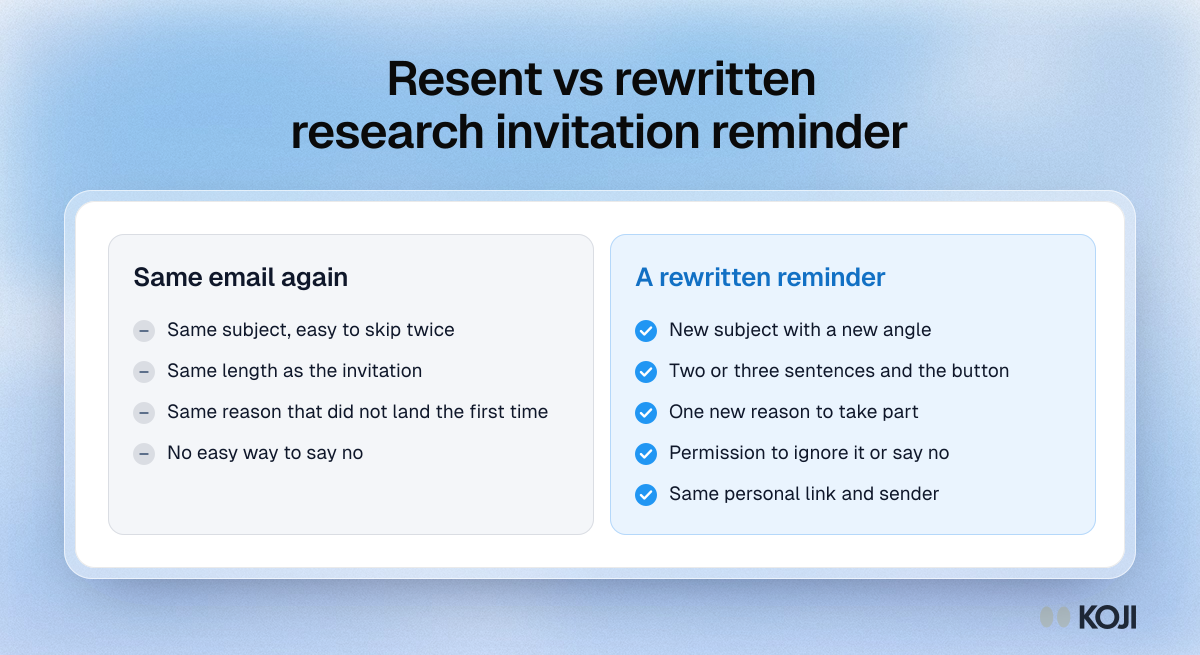
Keep the link and the sender. Change almost everything else.
- Subject line. Give it a new angle rather than "Fwd:" or "Reminder" alone. If the invitation said "15 minutes on how you plan trips", the reminder might say "Still looking for 5 more travellers this week".
- Length. Shorter than the invitation. Two or three sentences and the button.
- The reason. Add one new thing: how long it really takes, what you will do with the answers, how many people have taken part, or when it closes.
- The way out. Tell them it is fine to ignore it, or to reply and say no thanks. People who feel trapped are more likely to mark the email as spam.
- The same link. A new link breaks tracking and can make the first email look like a mistake.
Three reminder templates
Each template assumes a named sender and a real reply-to address. Replace the bracketed parts.
Reminder 1: the short nudge (two to five days later)
Subject: [First name], 10 minutes this week?
Hi [first name], a quick follow-up on my note from [day]. We are talking to [type of person] about [topic] and your view would help. It takes about [time] and you can do it whenever suits you, by voice or text.
[Button: Share your view]
If now is not a good time, no problem. Just ignore this.
Reminder 2: the new reason (if you need one more)
Subject: What we will do with your answers
Hi [first name], last note from me on this. We have heard from [number] people so far, and what they said is shaping [what changes, e.g. how we redesign onboarding]. We would still love to include you. It closes on [date].
[Button: Take part]
If you would rather not, reply "no thanks" and I will not ask again for this study.
Reminder for churned or inactive customers
Subject: No sales pitch, just a question
Hi [first name], I wrote a few days ago. I am not trying to win you back. I want to understand what did not work for you, so we can fix it for others. It takes about [time].
[Button: Tell us what happened]
Thank you either way.
If you are offering an incentive, say so in the reminder as well: people who skimmed the invitation may have missed it.
When to stop
Two reminders is the limit for one study. After that you are spending goodwill you will need for the next study, and the extra reminder is unlikely to fix the real problem. Van Mol's finding is the reason: an extra reminder raised the response rate but did not change who answered.

Photo by Gorilla ROI Data Connector on Unsplash
So after the last reminder, look at who is still missing rather than sending another email. If all your answers come from your most active users, or from one country, or from one plan size, more reminders to the same list will not change that. Recruit the missing group another way: a personal note from their account manager, an in-product prompt, a short phone call or a research panel.
Common reminder mistakes
- Reminding everyone, including people who already took part.
- Forwarding the original with "Just bumping this" on top.
- A new link in every message, so you cannot tell who responded to what.
- Guilt or urgency ("We really need you", "Last chance!") for an unpaid ask.
- Three or more reminders for one study.
- Judging success by the response rate alone instead of checking who is missing.
How to send reminders in Koji
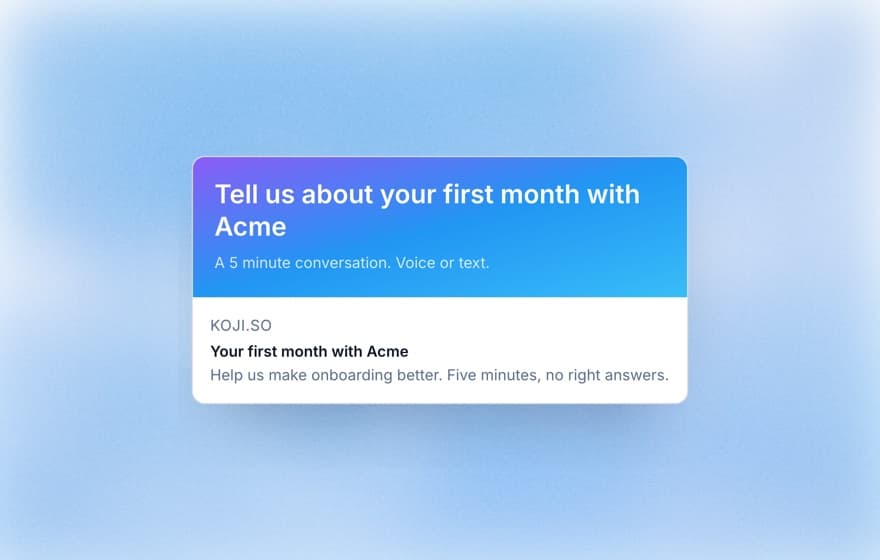
If you recruit your own users, customers or contacts with Koji, the reminder is part of the invitation. Add your people to Participants (import a CSV or add them one by one), group them into an audience, and invite that audience from the study's Self-recruit tab. You write the invitation beside a live preview, with the sender name, a reply-to address, the subject, the message and the button label, and merge tags such as the person's first name. Send yourself a free test first.
Then tick Remind anyone who hasn't started after and choose 2, 3, 5 or 7 days. Koji sends one reminder, with the same personal link, only to the people from that send who have not started the interview. People who unsubscribed or whose address bounced are left out. The reminder keeps your message and puts "Reminder:" in front of your subject line, so if you want a fully rewritten second message, send it yourself to the people who have still not started.
The study shows a funnel for every send: emailed, delivered, opened, clicked, started and completed, per person. That tells you whether people are not seeing the email (low opens), not convinced by it (opens but no clicks) or dropping out on the way in (clicks but no starts), which tells you what to fix before the next reminder. Recruitment email is available on the Insights, Interviews and Enterprise plans. Each email and each reminder uses one email from the workspace allowance.
Because each person has their own link, the report shows who took part, and you can compare that with who you invited. For the full setup, see managing research participants and importing participants from a CSV. For the invitation itself, use our recruitment email templates.
The short version
- Plan one reminder before you send the invitation, and a second only if you need it.
- Wait two to five days. Send at a different time, but do not agonise over which.
- Remind only people who have not started, using their own link.
- Rewrite the reminder: new subject, shorter body, new reason, easy way out.
- Stop at two. Then check who is missing and recruit them another way.
Ready to run it? Create a Koji account and set up your study for free. On a paid plan you can invite your own list with the reminder already set, and the funnel shows who still needs a nudge. If you want to work out how many people to invite in the first place, read how many user interviews you need.