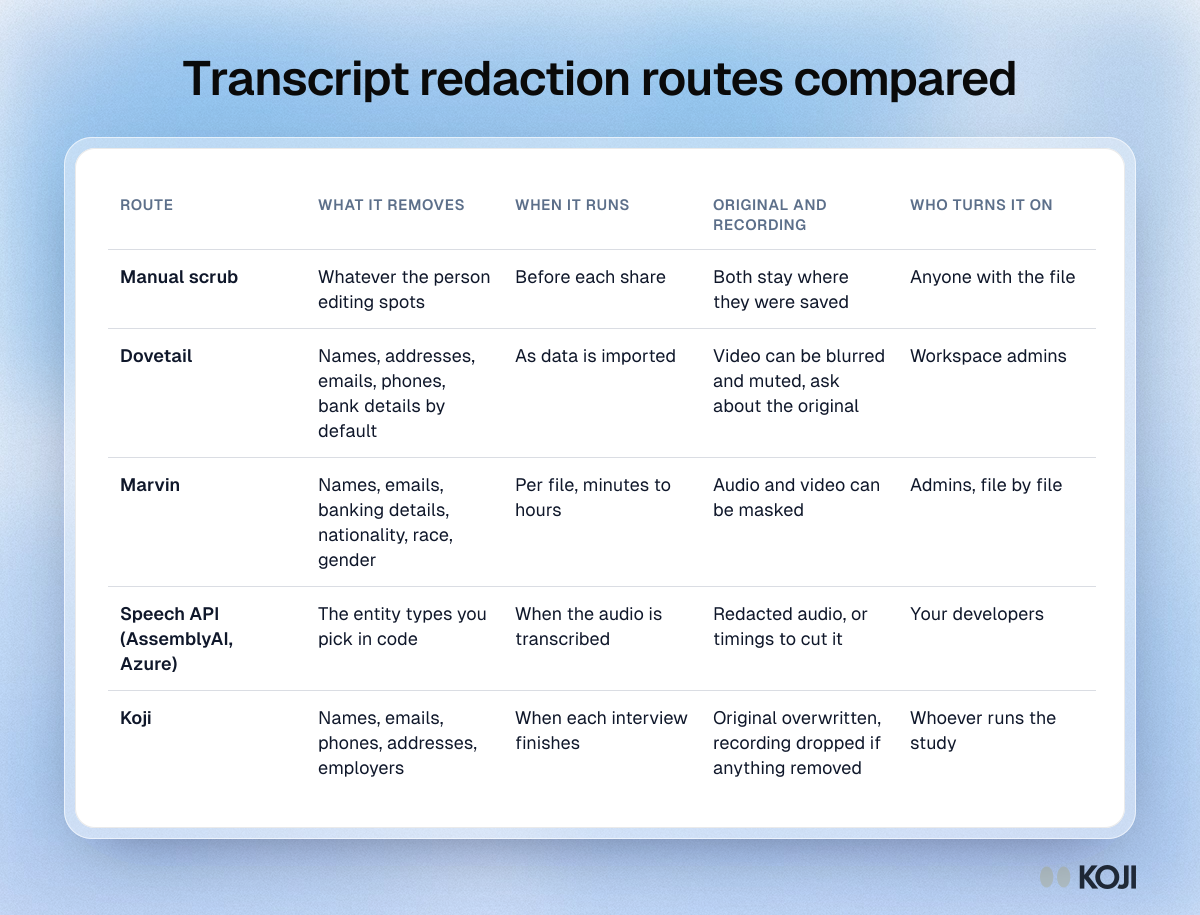
If you need names, emails and employers out of interview transcripts before other people read them, you have four realistic routes in 2026: scrub by hand, let your research repository redact on import (Dovetail and Marvin both do this on their Enterprise plans), call a speech-to-text API with redaction switched on (AssemblyAI, Azure AI Language), or have the interview tool clean each transcript the moment the interview ends (Koji's Remove personal details setting, on every plan including Free). They differ on four things that matter more than the feature list: what gets removed, when it runs, whether the original and the recording survive, and who can switch it on.
Try it now: in Koji, open a study, go to Branding & Settings, open Privacy and turn on Remove personal details. Every interview that finishes after that is cleaned before any analysis runs.
None of the four makes a transcript anonymous. They remove direct identifiers. A job title, a city and a company size can still point to one person, which is why the last section of this post is a checklist, not a promise.
Why this matters more as you move upmarket
Personal details are the most common thing lost in a breach. IBM's Cost of a Data Breach Report 2025 found customer personal data was involved in 53% of breaches, and put the global average cost of a breach at $4.44 million. Interview transcripts are full of exactly that data: people say their own name, their manager's name and their employer without being asked.

Photo by Christina @ wocintechchat.com M on Unsplash
The other pressure is the security review. The first enterprise customer who asks "how do you handle interview data?" wants to hear where personal data is removed and who can see the raw version. "We are careful in Slack" is not an answer that survives a procurement questionnaire.
And removing names is not the same as anonymising. Latanya Sweeney showed in 2000 that 87% of the US population could be uniquely identified by just ZIP code, gender and date of birth. Rocher, Hendrickx and de Montjoye (Nature Communications, 2019) estimated that 99.98% of Americans could be correctly re-identified in any dataset using 15 demographic attributes. Redaction handles the names. You still have to handle the combinations. Our guide to quasi-identifiers in research data goes deeper on that part.
The four routes, compared
1. Manual scrubbing in a document
Who it is for: a team running a handful of interviews a quarter, sharing a few quotes at a time.
Someone opens the transcript, finds names, emails and employers, and replaces them before pasting quotes into a deck or a channel. It costs nothing and you control every decision.
The weaknesses are the obvious ones. It depends on the person doing it being thorough every single time, it is easy to miss a name repeated twenty minutes later, and the raw transcript and the recording still sit wherever they were saved. It also does not scale: by the time you are running interviews every week, nobody is scrubbing every transcript before it lands in a shared folder.
2. Research repositories: Dovetail and Marvin
Who it is for: teams that already centralise interviews from many sources in one repository and are on an enterprise contract.
Dovetail offers manual and automatic redaction, and its help centre says both are available only on the Enterprise plan. Workspace admins set it up under Settings, Compliance, Data redaction. By default it targets common personal data such as names, addresses, email addresses, phone numbers and bank details, and admins can adjust what it looks for. Each item is screened as it is imported, and the setting applies to data imported after it is switched on; for earlier data, Dovetail says to contact support. Its "magic redact" can also blur and mute sections of uploaded video and redact the matching transcript, and redactions carry through to highlights that reference them. Dovetail is clear that automatic redaction is AI-driven and may miss things, and recommends reviewing it. It has also published a changelog entry for restoring redacted data, so ask whether the original is retained if that matters for your policy.
Marvin can detect and mask personal information in transcripts, audio and video recordings, and separately in survey responses and support tickets; its help centre lists that second capability as Enterprise only. You turn it on per file rather than for the whole workspace. It covers names, email addresses and banking information, and also sensitive categories such as nationality, race and gender. Marvin notes that it currently masks personal information in English only, that processing can take from a few minutes to a few hours depending on the recording, and that admins can keep an exclusion list of words that should never be masked.
The strength of this route is breadth: it works on anything you import, including recordings from Zoom or a moderated session. The trade-off is that the raw data reaches the repository first and is cleaned on arrival, and the feature sits on the top plan.
3. Speech-to-text APIs: AssemblyAI and Azure AI Language
Who it is for: teams with developers who already run their own transcription pipeline.
AssemblyAI lets you choose which entity types to redact (person names, phone numbers, email addresses, card numbers, dates of birth and many more), and replace them either with hash characters or with the entity type in brackets. It can also produce a redacted audio file with the matches bleeped or silenced; its docs say that file is available for 24 hours.
Azure AI Language has a conversational PII feature that finds personal details in transcripts and chats across predefined categories, returns the redacted text, and for transcripts gives the audio timings of each detail so you can cut it from the recording. Microsoft's docs say the generally available conversational model supports English, and that async results are purged after 24 hours.
These are precise and configurable, and built for call centres and developers. Someone has to write and maintain the code, decide which entities matter for research (an API does not know that "Notion" is a finding and "Northwind" is an employer), and wire the output into wherever the team reads interviews.
4. Redaction inside the interview tool: Koji
Who it is for: teams running AI-moderated interviews who want transcripts clean before anyone, including the analysis, reads them.
Koji's Remove personal details is a per-study setting. When it is on, each interview is cleaned as soon as it finishes and before any analysis runs:
- People's names, email addresses, phone numbers, street addresses and postcodes, and the organisations people work for or are clients of, are replaced with labels: [NAME], [EMAIL], [PHONE], [ADDRESS], [COMPANY].
- The same details are removed where the AI interviewer repeated them back.
- Products, tools and brands people mention stay, as do job titles, cities and countries, so "we moved from Trello to Notion" keeps its meaning.
- The original transcript is overwritten, not hidden. If anything was removed from a voice interview, the recording is not kept either.
- Summaries, per-question results, report quotes and exports are all built from the cleaned text.
It is available on every plan, including Free, and you can also switch it on by asking Chat with Koji or an AI assistant connected over MCP.
The limits, stated plainly: it only cleans interviews that finish after you turn it on, it leaves pre-interview form answers as they are (those are fields you asked for by name), and because it is automatic it can miss a detail. You cannot get the original back, by design, so turn it on only for studies where you will never need names. If you need to follow up with someone, collect their email in the pre-interview form rather than relying on what they say in the interview.
Which route should you pick?
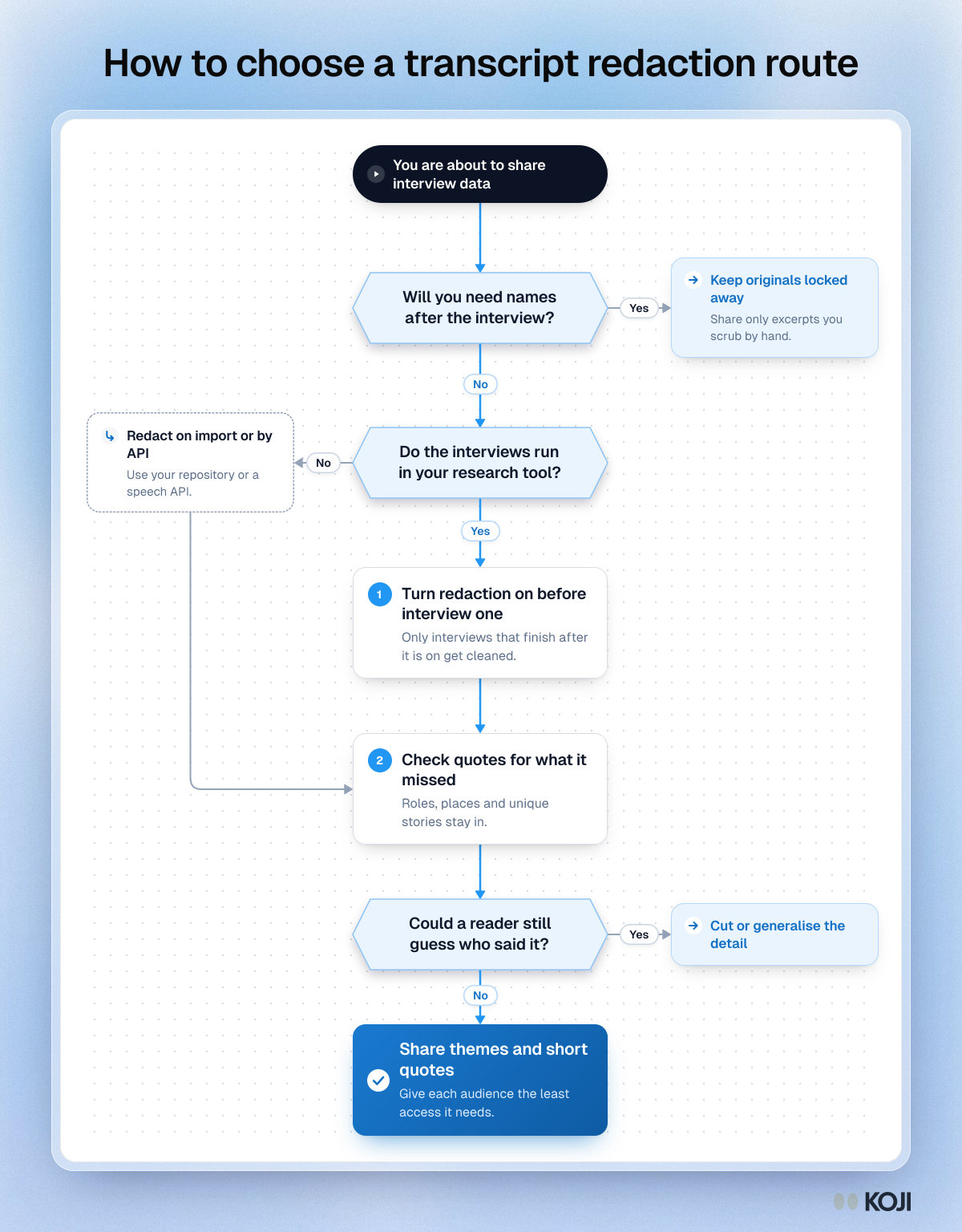
A few rules of thumb:
- You need names later (to follow up, to pay incentives, to link to CRM records): keep the originals in a restricted place and share only scrubbed excerpts. Automatic removal is the wrong tool.
- You run interviews in Koji: turn on Remove personal details before the first interview. Cleaning at the source means the raw version never reaches your report, your exports or your teammates.
- You import recordings from many places and already pay for Dovetail or Marvin Enterprise: use their redaction on import, and check what happens to the original.
- You run your own transcription pipeline: use an API, and spend time on the entity list. Employers and clients are the details that most often identify a B2B participant.
What none of them handle
Every route above removes direct identifiers. None of them reliably removes:
- Combinations. "Head of RevOps at a 40-person fintech in Lisbon" is one person.
- Unique stories. "The week our CEO resigned on stage" needs no name.
- Things said in other ways. A nickname, a misspelt surname, "my boss, the one who joined from Google".
- Data collected elsewhere. Form answers, calendar invites, incentive records and your CRM still hold the names.
That is why each tool's own documentation says to review results before sharing. The anonymising interview data guide covers techniques such as generalising roles and bands, and k-anonymity for segment reporting covers when a segment is too small to report.
Who sees your transcripts, and what to check before you share
Redaction decides what is in the transcript. Access decides who reads it. Before a quote leaves the research team, run through this list.

Photo by LinkedIn Sales Solutions on Unsplash
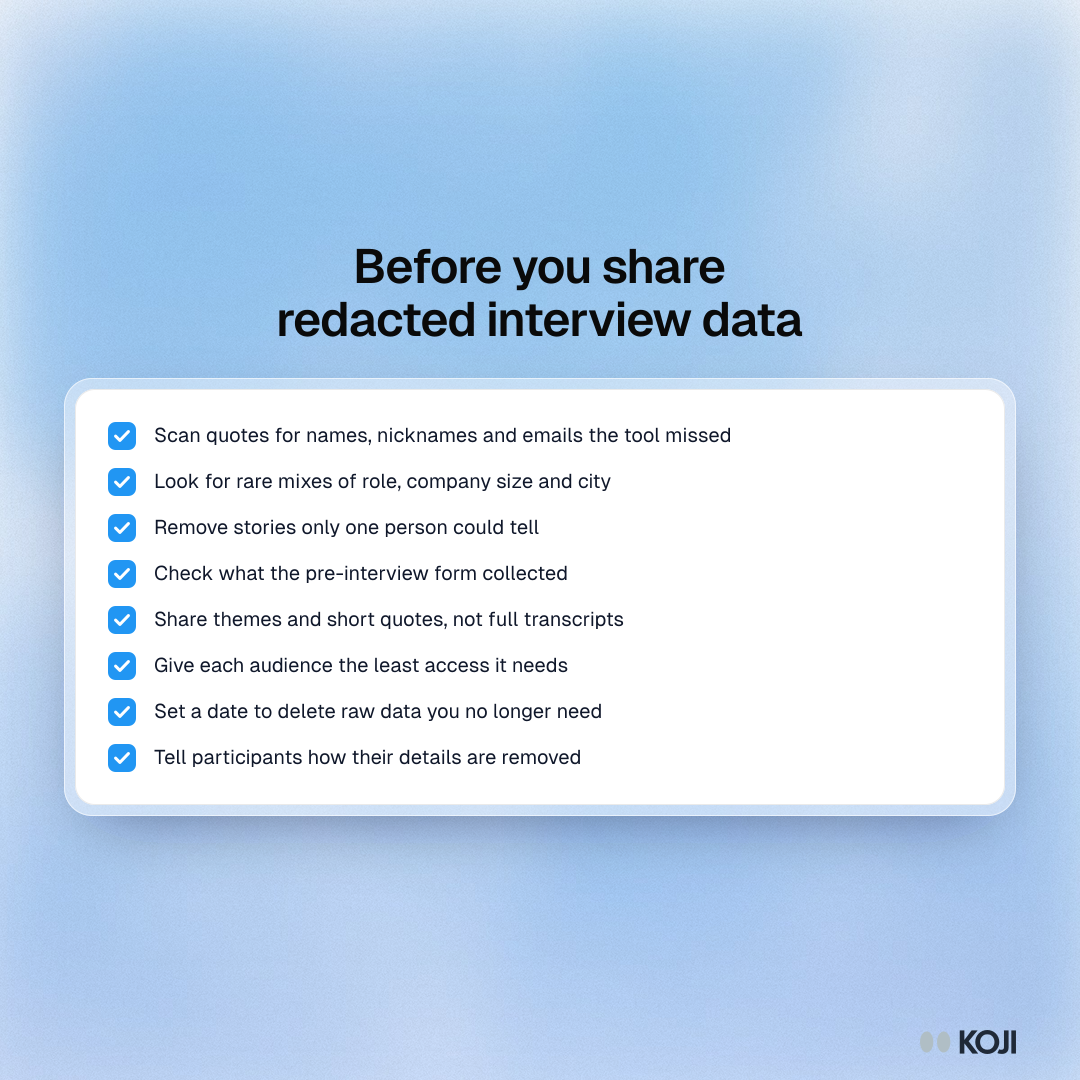
In practice:
- Scan quotes for names, nicknames and emails the tool missed.
- Look for rare mixes of role, company size and city.
- Remove stories only one person could tell.
- Check what the pre-interview form collected.
- Share themes and short quotes, not full transcripts.
- Give each audience the least access it needs.
- Set a date to delete raw data you no longer need.
- Tell participants how their details are removed. Our consent form wording guide has language you can reuse.
If you are answering a customer's security questionnaire, the AI interview data privacy and security guide lists the questions buyers ask and what a good answer covers, and the GDPR guide for AI user research covers the legal side.
Common mistakes
- Turning redaction on after the study launched. In Koji, Dovetail and Marvin alike, the setting applies to what comes in afterwards. Switch it on before the first interview.
- Calling cleaned transcripts "anonymous". Say "personal details removed". It is accurate, and it is what your consent form should promise.
- Forgetting the recording. A redacted transcript next to the original audio has not removed anything.
- Removing too much. A tool that strips product and competitor names destroys the finding. Check that brands and tools survive.
Start with your next study
If your interviews already run in Koji, the cheapest route is the one at the source: open the study, go to Branding & Settings, then Privacy, and turn on Remove personal details before you send the link. Then use the checklist above before every share. If you are new to Koji, start a free study and the setting is there from day one. For the method behind it, read our deeper guide to automatic PII redaction in user research.
Sources: IBM, Cost of a Data Breach Report 2025. Latanya Sweeney, Simple Demographics Often Identify People Uniquely, Carnegie Mellon University, 2000. Luc Rocher, Julien Hendrickx and Yves-Alexandre de Montjoye, "Estimating the success of re-identifications in incomplete datasets using generative models", Nature Communications, 2019. Dovetail help centre, "Blur and redact" and "Manage PII in Dovetail". Marvin help centre, PII masking articles. AssemblyAI docs, "Redact PII from transcripts". Microsoft Learn, "Detect and redact PII in conversations".