The short answer: match the method to the question. Use problem interviews to learn whether the problem is real and frequent, a concept test to see whether people understand the idea and want it, a fake door to measure whether they click when it's in front of them, a prototype test to check they can use it, a price test to see what they would pay, and a staged rollout or A/B test to prove it moves the metric. Most product managers need two of these per feature, not six: one that asks people and one that watches what they do.
This guide is for product managers with a live product and real users, deciding what to build next. If you are still validating a startup idea, start with which validation test to run first instead.
Why feature validation matters more than it feels
Shipping is the easy part. The hard part is shipping things people use:
- Pendo's analysis of three months of usage across 615 of its customers' products found that 80% of features are rarely or never used, and an average of 12% of features generate 80% of daily usage (Pendo, Feature Adoption Report, 2019).
- At Microsoft, controlled experiments showed that only about one third of ideas improved the metric they were designed to improve; a third made no difference and a third made it worse (Ron Kohavi, Online Controlled Experiments: Introduction, Learnings, and Humbling Statistics, 2012).
- In CB Insights' review of 111 startup post-mortems, 35% named no market need as a cause of failure (CB Insights, The Top Reasons Startups Fail, 2021).
The Pendo figure is from 2019 and covers a three-month window, so treat it as a direction, not a precise benchmark. The point holds: most features you are confident about will not move anything. Validation is how you find out which ones before engineering spends a quarter on them.
The six methods, and the question each one answers
Each method answers one question well and others badly. Pick by the question you can't answer yet.
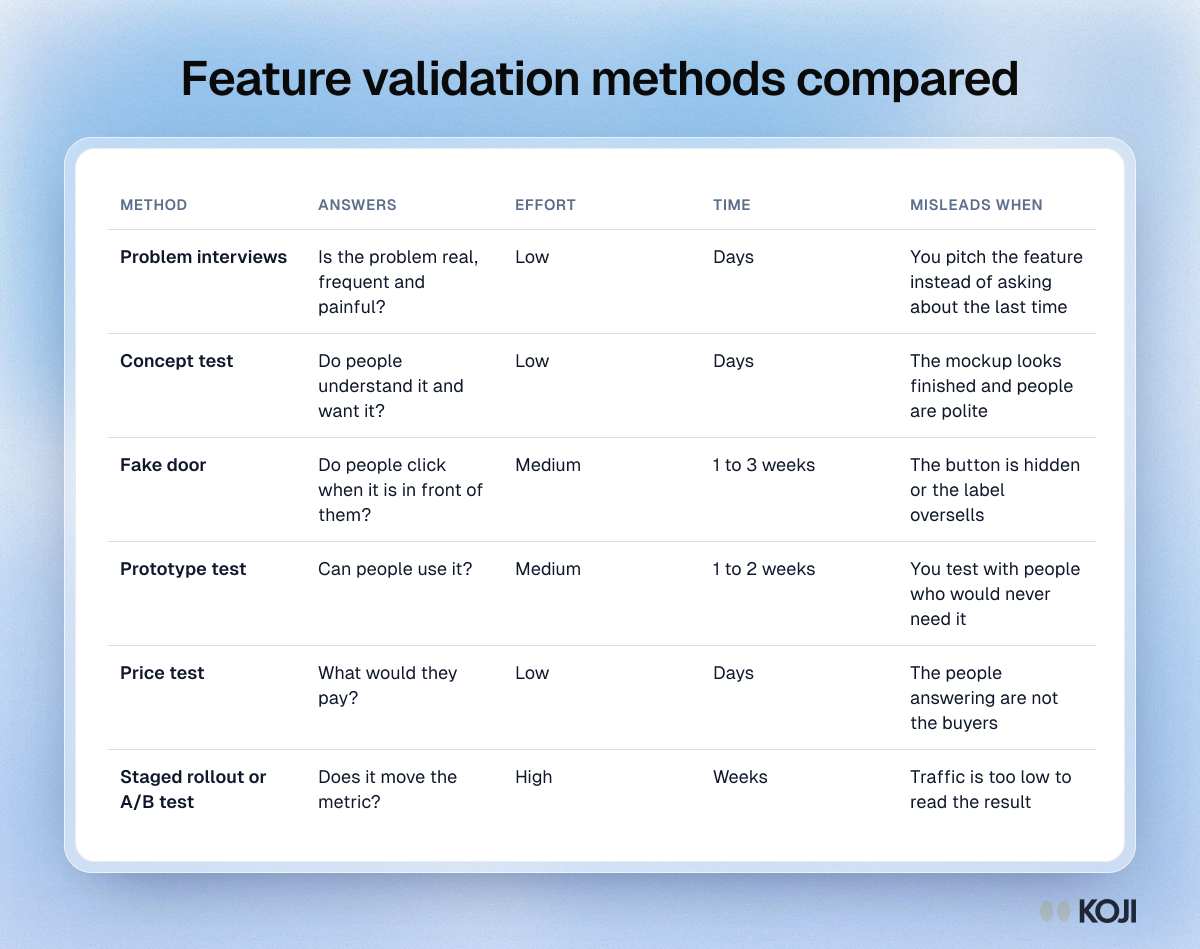
| Method | Answers | Effort | Time | Misleads when |
|---|---|---|---|---|
| Problem interviews | Is the problem real, frequent and painful? | Low | Days | You pitch the feature instead of asking about the last time |
| Concept test | Do people understand it and want it? | Low | Days | The mockup looks finished and people are polite |
| Fake door | Do people click when it's in front of them? | Medium | 1 to 3 weeks | The button is hidden or the label oversells |
| Prototype test | Can people use it? | Medium | 1 to 2 weeks | You test with people who would never need it |
| Price test | What would they pay? | Low | Days | The people answering are not the buyers |
| Staged rollout or A/B test | Does it move the metric? | High | Weeks | Traffic is too low to read the result |
1. Problem interviews
Talk to users about the last time they hit the problem: what they were doing, what they tried, what it cost them. Don't mention the feature. If people can't recall a recent example, the problem is not frequent enough to build for. Ten to fifteen interviews with the right segment usually show whether a pattern exists; how many user interviews covers sample sizes. The full method is in our feature validation guide.
2. Concept test
Show a mockup, a description or a short video of the feature and ask what they think it does, when they would use it and what it would replace. Concept tests catch misunderstandings early, which is cheaper than catching them after launch. A rough sketch gets more honest answers than a polished design, because people are less afraid to criticise it. See concept testing methodology.
3. Fake door
Add the entry point (a menu item, a button, a pricing tier) before the feature exists, and count how many people click. Clicking leads to a short "we're building this, want early access?" message. A fake door is the only cheap method that measures behaviour instead of opinion, but it measures curiosity, not lasting use. Keep it up for a fixed time, and decide the click rate that would count as a yes before you launch it. Fake door testing covers ethics and setup.
4. Prototype test
Ask users to complete a task in a clickable prototype while you watch. This tells you whether the design works, not whether anyone needs it, so run it after the problem is confirmed. Five users find most of the usability problems in one round of testing; see how many users for usability testing and prototype testing and concept validation.
5. Price test
If the feature is a paid add-on or a reason to upgrade, test the price before you build the packaging. A Gabor-Granger test asks people whether they would buy at one price at a time and finds the price that earns the most. Make sure the people answering are the ones who would pay. Price testing methods for startups compared shows when to use which method.
6. Staged rollout or A/B test
Ship to a slice of users and compare the metric against everyone else. It's the only method that proves impact, and the most expensive, because you have to build the feature first. Use it to confirm a decision the cheaper methods already pointed to, not to discover what to build. With low traffic, an A/B test can run for months without a clear result; a staged rollout with follow-up interviews is often more useful for B2B products.
Map: what people say versus what they do
The methods fall into three groups. Asking people (interviews, concept tests) is fast and tells you why. Watching behaviour (fake doors, prototype tests, rollouts) is slower and tells you what. Asking for commitment (price tests, pre-orders) sits in between.
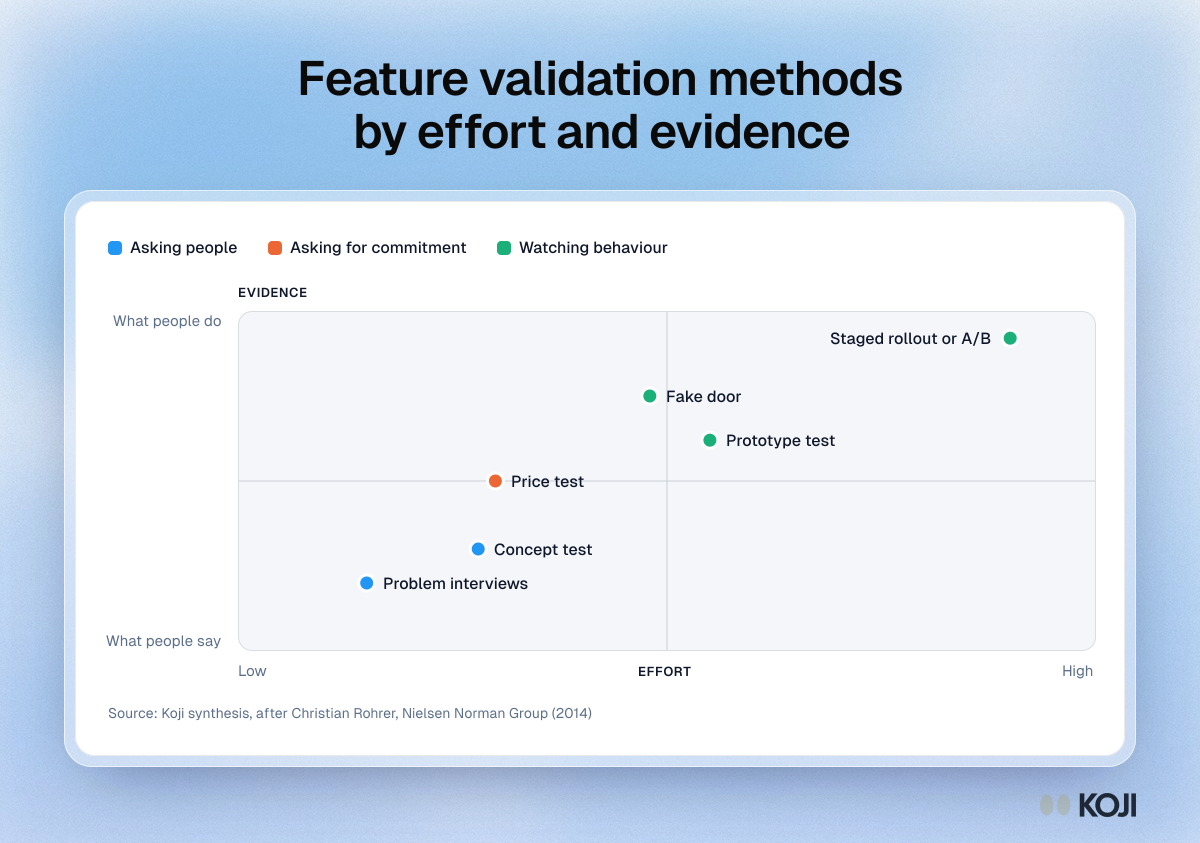
The pairing that works for most features: problem interviews plus a fake door. The interviews tell you whether the problem is real and in what words people describe it, and the fake door, labelled in those words, tells you whether people act on it. When both say yes, build a first version and roll it out in stages. When they disagree, believe the behaviour and go back to the interviews to find out why.
Which method to use when
- You have a feature request from a big customer. Problem interviews with five to ten other customers in the same segment. One loud customer is not a market.
- You have an idea nobody asked for. Concept test first. If people can't explain back what it does, fix the concept before measuring demand.
- You have a design and want to know if it works. Prototype test with users who have the problem.
- You have to decide whether it's a paid add-on. Price test with the people who hold the budget.
- You have to justify the roadmap to leadership. A fake door or staged rollout gives you a number, and interview quotes tell the story behind it.

Photo by Brands&People on Unsplash
When validation lies to you
- Politeness. Users want to be helpful and will say they'd use almost anything. Ask about past behaviour, not future intent.
- The wrong sample. Power users love power features. Screen for the segment the feature is for, not whoever replies first.
- Leading prototypes. A beautiful mockup reads as "already decided". Show rough work and ask what's missing.
- Small numbers read as precise. Twelve clicks out of 300 is a signal, not a 4% conversion rate.
How to run feature validation in Koji
Koji runs the asking half of this pairing as AI interviews, by voice or text. Interviews run in parallel and participants take them when it suits them, so there are no calls to schedule.
- Problem interviews with your own users. Start a study, and the research assistant drafts the brief from your research question. Share one study link in your app or newsletter, or email users from Participants with a personal link each (paid plans). Add screening questions so only the segment you care about takes part.
- Concept tests with images. Attach a mockup, a screenshot or a sketch to any question, and Koji's follow-up questions are about what the image shows. Set the image to show once, full screen, for 3, 5, 10 or 15 seconds, then ask what people remember: a first-impression test in the same interview.
- Price tests. Add a price test question with a ladder of 3 to 10 prices. Koji finds the highest price each person would still buy at, asks why, and the report shows the share who would buy at each price with the quotes behind it. It reads best from about 30 interviews and is labelled directional. Setup is in set up a price test in Koji.
- Shuffled choice questions for prioritising between candidate features, so the first option on the list isn't favoured.
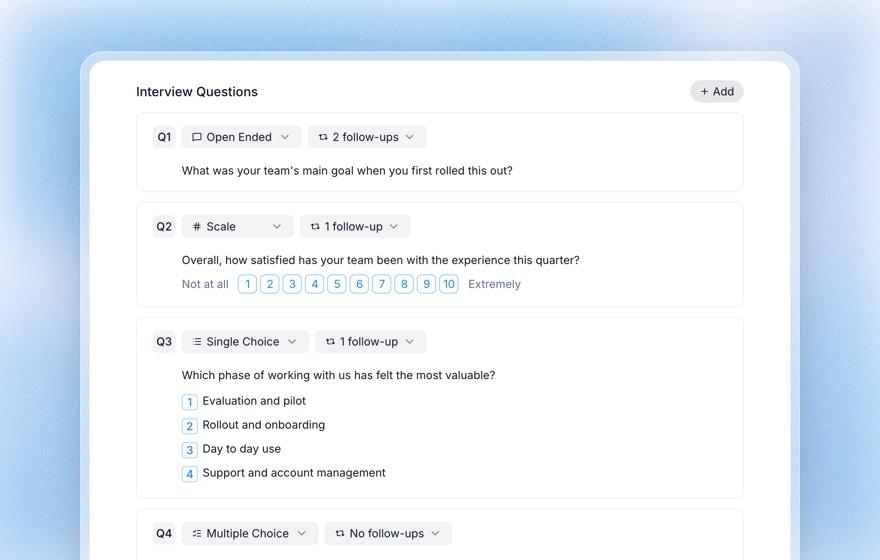
Screening questions, images on questions and price tests are available on every plan, including Free.
Validate the next feature this week
Pick the feature at the top of your roadmap and write down the one question you can't answer about it. If it's "is the problem real?", run ten problem interviews. If it's "will they click?", ship a fake door. Most of the time you need both.
Start a free Koji study for the interview half, and see Koji for product managers for templates built for discovery, concept tests and pricing.