Set Up a Price Test in Koji: Every Setting Explained
How to add a Gabor-Granger price test to a Koji study: entering the price ladder, currency and unit, choosing who counts as a buyer, where participants start, and what to know before you publish.
To set up a price test in Koji, add a question to your study, change its type to Price Test (Gabor-Granger), type in 3 to 10 prices (5 to 7, evenly spaced, work best), pick the currency and what the price is per, then choose who counts as a buyer and where each participant starts on the ladder. Publish the study as text or voice, and Koji asks each person about one price at a time, finds the highest price they would still buy at, and then asks them why. The report turns those answers into the share who would buy at each price, the revenue each price implies and the price that earns the most.
If you're a founder with a handful of customers and no pricing consultant, that's the whole job: one question in a study you were going to run anyway. This guide walks through every setting, what the participant sees, and the choices that decide whether the result is worth acting on. For the method itself (where it comes from, and when it misleads), read the Gabor-Granger pricing method reference.
Try it now: open a study, add a question such as "Here's what Acme Notes does for a team of five. How likely would you be to buy it?", switch the type to Price Test and enter five prices. Preview it yourself before anyone else sees it.
What a price test measures
A Gabor-Granger price test asks people how likely they are to buy a product at a specific price, then moves the price up or down depending on the answer. The idea dates back to economists André Gabor and Clive Granger in the 1960s, and it's still one of the most common ways to estimate a demand curve before a launch. Each person ends up with one number: the highest price on your list they said they would still buy at.
Put everyone's numbers together and you get a curve. For example: at €9, 80% would buy; at €19, 55%; at €29, 30%. Multiply each price by its share and you see which price brings in the most revenue per person asked. That's the answer most founders want, and it's what the Koji report leads with.
What a survey tool can't give you is the reason behind each answer. In Koji the AI interviewer asks why straight after the ladder ends, in the participant's own words. You might find that the people who stopped at €19 compared you to a free tool, while those who went to €29 were replacing a spreadsheet someone maintains by hand.
Step 1: Add the question and pick the type
Open your study and add a question in the interview questions editor, or change the type of one you already have. In the type menu, choose Price Test (Gabor-Granger), described as "Find the price that earns the most."
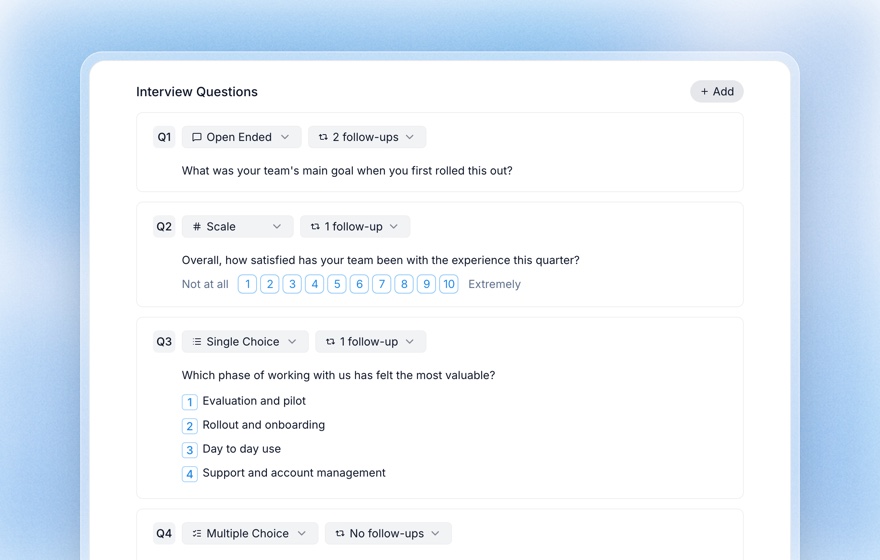
Write the question text as the product description. Participants read (or hear) it before the first price, so it has to say what they would be buying: what it does, for whom, and anything that changes the value, such as seats or usage limits. "Acme Notes, shared meeting notes for a team of five, with search across every meeting" will get better answers than "our product."
You can also attach an image to the question, such as a mockup, a packaging shot or a pricing page, and participants see it alongside the price. That's how you run a concept test and a price test on the same screen.
Prefer to describe what you want? Ask the research assistant ("help me test pricing for a team note-taking app at €9 to €39 a month") and it sets up the price test question for you, prices and currency included. You can then adjust every setting by hand.
Step 2: Enter the prices
Type prices into the field under the question, separated by commas or spaces ("9, 14, 19, 24, 29"), and press Enter. Koji sorts them from low to high, removes duplicates and rounds to cents. Use a dot for decimals: 29.99, not 29,99.
- Minimum 3, maximum 10 prices. Below 3, the editor asks for more.
- 5 to 7 prices, evenly spaced, work best. If the gaps are uneven (one gap more than twice the size of another), the editor warns you, because some steps would then tell you more than others.
- Bracket what people would pay at both ends. The lowest price should be one most people accept, and the highest one most people refuse. If too many people would buy even at your top price, the report tells you to try higher prices; if too many refuse even the lowest, it tells you to try lower ones.
Choosing the range is a decision of its own. How many prices to test, and how far apart covers it with worked examples.
Step 3: Set the currency, unit, buyer threshold and start
Four settings sit below the prices. Each one is a chip you click to change.
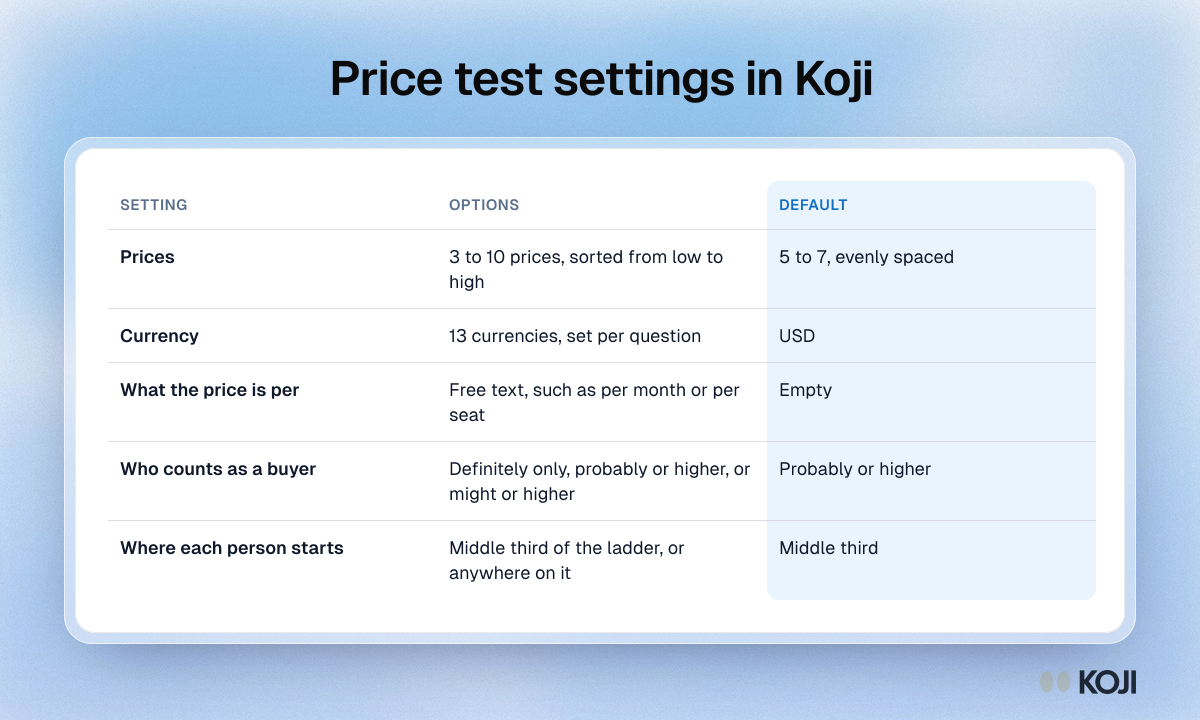
Currency. Each price test question has its own currency: USD (the default), EUR, GBP, CAD, AUD, CHF, SEK, NOK, DKK, PLN, BRL, INR or JPY. Participants see prices formatted the way their language writes them, for example €19 or $19.
What the price is per. Optional free text such as "per month", "per year" or "per seat per month". It's shown after every price, so leave it empty only for one-off purchases.
Who counts as a buyer. Participants answer on a 5-point purchase-intent scale, from "Definitely would buy" to "Definitely would not buy". You decide which answers count as a yes:
- Probably or higher (recommended). The standard top-two-box rule.
- Definitely only. Strict, with fewer buyers, and closer to what people actually do.
- Might or higher. Generous, counting the undecided as buyers.
People overstate what they'd buy, so if the price decision is expensive to reverse, "Definitely only" gives you a more conservative curve. The purchase intent scale guide explains the trade-off.
Where each participant starts. By default, Koji starts each person at a random price in the middle third of your ladder, so nobody anchors on the cheapest price. You can switch to "Starts at any price" to draw the first price from the whole ladder. Stick with the default unless you have a reason.
What participants see
Each participant reads (or hears) your question, sees the image if there is one, and gets one price: "How likely would you be to buy it at €24 per month?" They answer with one of the five buttons. Then Koji moves:
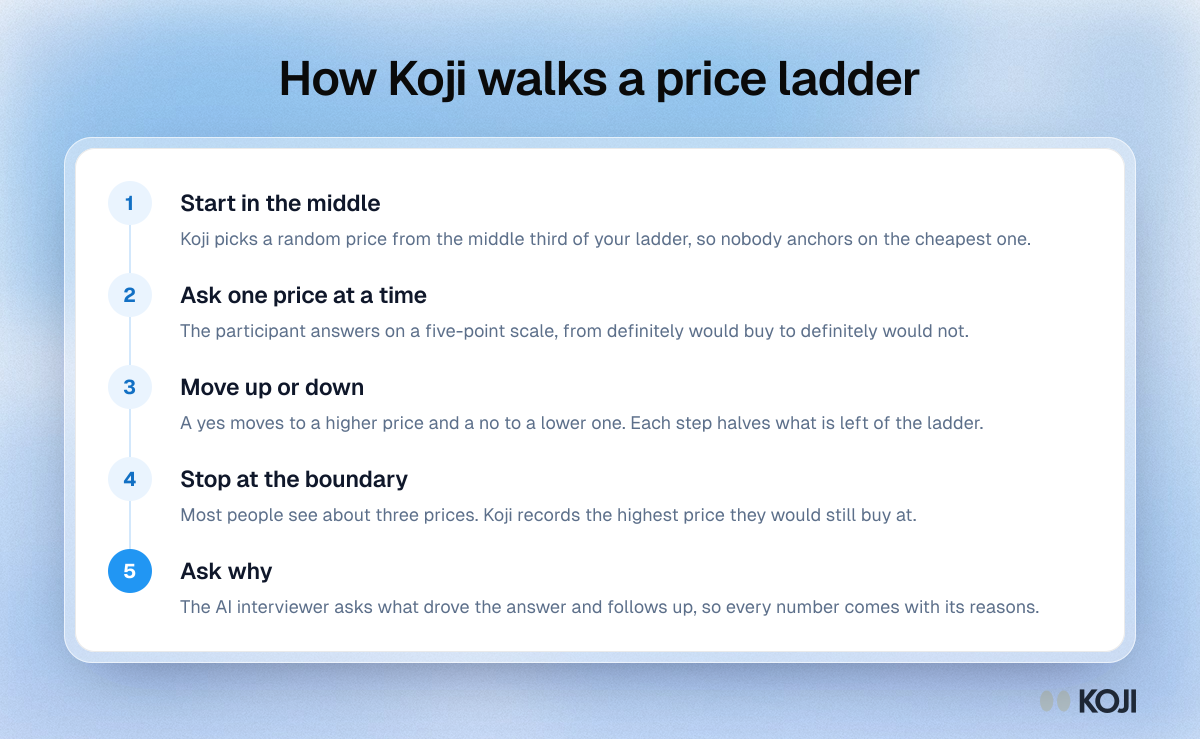
- If they would buy, Koji asks a higher price ("And at €34?"). If not, a lower one.
- Each step halves the remaining range, so on a 5 to 7 price ladder most people answer about three prices before Koji knows where they stop.
- Their answer is recorded as the boundary, for example "Would buy at €29, not at €34", or "Would not buy at €9" if they refuse every price.
- Then the AI interviewer asks why, and follows up on what they say.
Because the walk is a fixed rule, the AI doesn't pick prices or nudge people. You set the prices and the scale; Koji only chooses the next price by the rule and asks about the reasons afterwards. A participant who refreshes the page picks up at the same starting price.
Things to know before you publish
- Text and voice only. A price test runs in text and voice interviews, not on phone calls. If phone calls are on for the study, Koji won't publish until you turn calls off or change the question type.
- Prices lock once interviews come in. After the first interview, the prices, currency, unit, buyer threshold and start setting can't be changed, so every participant answers the same question. To test a different ladder, duplicate the study.
- Aim for about 30 interviews. The report reads the curve as an early signal below 30 and says so. Fewer can still show you the shape and the reasons, but not a precise price.
- One product per question. To compare two packages, use two price test questions, one for each.
Reading the result
The report shows a demand curve for the question: the share who would buy at each price, the revenue each price implies per person asked, and the price that earns the most, with the quotes behind each point. When two or more prices earn within about 10% of each other, the report treats them as a tie rather than crowning a winner, because one participant more or less could flip it.
It also labels the result as directional. People say they would buy more often than they do, and the best price is always one of the prices you tested. Treat the curve as a range to check with something people actually pay for: a pre-order, a letter of intent or a live pricing page.
Where a price test fits with other methods
A Gabor-Granger price test answers "which of these prices earns the most?" It doesn't tell you what range to test in the first place. If you have no idea where to start, run a Van Westendorp price sensitivity question set or a round of pricing research interviews first, then use the price test to choose within the range those turn up. You can mix the price test with every other question type in the same interview: a screener, a scale question about the current workaround and an open question about the last time the problem came up. The structured questions guide covers when to use each.
AI assistants connected to Koji over MCP can also create studies with price tests and read their results, so you can set one up from Claude or ChatGPT.
Related Resources
- Structured Questions Guide: every question type, including the price test, and when to use each
- Gabor-Granger Pricing Method: the method behind the price test, and its limits
- Choosing the Prices to Test: how many price points, and how far apart
- Purchase Intent Scale: how to ask "would you buy this?" and read the answer
- Van Westendorp Price Sensitivity Meter: find the range before you test prices in it
- Pricing Research Interviews: the conversations that explain the numbers
Related Articles
Gabor-Granger Pricing Method: Find Your Revenue-Maximizing Price
A practical guide to the Gabor-Granger pricing method — how it works, a worked revenue-curve example, its limitations, how it compares to Van Westendorp and conjoint, and how to run it with AI.
Choosing the Prices to Test: How Many Price Points, and How Far Apart
How to build the price ladder for a Gabor-Granger price test: how many prices to use, where to set the floor and ceiling, how to space the steps, where people start and who counts as a buyer.
Pricing Research Interviews: How to Understand What Customers Will Pay
Discover how to run qualitative pricing research interviews that reveal willingness to pay, price anchors, and the emotional logic behind buying decisions — beyond what surveys can surface.
Purchase Intent Scale: How to Ask "Would You Buy This?" and Read the Answer
How the 5-point purchase intent scale works, how to score it as top-box or top-2-box, what the research says about when intent predicts sales, the 11-point Juster probability scale and how to pair the score with the reasons behind it.
Structured Questions in AI Interviews
Mix quantitative data collection — scales, ratings, multiple choice, ranking — with AI-powered conversational follow-up in a single interview.
Van Westendorp Price Sensitivity Meter: The Four-Question Pricing Research Method
The Van Westendorp Price Sensitivity Meter uses four questions to identify the optimal price for any product. Learn how to run the PSM with AI interviews at scale and combine the four numbers with qualitative reasoning.