If you are the business analyst on an AI or automation programme, someone will soon hand you a list of 40 workflow steps and ask which ones an agent can take. This playbook gives you a method for answering that with evidence: run short AI-moderated interviews with the people who do the work, score every step on four signals, and sort it into automate, agent or human. By the end you can run the whole thing in two weeks and hand your sponsor a triage table backed by quotes.
Why AI agent workflow triage matters now
The pressure to automate is real, and so is the failure rate. Gartner forecast in June 2025 that over 40% of agentic AI projects will be canceled by the end of 2027, citing rising costs, unclear business value and inadequate risk controls. McKinsey's 2025 State of AI survey found that 88% of organizations use AI regularly in at least one function, yet no more than 10% say they are scaling AI agents in any given function. Adoption is wide. Fit is the problem.

Photo by Patrick Perkins on Unsplash
Fit is a business analysis problem. PMI's 2026 Pulse of the Profession found that 31% of complex projects fail to achieve the full scope of their intended benefits. An agent pointed at the wrong step is a textbook way to join that 31%.
The usual shortcut is process mining or the documented procedure. Both show you the process as the systems and the manual record it. A 2025 study in Business & Information Systems Engineering looked at 13 workarounds across four organizations and identified three ways they make event data diverge from how work is really executed. The step an agent will choke on is usually the one nobody logged: the phone call, the spreadsheet on someone's desktop, the judgment call made from experience.
The profession is already moving this way. The IIBA's 2026 Global State of Business Analysis report drew on 2,120 professionals in 122 countries, and 69% of them reported a positive impact from AI on their work. Analysts are being asked to be the people who decide where AI goes. If you skip the conversations with the people who do the work, you are guessing with a title.
The cost of not doing this: a pilot that demos well on the happy path, then fails on the exceptions, and a sponsor who remembers which analyst recommended it.
What good looks like
Triage is a judgment about steps, not processes. "Invoice handling" is not automatable. "Matching an invoice to a purchase order when the quantities differ" might be. Break the workflow down to steps before you interview anyone, then interview about steps.
I use four signals. Score every step 1 to 5 on each, using what practitioners tell you, not what the procedure says.
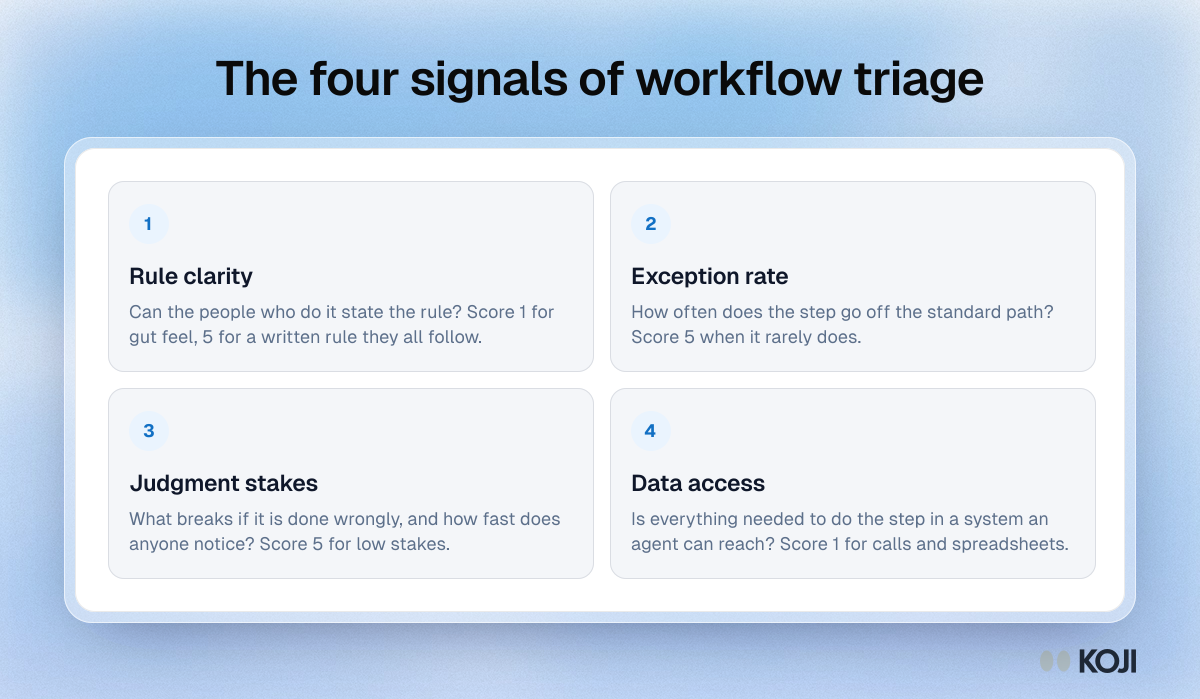
The decision rule is simple. A step with clear rules, a low exception rate, low stakes and data an agent can reach goes to automation or an agent. A step with unclear rules or high stakes stays with a person, with an agent as a drafting aid at most. Anything in between gets a human-in-the-loop design: the agent proposes, a person approves. If a step scores 4 or 5 on rule clarity but also 1 or 2 on exception rate (it often goes off the standard path), treat it as human until you have seen the exceptions written down. That one rule catches most bad calls.
Who to interview. Five to eight people per workflow variant: front-line executors, at least one supervisor, and one newer person who follows the written procedure closely. Include the person who covers when the usual owner is on leave. They know where the process is fragile.
When to stop. Stop when your last three interviews add no new exception. Fewer than that and you are still discovering; more is spend you do not need. This is a rule of thumb from running discovery work, not a published threshold.
Common mistakes:
- Asking "how should this work?" You need how it does work. Anchor on the last time they did it.
- Letting the procedure document lead the conversation. Use it afterwards to probe the gaps.
- Interviewing managers only. They describe the policy.
- Showing one participant's description to another. It anchors them.
- Scoring from the first interview. Variation between people is a finding.
- Telling people the interview is about automation without saying what happens to their role. Say it plainly in the invitation.
How to set it up in Koji, step by step
You can run this on any plan with text interviews, which includes the Free plan. Voice interviews need the Interviews plan or Enterprise. For process narratives, voice is usually better: people explain a sequence faster than they type it. Text works well when participants are in a noisy environment or prefer to answer between tasks.
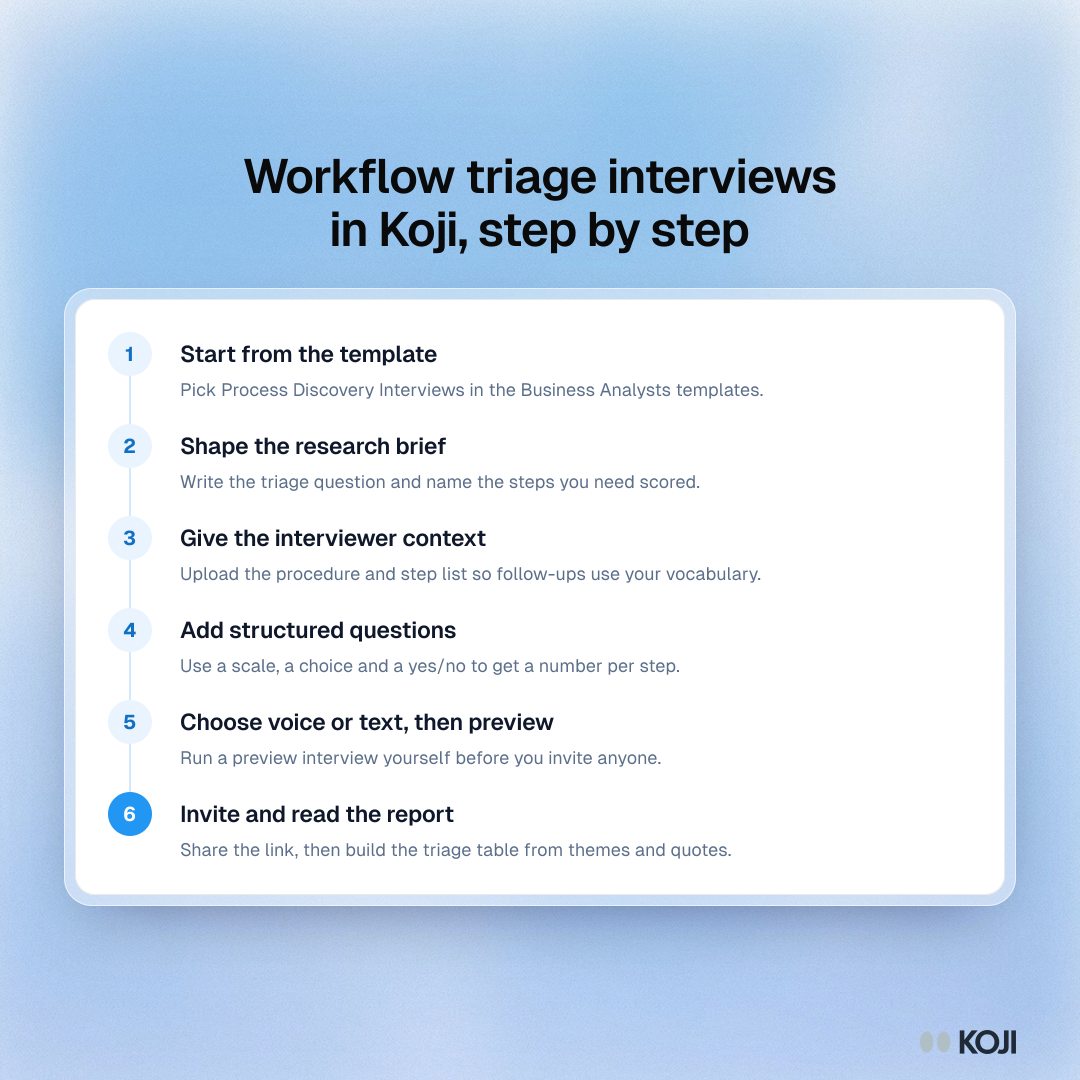
- Start from the template. Open the template gallery in your dashboard and pick "Process Discovery Interviews" from the Business Analysts templates. It already asks participants to walk through the last time they did the work, where it deviated, and what they do that is not in the procedure. Or type your question into the home screen box and let Koji draft a brief.
- Shape the research brief. Replace the problem statement with the triage question: "Which steps of [workflow] can be automated, handled by an agent, or must stay with people, and why?" Name the step list in the brief.
- Give the interviewer context. Upload the procedure document and the step list as context files. The AI uses them to ask sharper follow-ups. Do not ask it to lead with the document.
- Add structured questions where you need a number. Use a 1 to 10 scale for exception frequency, a single choice for "how often is this step done differently from the procedure", and a yes/no for "do you do anything off-system". These give you a distribution in the report, next to the open-ended narrative.
- Choose voice or text, then preview. Run a preview interview yourself. A preview is saved with its own analysis but is not counted as a response.
- Invite participants. Share the interview link in the team channel, or import a CSV of participants to create personalised links on the Interviews plan. Then set a response limit if you want a cap.
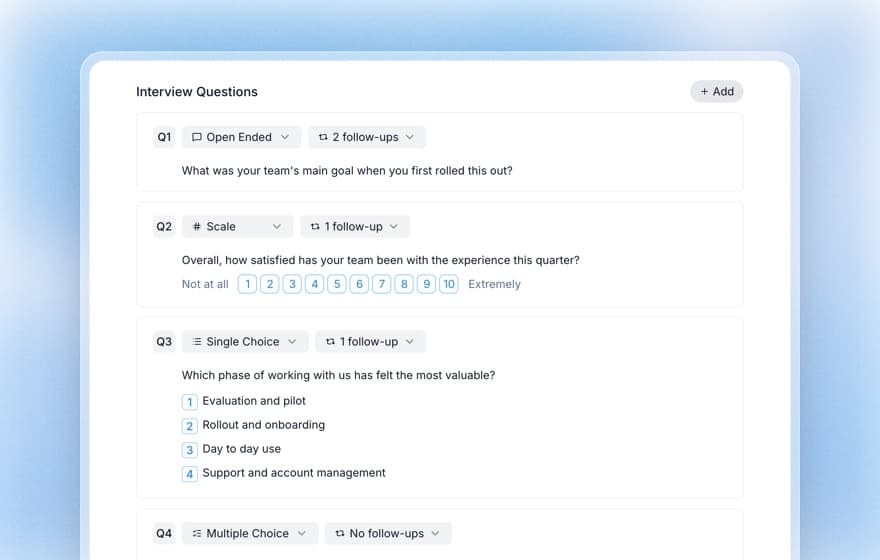
Set follow-up probing to 2 on the narrative questions and 1 on the scale questions. Koji's interviewer can ask zero to three follow-ups per question. For how it works, see how Koji's AI follow-up probing works.
Copy this interview guide
Paste this brief into the "What do you want to research?" box:
Interview people who perform [workflow] day to day to find, step by step, where the real process differs from the procedure, how often exceptions happen, and which steps depend on personal judgment, so we can decide which steps to automate, hand to an AI agent, or keep with people.
Opening line: "I'm mapping how [workflow] really gets done, including the shortcuts. Nothing you say is a performance review. The more specific you are about the last time you did it, the more useful this is."
- (Open) "Walk me through the last time you did [workflow], from the trigger to the end." Probe: "What happened right before that?"
- (Open) "Which step took longest, and why?" Probe: "What would have made it quicker that day?"
- (Single choice) "How often does this step go differently from the written procedure?" Never, rarely, about half the time, most of the time. Probe: "What was the last different case?"
- (1 to 10 scale) "How often do exceptions force you to stop and decide something yourself?" 1 is never, 10 is every time. Probe: "What was the decision, and how did you make it?"
- (Yes/no) "Do you use anything that is not in the official system, such as a spreadsheet, a message, a call?" Probe: "Walk me through the last time."
- (Open) "What would go wrong if this step were done wrongly, and how quickly would anyone notice?" Probe: "Who would notice first?"
- (Open) "What do you know about this step that a new starter would not?" Probe: "How did you learn it?"
- (Single choice) "If a tool did a first pass of this step, what would you need to do before you would trust it?" Check the output every time, spot check, only check exceptions, nothing. Probe: "What would make you stop trusting it?"
Closing question: "What have I not asked about that I should have?"
What you get
Each interview is analysed on its own, with a quality rating, key findings and pain points. The report pulls them into themes with the share of participants behind each one, and every claim links back to supporting quotes. You can analyse AI-moderated interview results by theme or open any single interview.
The next day, you build the triage table: one row per step, four scores, a recommendation and the quote that justifies it. You walk into the sponsor meeting with "these 11 steps go first, these 6 need human approval, these 4 stay as they are", and the exceptions in the participants' own words. Share the report with your team using a published link instead of pasting screenshots into slides.
The same playbook elsewhere
The same structure works wherever someone must decide what to change before they change it. HR runs it before restructuring a team. Customer success runs it before changing a handover. Agencies run it with client departments before proposing a redesign; see the multi-market playbook for agencies. Where the question is why things stall rather than how work is done, look at no-decision loss interviews and renewal risk interviews: the same "last time it happened" questioning applies.
Why Koji for AI agent workflow triage
Pricing for these alternatives varies and is not always public, so the table compares what each method gives you, not what it costs.
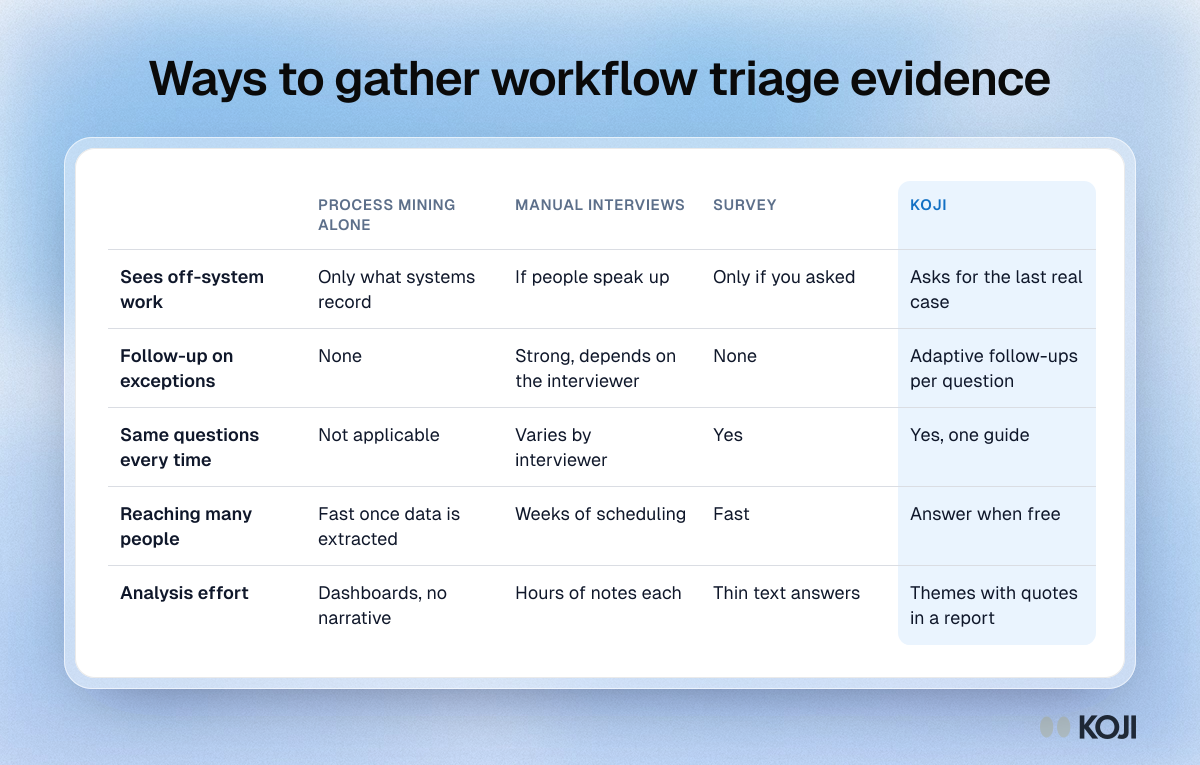
- It finds what logs cannot. The interviewer asks about the last real case, then follows up on exceptions and off-system steps. That is where event data and procedures run out.
- Everyone gets the same guide. With manual interviews, five interviewers produce five styles. One guide means differences you see are differences in the work.
- It fits calendars. Participants answer when they are free, so shift workers and people covering two roles are not blocked by scheduling. See asynchronous interviews.
- Structured and open answers sit together. The scale and choice questions give you numbers per step. The narrative gives you the reason.
- Evidence you can defend. Reports link claims to quotes, which matters when a sponsor asks why a step was left with people.
Questions you might have about AI interviews
Will staff describe their real workarounds to an AI? Often more readily than to a colleague with a say over their job, because there is no one in the room to impress. Say in the invitation who sees the results and that this is not an assessment. For evidence on how people respond, read will customers open up to an AI interviewer.
Can an AI follow a step-by-step process narrative? Yes. It asks follow-ups on what the participant just said, and you can load your step list as context so it knows the vocabulary. Check this in a preview before launch.
Is it safe to collect how people really work? Tell participants how responses are used, exclude topics you do not want covered with guardrails, and keep the report shared only with the team that needs it. For how data is handled, read the AI interview data privacy and security guide.
When Koji may not be the right fit
If your workflow has three people and one process owner who can walk you through it in an hour, just talk to them. If the question is purely quantitative, such as cycle time across 200,000 transactions, event data answers it better than interviews. And if the work is physical or happens on a shop floor, shadowing someone beats any interview. Koji is for the middle: dozens of people, judgment-heavy steps, and a decision riding on getting the exceptions right.
Metrics to track
- Number of steps triaged, and the share with a quote behind the recommendation
- Exceptions found that the procedure did not mention
- Steps moved from "automate" to "human in the loop" after interviews
- Pilot completion and exception handling rate after go-live
- Time from kickoff to a sponsor-ready triage table
FAQ
How many people should I interview per workflow? Five to eight per variant, stopping when three interviews in a row add no new exceptions.
Should I use voice or text? Voice for process narratives. Text for people who cannot talk at work. Voice interviews need the Interviews plan or Enterprise.
Can I run this on the Free plan? Yes, with text interviews and the template. Voice and CSV import of participants need a higher plan.
Does this replace process mining? No. Use the logs for volumes and timings, and interviews for judgment and off-system work.
What if participants fear the automation? Say what the project is and is not in the invitation. Do not hide it. Candour is the source of the data.
What does the interview cost in credits? A text interview is 1 credit and a voice interview is 3 credits, and only conversations that pass the quality check consume credits.
Start your triage interviews
Open the Business Analysts templates, pick Process Discovery Interviews and paste the brief above. More about the role is on the Koji page for business analysts, and every playbook for analysts is in the use case library.