Say you shipped last week and the dashboard shows only a small share of eligible accounts touched the new feature. Nobody on the team knows why. This playbook shows you how to run 20 to 30 short AI-moderated interviews in the first 30 days after launch, split by what people did (never saw it, tried once, kept using it), so that at the day-30 review you can name the fix instead of arguing about it.
Why launch-window interviews matter now
Analytics tell you what happened. They have never told you why, and the gap is getting more expensive as shipping gets faster.

Photo by Sable Flow on Unsplash
- Most shipped surface area goes unused. Pendo's feature adoption analysis of 615 subscriptions found that 80 percent of features in the average software product are rarely or never used (Pendo, 2019). The data is old, but nothing since has made the pattern go away.
- Teams cannot see the reason. In Userflow's 2026 survey of 107 senior product leaders, 44 percent said trusting the output is where users struggle most with AI features, only 33 percent measure outcomes such as task completion, and only 7 percent can spot and act on an adoption problem the same day (Userflow, 2026). Userflow sells in-app adoption software, and these are leaders' beliefs about users, not user reports. That is the point: the people who own the feature are guessing.
- Adoption gaps are everywhere. ECI Research, covering Banyan Software's first AI benchmark, reports that 51 percent of vertical software operators have fewer than one in four customers using the AI features they built (Banyan Software via ECI Research, 2026).
- The conversation habit is thin. IdeaPlan's State of Product Management 2026 reports that only 28 percent of PMs hold two or more customer conversations a week, and 47 percent talk to customers at least weekly. Its summary page adds that 44 percent say recruitment blocks them (IdeaPlan, 2026).
Put those together. You are measured on adoption, activation and the revenue the launch was supposed to bring. You have a short window, usually the first month, before the team moves to the next thing and the launch becomes "done". And you have no time to schedule 20 calls with people who, by definition, are not using your feature. The cost of skipping this is a feature that quietly joins the 80 percent, with the roadmap for the next quarter already built on top of it.
What good looks like
Treat the launch window as a short, scheduled study with a fixed shape, not as "we should talk to some users".
1. Interview by behaviour, not by account size. Build three groups from your own usage data on day 7:
- Never saw it (no exposure event). Their story is about discovery and relevance.
- Tried once and left (one use, no return within 14 days). This is your richest group. They were interested enough to try and something stopped them.
- Repeat users (three or more uses). They tell you what the feature is really for, which is often not what you built it for.
Adopters are the worst sample for the question "why isn't this working", so keep them to a minority.
2. Decision rule for sample size. If fewer than 200 accounts are eligible, invite all of them. If more, invite at least five times the number of completes you want. Aim for 20 to 30 completes: roughly 10 never-saw-it, 10 tried-once and 8 repeat users. Below about 8 per group you are collecting anecdotes. Past 30 you mostly hear the same three themes again.
3. Ask about the last time, not about the feature. "Walk me through the last time you had to do X" beats "what do you think of the new feature". People are poor at predicting and flattering about opinions, and good at recalling a specific recent event. Anchor on the job the feature was built for, then ask what they did, then ask about the feature.
4. Time it. Invite on day 7, field days 8 to 21, read the report on day 22, decide on day 28. The first two weeks after launch is when memories are fresh and the "we could still change it" window is open. Wait until day 60 and you are researching history.
5. Decide before you ask. Write down the decisions the interviews can change: iterate on the entry point, change the default, rewrite the announcement, cut scope, or leave it alone. If no answer could change a decision, don't ask the question.
Common mistakes
- Interviewing only the people who replied to the launch email. They are the adopters.
- Asking "would you use this?" instead of "when did you last face this problem?".
- Mixing the groups in one analysis, so the repeat users' praise cancels the non-adopters' confusion.
- Counting a barrier you heard once as a trend. Look for it in at least three people in a group.
- Waiting for a "big enough" sample. 20 conversations in week three beat 100 in week eight.
Copy this interview guide
Paste this into any tool. It works for a feature of any size. Replace [feature] and [job] (the thing the feature helps with).
Research brief (one line for Koji's "What do you want to research?" box): "Why aren't more of our active users using [feature] in the first 30 days after launch, what stopped the ones who tried it once, and what kept the ones who stayed?"
Opening line: "Thanks for helping. We shipped something new and want to learn from honest experience, including that it didn't help. There are no wrong answers and you won't hurt anyone's feelings."
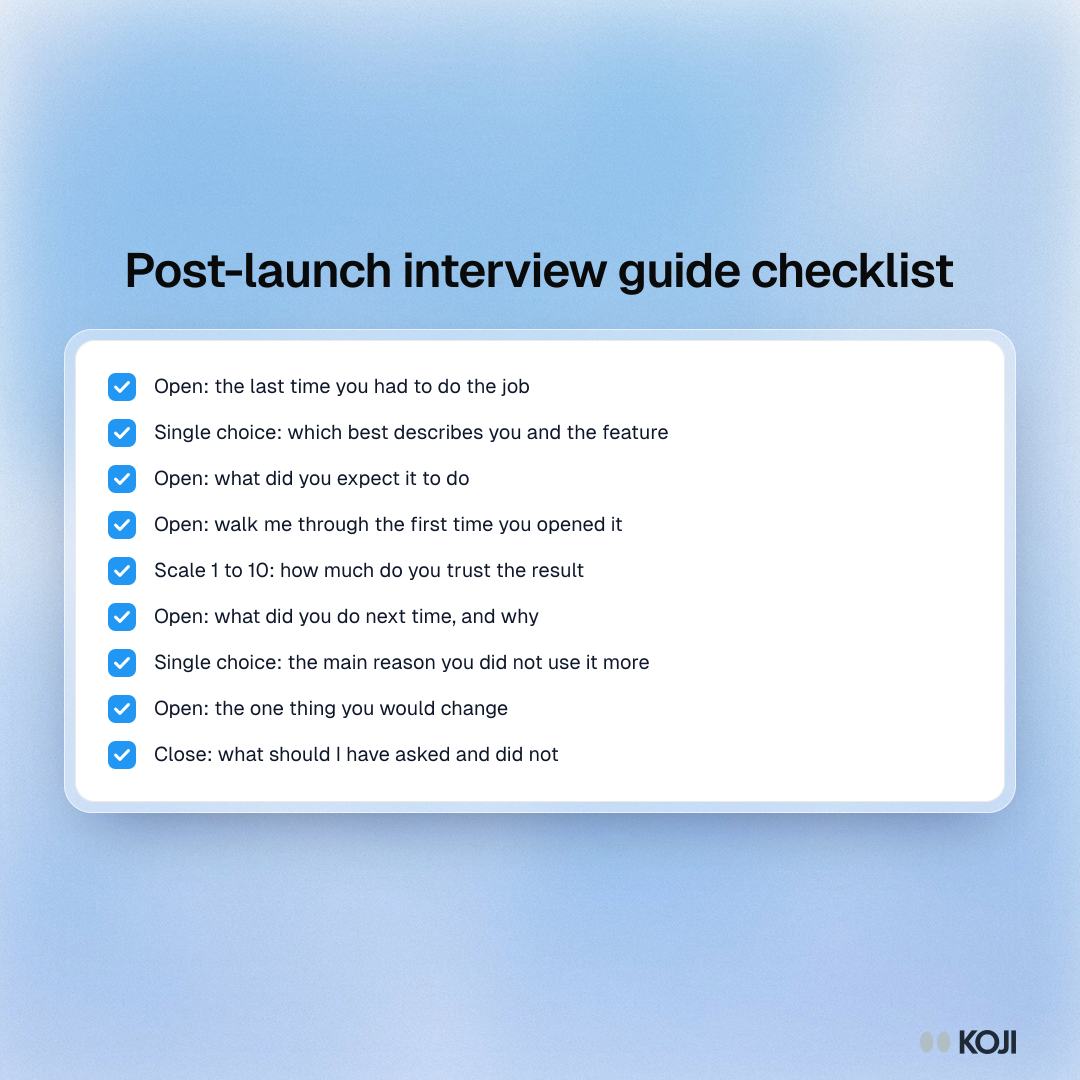
- (Open) "Tell me about the last time you had to [job]. What happened?" Probe: "What did you use? What was annoying about it?"
- (Single choice) "Which best describes you and [feature]? I haven't seen it / I saw it but haven't tried it / I tried it once or twice / I use it regularly." Probe: "Tell me about the moment you first came across it."
- (Open) "What did you expect it to do for you?" Probe: "Where did that expectation come from?"
- (Open) "Walk me through what you did the first time you opened it." Probe: "What were you hoping would happen next?"
- (1 to 10 scale) "How much do you trust the result [feature] gives you?" Probe: "What would make that one point higher?"
- (Open) "What did you do the next time you had to [job]? Why?" Probe: "What would have made you come back?"
- (Single choice) "What is the main reason you haven't used it more? Didn't know it was there / didn't need it / couldn't figure it out / didn't trust it / the old way is faster / something else." Probe: "Say more about that."
- (Open) "If you could change one thing about it, what would it be?" Probe: "What would that let you do that you can't now?"
- Close: "Is there anything I should have asked and didn't?"
The question in step 2 is a check on which group the person belongs to. Compare it with what your usage data says, because people often misremember what they tried.
How to set it up in Koji, step by step
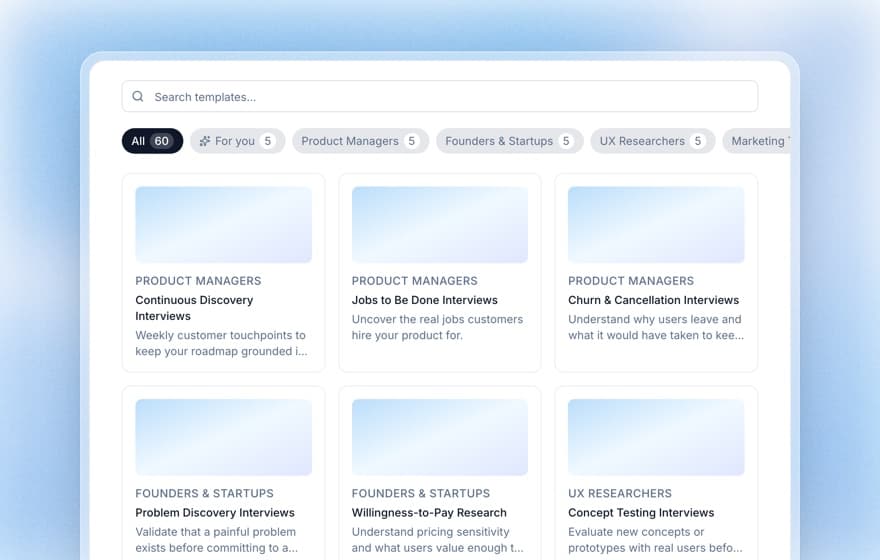
Koji ships a template for this, "Post-Launch Feedback Interviews", in the template gallery under Product Managers. It is built for the same shape (adopters and non-adopters, a 1 to 10 confidence scale, a discovery-path probe) and is a good starting point for the guide above.
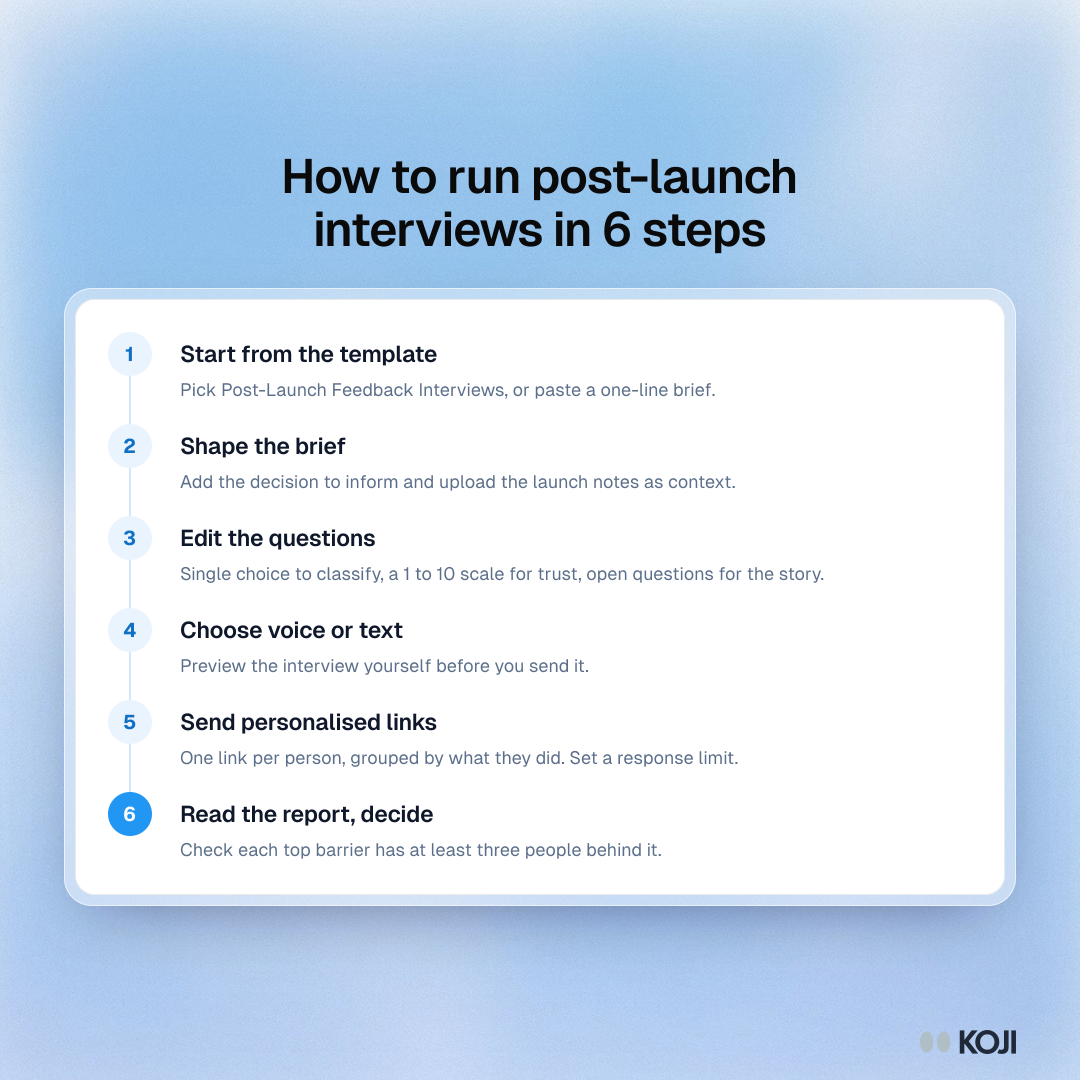
- Start a study. Open the dashboard and pick the Post-Launch Feedback Interviews template, or paste the one-line brief above into the "What do you want to research?" box.
- Shape the brief. Add the decision the study informs ("whether to change the entry point, the default or the announcement") and your hypothesis. Upload the launch announcement, the help article and any support tickets as context files so the interviewer knows what the feature is called and does.
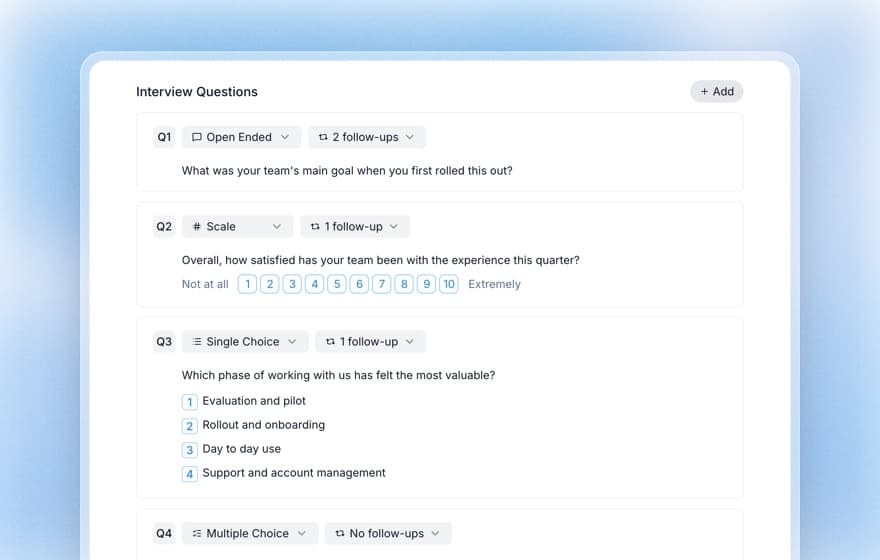
- Edit the questions. Use the nine questions above. Mark step 2 and step 7 as single choice, step 5 as a scale from 1 to 10, the rest as open-ended with a follow-up setting of one or two.
- Choose voice or text. Text interviews are available on every plan. Voice interviews are available on the Interviews plan and above. Text interviews cost 1 credit and voice interviews cost 3 credits. Preview the whole interview yourself before sending it. A preview is not counted as a response.
- Send personalised links by group. Export your three groups from your analytics tool and create a personalised interview link for each person, so you know who said what without asking them to identify themselves. Personalised links work on every plan, and contact import from a CRM needs the Interviews plan. Set a response limit so you stop at your target.
- Read the report and decide. As responses come in, generate the report. It lists themes with the number of participants behind each, with the supporting quotes one click away. Check that your top three barriers each have at least three people behind them.
Read more: Feature adoption research: how to interview users who aren't using your product, Personalized interview links, Importing participants via CSV and Pre-launch user research for the study you should have run before this one.
What you get
By day 22 you hold a report, not a transcript pile.
- A ranked list of barriers per group. For example: "never saw it" is mostly a placement problem, "tried once" is mostly trust, "repeat users" use it for something else.
- Quotes you can paste. Each finding links to the participants behind it, so the review meeting argues about what to do, not whether the finding is real.
- A scale distribution on trust or confidence, so you can show the shape of the problem next to the usage chart.
- A published report link you can send to design, engineering and your leadership. Report publishing is available on every plan.
Use it the next day. Put the top three barriers and their counts at the top of the day-28 review, and list the decision you wrote down in advance. Choose one: change the entry point, change the default, rewrite the announcement, cut scope or leave it alone. Then rerun the same guide with a smaller sample 30 days after the fix, so you can see whether the barrier moved.
The same playbook elsewhere
The idea is the same wherever something new has landed and the numbers cannot say why.
- Customer Success: onboarding check-ins at day 14 and day 30, asking new accounts what they expected and what happened. See renewal risk interviews.
- HR: a 30-day new hire check-in or the first 60 days after a policy change, as in pay transparency research.
- Product, AI features: if what you shipped is an AI feature, the barrier is usually trust. See the AI feature adoption playbook.
- Founders: the first 30 days after a paying customer signs up, to find out whether they got to the first win.
Why Koji for launch-window interviews
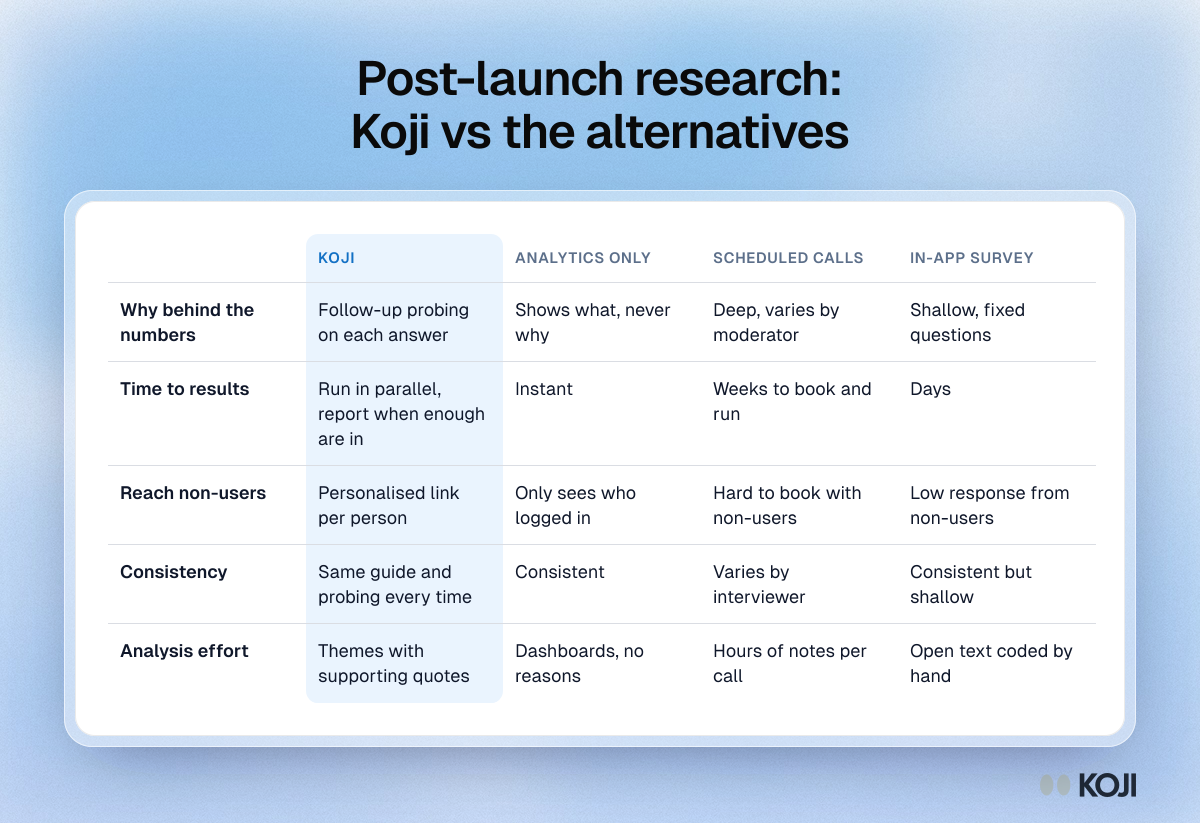
Analytics, scheduled calls and in-app surveys are all fair choices. Analytics are essential and free to read once instrumented. Calls give you the deepest conversation if you can book them. In-app surveys are quick. The trouble is the combination you need in the launch window: depth, speed, and reach into people who are not using the feature.
- Follow-up probing on every answer. Each open question can have one or two follow-ups, so "it was confusing" turns into the step where they got lost.
- Reach non-users without a calendar. A personalised link lets someone answer in text or voice when it suits them, in about the time of a coffee.
- Mixed question types in one conversation. The single choice classifies, the 1 to 10 scale gives you a distribution, and the open questions give you the story.
- Same guide for every participant. Every person gets the same questions with the same probing, so you can compare the groups.
- Themes with the people behind them. The report links each finding to supporting quotes, so you can check it before you present it.
Questions you might have about AI interviews
Will people who barely use the product talk to an AI? Some will not, and that is fine: invite five times your target. A short invitation that says how long it takes helps. Participants see the time estimate and the privacy note before they start, and can choose voice or text. A text option matters for people who are busy or in an open office.
Does it probe like a researcher would? It follows the question you wrote and the follow-up setting you chose, and reads the context files you uploaded, so it knows your product's vocabulary. Run the preview yourself first, and read the first five transcripts before the rest come in.
Where does the data go? Participants see a data note on the welcome page. Interviews are stored in the EU. Read the privacy details in the docs before you send to customers, and on Enterprise you can bring your own keys (see bring your own key).
When Koji may not be the right fit
If you have fewer than about 30 active users, call them. You'll learn more in five conversations than from any tool. And if the real barrier is a bug, instrument it and fix it before interviewing anyone. Koji is also not a replacement for usability testing with screen recording, where you need to watch what someone clicks.
Metrics to track
- Share of eligible accounts that reach a second use within 14 days, before and after the fix.
- Response rate per group (never saw it, tried once, repeat).
- Top three barriers by number of participants, week over week.
- Days from launch to the first documented decision.
- Share of interviews rated good or better for quality in the report.
FAQ
When should I start the interviews after launch? Invite on day 7 once you have seen who is not using it, field through day 21, and decide by day 28.
How many people should I interview? 20 to 30 total, with at least 8 in each behaviour group. If fewer than 200 accounts are eligible, invite everyone.
Who should I talk to first? Users who tried it once and did not return. They had the intent, so their reason is the most actionable.
Is this different from a pre-launch study? Yes. Pre-launch tests whether people want it. Launch-window interviews explain what actually happened when they met it.
Which plan do I need? Text interviews and personalised links work on every plan. Voice interviews and CRM import need the Interviews plan.
Start from the template
Open Koji, choose the Post-Launch Feedback Interviews template, paste your brief and send the first ten personalised links this week. See the Product Managers page for more, or browse every playbook for your role in the use-case library.