

The short answer
Optimal Workshop is the specialist for information architecture research; Lyssna is the broader, cheaper-to-start tool for quick unmoderated tests. Both run card sorts, tree tests, first-click tests, surveys and prototype tests. Optimal goes deeper on the IA methods and sells an annual plan priced by studies a year. Lyssna adds five-second and preference tests, has a free plan, bills monthly if you want, and comes with its own participant panel.
Pick Optimal Workshop if you are restructuring navigation or a large site and need the strongest card sorting and tree testing analysis. Pick Lyssna if you run lots of small design tests and want to start free. Neither will tell you why customers behave the way they do in their own words at scale; for that you need interviews, which we cover at the end.
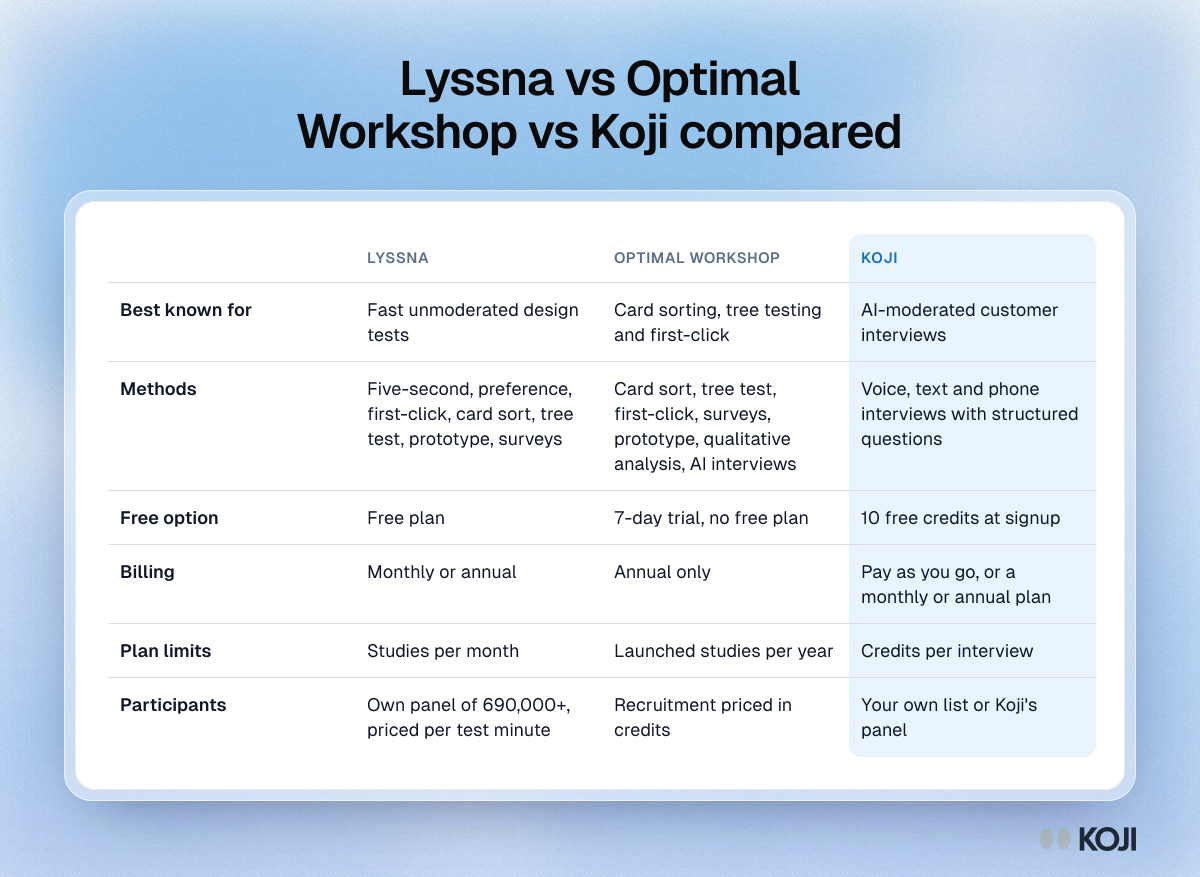
Lyssna vs Optimal Workshop at a glance
| Lyssna | Optimal Workshop | |
|---|---|---|
| Best known for | Fast unmoderated design tests | Card sorting, tree testing and first-click |
| Methods | Five-second, preference, first-click, card sort, tree test, prototype, surveys | Card sort, tree test, first-click, surveys, prototype, qualitative analysis, AI interviews |
| Free option | Free plan | 7-day trial, no free plan |
| Billing | Monthly or annual | Annual only |
| Plan limits | Studies per month | Launched studies per year |
| Participants | Own panel of 690,000+, priced per test minute | Recruitment priced in credits |
What Optimal Workshop does best
Optimal Workshop (now branded Optimal) built its name on three tools: OptimalSort for card sorting, Treejack for tree testing and Chalkmark for first-click testing with heatmaps. If you are deciding how to label and group a navigation menu, these are still the tools many IA specialists reach for. It also has surveys, a usability testing tool for Figma prototypes and live websites, and Qualitative Insights (formerly Reframer) for tagging and analysing notes.
In the past year it added AI-simplified survey questions and an AI Interviews tool that finds themes and links each insight to video, in 13 languages (Optimal).
Pricing. The Starter plan is $199 a month, billed annually, with 5 launched studies a year, unlimited seats and unlimited responses per study. You can buy extra study bundles. Enterprise is priced on request. There is no free plan, only a 7-day trial (Optimal). Recruitment is paid in credits; the per-credit price isn't published.
The catch. Five studies a year is tight for a team that tests every sprint, and reviewers describe a steeper learning curve than lighter tools. It is built for planned IA projects, not quick checks.
What Lyssna does best
Lyssna, formerly UsabilityHub, is the quick-test tool. Its five-second tests and preference tests answer the questions designers ask every week: what do people remember from this page, and which of these two versions do they prefer? It covers card sorting, tree testing, first-click, prototype tests and surveys too, plus live website testing and moderated interviews with recordings on paid plans.
Its own panel of 690,000+ people with 395+ targeting options is a big part of the appeal (Lyssna). Unmoderated panel responses cost about 1 credit per test minute per participant, with a credit worth roughly US$1 and cheaper in bulk (Lyssna help).
Recent additions include AI follow-up questions, AI summaries, a synthesis feature and an MCP server in beta for querying research from AI assistants (Lyssna). As of mid 2026, Lyssna does not run AI-moderated interviews.
Pricing. There is a Free plan with limited self-recruited responses. Growth is about $165 a month billed annually (Lyssna's comparison page says "from $166") or $199 billed monthly, with five seats and a monthly study allowance. Enterprise is custom. Panel responses are billed separately on every plan. Check Lyssna's pricing page for current limits.
The catch. Studies-per-month limits on Growth can bite, and the IA analysis is lighter than Optimal's.
How many participants each method needs
Whichever tool you use, sample size drives your cost, and it differs a lot by method:
- Usability testing: Nielsen and Landauer's model says five users find about 85% of usability problems in a qualitative test (Nielsen Norman Group).
- Card sorting: results from 5 users correlate only 0.75 with the final structure; you need about 15 users to reach 0.90 (Tullis and Wood, via Nielsen Norman Group).
- Tree testing: NN/g treats task success below 40% as poor and above 90% as excellent, which means you need enough participants per task to tell those apart (Nielsen Norman Group).
That is why panel pricing matters as much as the plan price. A card sort with 15 recruited people on Lyssna costs a known amount per minute; on Optimal, ask for the credit price before you plan the study. Our guides to card sorting, tree testing and first-click testing cover how to set each one up.
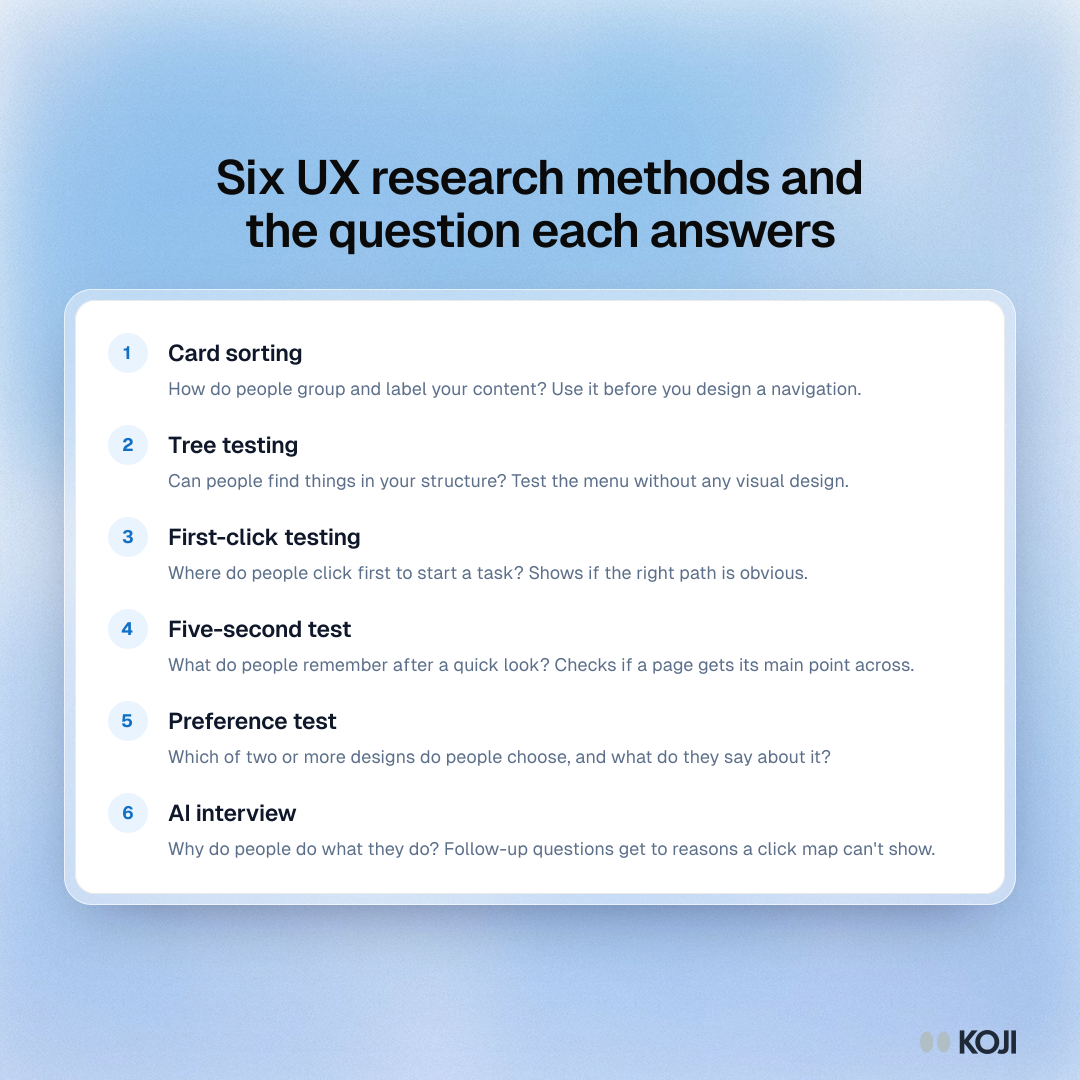
If you're not sure which method fits your question, start here:
What both tools leave out
Lyssna and Optimal are built to measure what people do with a design: where they click, where they get lost, which version they choose. They are less suited to the question that usually comes next: why.

Photo by Paper Textures on Unsplash
Maze's 2026 research report found 69% of research teams use AI in at least some projects, up from 50% a year earlier, and 21% are experimenting with AI-moderated interviews (Maze). The reason is simple. A tree test might show you that a third of people looked for billing under Account. It can't tell you what they expected to find there, or what they tried before they gave up.
Which one should you pick?
Pick Optimal Workshop if you are doing serious IA work (a site restructure, a new navigation, a large content migration), you can plan around a yearly study allowance, and you want the deepest card sort and tree test analysis.
Pick Lyssna if you test designs every week, want five-second and preference tests, like the option to pay monthly, and want a large built-in panel with per-minute pricing.
Add interviews if your tests keep raising "why" questions that a click map can't answer.
Where Koji fits: the "why" behind the clicks
Koji is an AI interviewer, not a testing tool. It doesn't run card sorts or tree tests. What it does is talk to people: each participant has a voice or text conversation with an AI that asks your questions and follows up when an answer is vague. Pair it with either tool above. Run the tree test, then interview the people who failed the task.
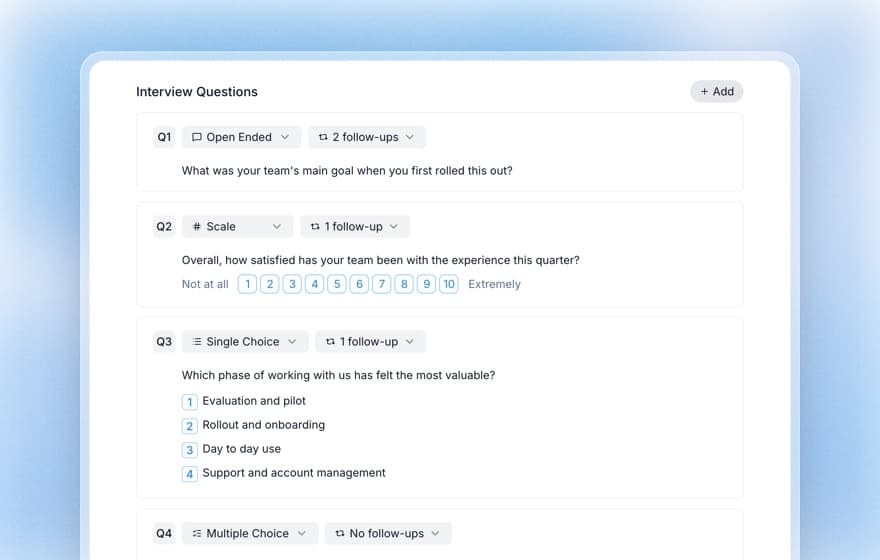
- Structured and open questions together. Six question types (open ended, scale, single choice, multiple choice, ranking and yes or no) in one conversation, so you get charts and quotes from the same study. See AI interviews vs surveys.
- Recruit or bring your own. Share a link with your users, or use panel recruitment on a paid plan, with the cost per respondent shown before you launch.
- 28 languages, voice or text, with no moderator to schedule.
- A quality gate. Each interview is scored 1 to 5, and only interviews scoring 3 or more use credits or enter the report. See how the quality gate works.
- Reports with evidence. Themes and findings, each traced to the quotes behind it.
Pricing is public. You get 10 free credits at signup with no credit card. A text interview costs 1 credit and a voice interview 3 credits, at €1 a credit. Insights is €29 a month with 29 credits, Interviews is €79 a month with 79 credits, and Enterprise is custom.
The bottom line
Optimal Workshop is the IA specialist with an annual, studies-capped plan. Lyssna is the quick-test generalist with a free plan, monthly billing and a big panel. Most teams can decide in five minutes: big IA project, Optimal; weekly design checks, Lyssna.
When the clicks raise questions, try Koji free and ask the people behind them. For more comparisons, see Koji vs Lyssna, Koji vs Optimal Workshop, Maze vs Lyssna and the best card sorting tools.


