How to usability test your MVP without a researcher: give five people who match your customer three real tasks, watch where they get stuck, fix the worst problem, and test again with five more. That is the whole method, and it fits in a week. The decision it settles is whether your product is ready to put in front of more people, or whether new users will get lost in a flow you can no longer see because you built it. By the end of this playbook you will have the tasks, the questions to ask after each one, a rule for what to fix first, and a plan you can run with your own users this week.
When you need this
You need this when you have something people can click (a live MVP, a staging build or a clickable prototype) and you are about to send real traffic to it. The signs are familiar: signups arrive and few of them reach the first useful action, friends say it "looks great" but you've never watched a stranger use it, and you keep adding tooltips without knowing which step is the problem.

Photo by William Marques on Unsplash
The cost of guessing is that you spend your next launch, ad budget or outreach list on a flow that loses people at a step you could have fixed in an afternoon. Amplitude's 2025 benchmark analysis suggests that if about 7% of a signup cohort is still active on day seven, that already puts a product in the top quarter for activation [1]. With odds like that, a confusing first screen is expensive.
You are also probably doing this yourself. Maze's 2026 survey of nearly 500 researchers, designers and product people found that 66% saw demand for research grow in the past year, up from 55% the year before [2], and User Interviews' 2025 report found that 71% of respondents work in organisations where people outside research also do research [3]. At a startup, that person is the founder.
The method in brief
For this decision, use a small think-aloud usability test: real people, real tasks, and you (or a tool) watching what they do rather than asking what they think. Koji's usability testing guide covers the method in full, how to write usability test tasks covers the tasks, and the think-aloud protocol covers the talking. If you can't sit with people live, an unmoderated usability test is the version where people do it on their own time.
Usability testing answers a different question from interviews. An interview tells you whether the problem is real and why people want it solved. A usability test tells you whether they can get your product to solve it. You need both, in that order. If you're not sure which one you need right now, user interviews vs usability testing lays out the difference.
Why five people, and why more than one round
Jakob Nielsen's rule is that testing with five users finds about 85% of the usability problems in a design, and that a budget for 15 users is better spent on three rounds of five, fixing problems in between [4]. The number comes from Nielsen and Landauer's 1993 model, in which the average problem was hit by about 31% of users [5].
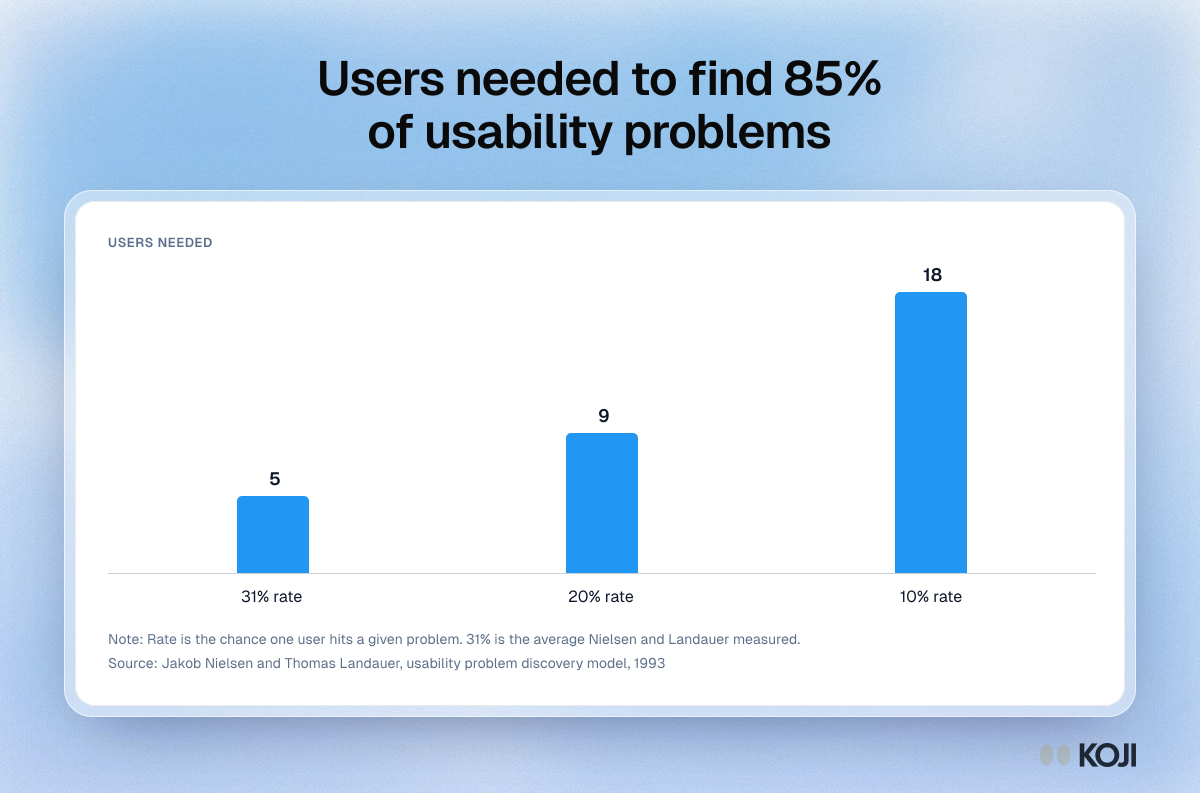
The catch is in that 31%. Jeff Sauro of MeasuringU points out that the rule is about how often a problem occurs: a problem that only 10% of users hit needs about 18 people for the same 85% chance of seeing it once [6]. By the same formula, a problem one in five users hits needs about 9. Laura Faulkner's 2003 study made the same point with real data. Across 100 random groups of five drawn from her participants, five users found 85% of problems on average, but one group found only 55% [7]. Groups of ten found 95% on average and never fewer than 82%, and groups of fifteen found 97%, never fewer than 90%.
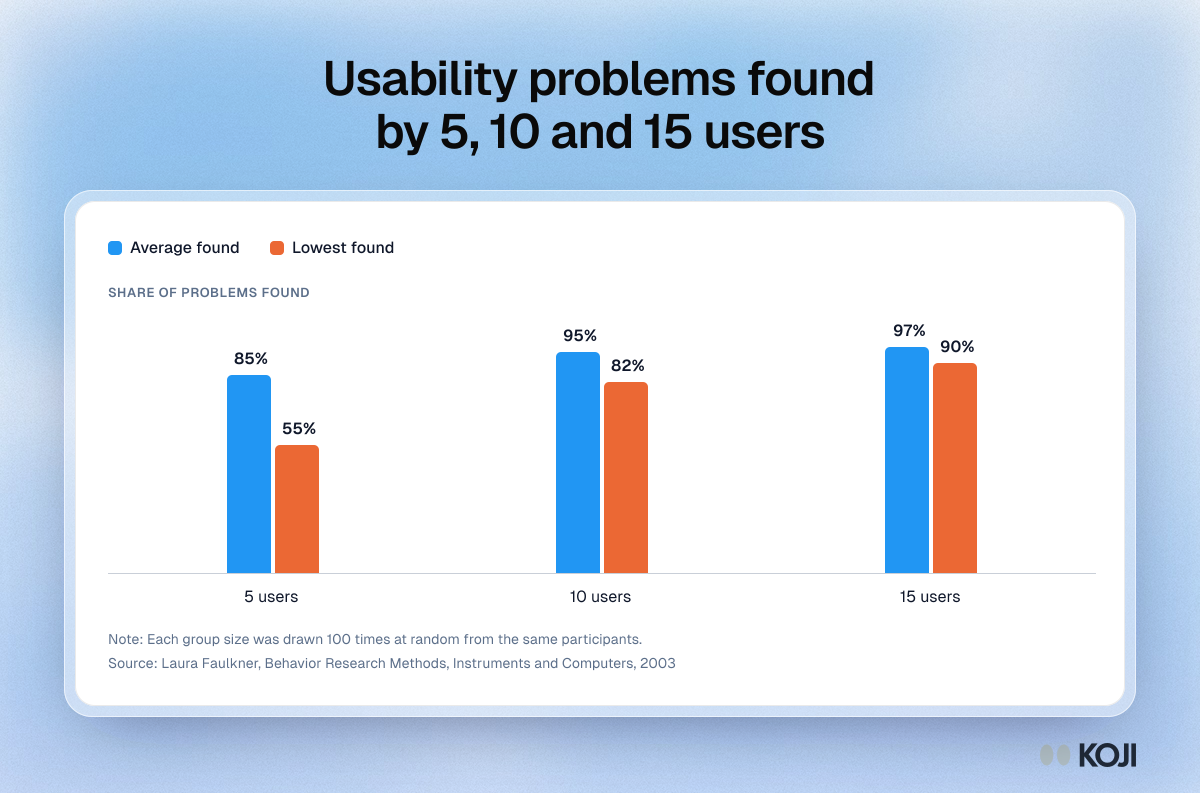
So for an MVP: five people per round, at least two rounds, and five per distinct type of user if you have more than one.
Step by step
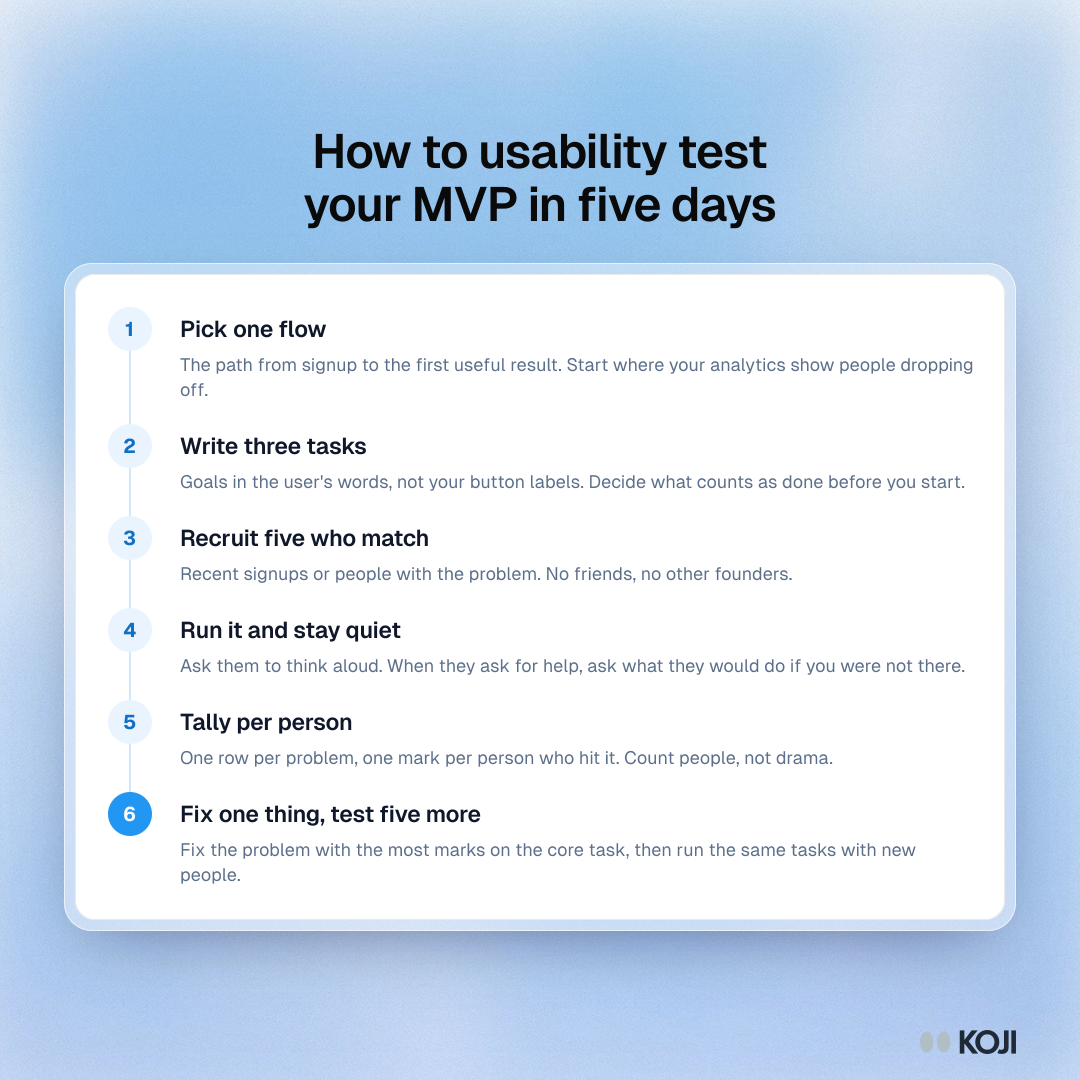
1. Pick the one flow that matters
Don't test the whole product. Pick the path from "just signed up" to the first moment of value: the first invoice sent, the first report built, the first booking link shared. If you already know where users drop off from your analytics, start there.
2. Write three tasks
A task is a goal in the user's words, not an instruction in yours. "You just finished a shoot for a client. Bill them for it" is a task. "Click New invoice and fill in the form" is a tour of your interface. Three tasks is enough for 15 to 20 minutes: the core action, a step people need soon after (adding a teammate, connecting an account), and one thing that worries you. Write down what counts as done before you start, so you aren't tempted to grade generously.
3. Recruit five people who match your customer
Not friends, not other founders, not your co-founder's partner. Five people who have the problem your product solves. Your recent signups are the best source, because they already showed interest. If you have none, the playbook on finding 20 people to interview with no audience lists the channels, and screening participants shows how to keep out the wrong ones. Add one screening question about the job they do ("When did you last send an invoice to a client?") rather than asking whether they'd use your product.
4. Run it and stay quiet
Ask people to say what they are thinking as they go. Then stop talking. The urge to help ("it's in the top right") is strong, and every time you give in you remove the problem you were there to find. When they ask you a question, send it back: "What would you do if I weren't here?" Steve Krug, who wrote the standard book on do-it-yourself testing, suggests one morning a month with three participants and the whole team watching [8]. For a founder, that rhythm is about right once the first two rounds are done.
5. Ask the same questions after each task
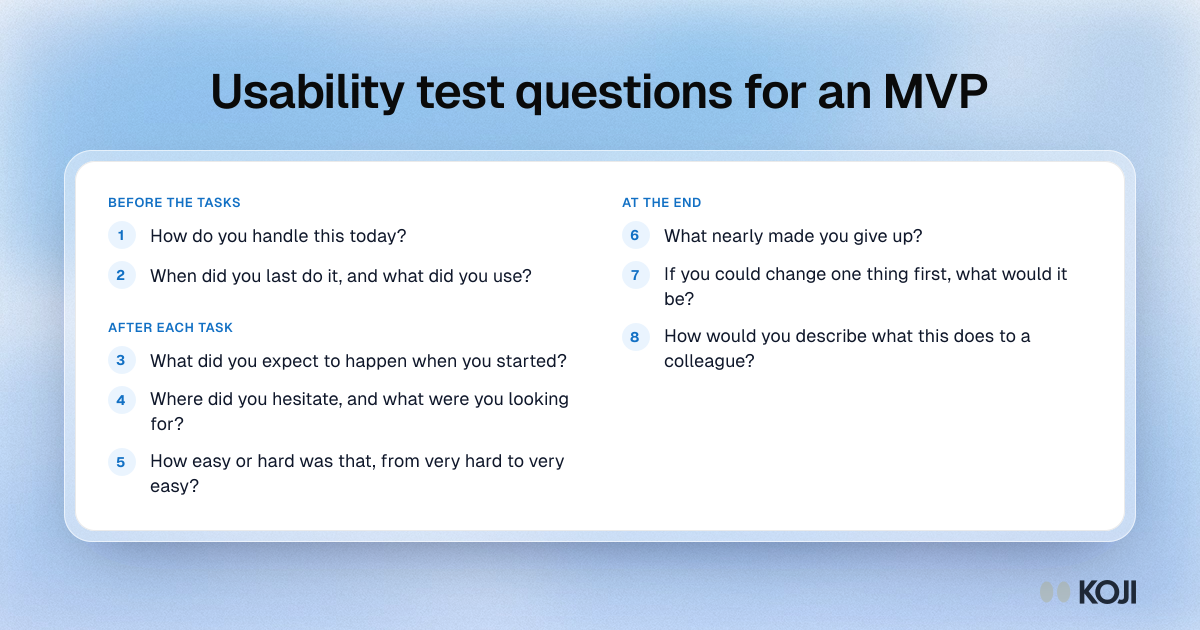
Before the tasks, ask how they handle the job today, so you know what they compare you with. After each task, ask what they expected to happen, where they hesitated, and how easy it was on a simple scale (Koji's guide to the Single Ease Question explains why one rating per task works). At the end, ask what nearly made them give up. Never ask "Would you use this?". It tells you how polite they are, not what they'll do.
6. Tally per person, then fix one thing
After five sessions, make a table: one row per problem, one column per person, and a mark where that person hit it. Count marks, not how vivid the moment was. Then fix the problem with the most marks on the core task, and run five more people through the same tasks.
A worked example
Say you're a two-person team building invoicing software for freelance photographers. You have 60 signups and only 9 have sent an invoice. You pick that flow and write three tasks: bill a client for a shoot you just finished, add your bank details so the client can pay, and send a reminder for an invoice that's overdue.
You recruit five photographers from your signup list who sent an invoice somewhere else in the last month. Four of the five finish the first task, but three of those four take more than four minutes because they look for "New invoice" under Clients, where they keep their client list, and only find it on the dashboard by accident. Two can't finish the bank details task at all: the form asks for a business registration number that freelancers often don't have, and they stop. Everyone finds the reminder.
What do you decide? The bank details form is the most serious problem: it stops people completely, and an invoice nobody can pay is worthless. You make the registration number optional. You also add "New invoice" to the client page, because that's where three of five looked. You don't touch the reminder flow. A week later, five new photographers run the same three tasks. All five finish the bank details task, and one new problem appears: they can't tell if the invoice was sent. That's round three.
Note what the test did not tell you: whether photographers will pay for this, or whether invoicing is painful enough to switch tools. That was the interview's job, earlier.
Reading the results and deciding
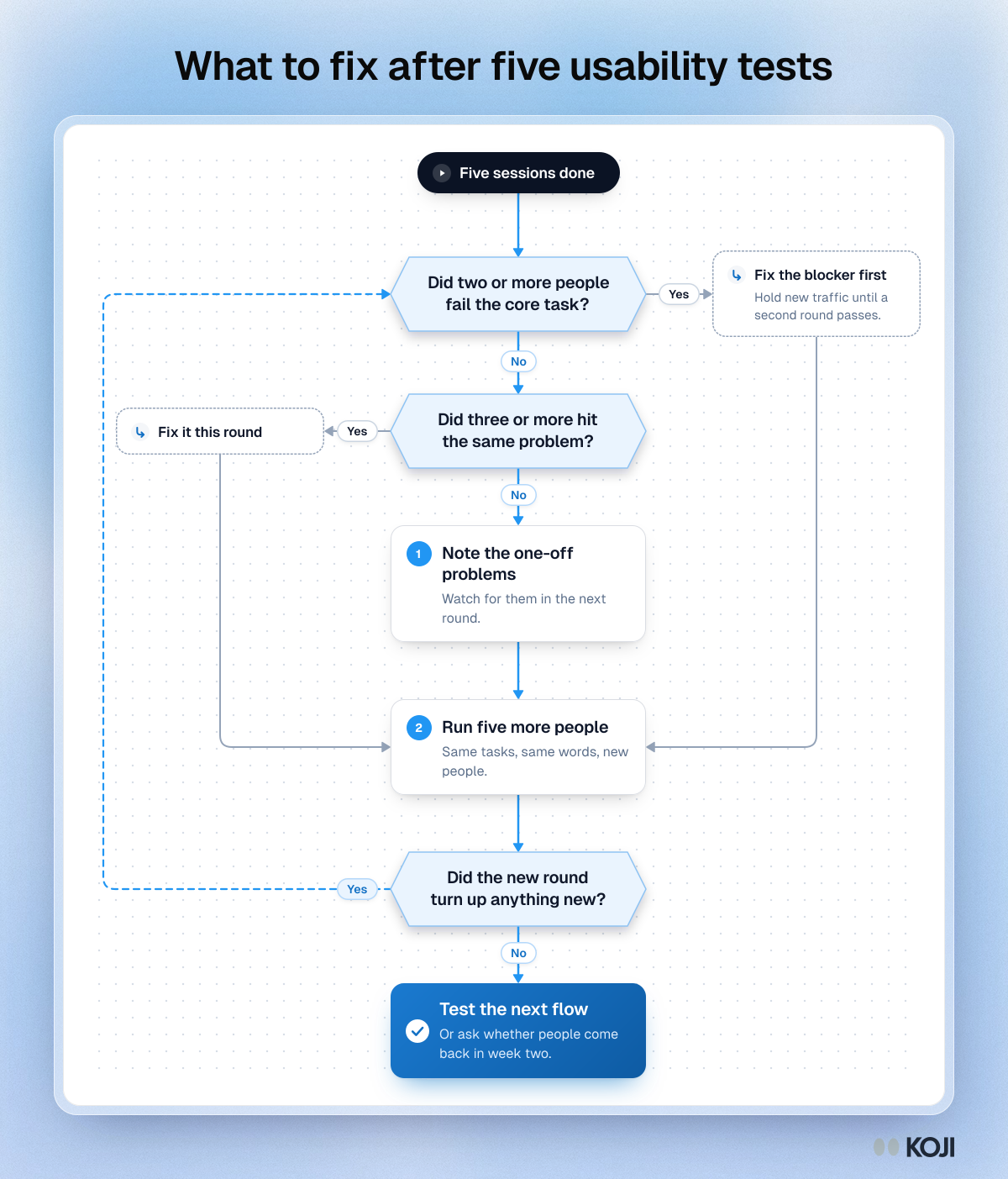
Use these rules after each round:
- Did anyone fail the core task? If two or more of five could not finish it, fix that before anything else, and don't send new traffic until a second round passes.
- Did three or more people hit the same problem? That is a pattern. Fix it in this round.
- Did only one person hit it? Write it down and watch for it in the next round. One in five might be rare, or it might be the start of a pattern a second group will confirm.
- Did everyone finish, but slowly or with detours? Look at where they looked first. That's where the button belongs.
- Did nothing new turn up in the second round? You're done with this flow for now. Test the next one, or move on to the question of whether people come back.
For context on "good enough", MeasuringU's analysis of 1,189 tasks across 115 usability tests found an average completion rate of 78% [9]. With five people you can't measure a rate that precisely, so treat it as a sanity check: if three of five fail, you're well below average. If you want real numbers to track over time, you need 20 or more people per round, and Koji's usability metrics guide shows how to report them.
Run it this week with Koji
You can do all of this over video calls with a notes app. Koji makes it faster when you can't book and sit through ten sessions, because it runs the task, watches and asks the follow-up questions for you, with your own users, on their own time. Task questions are available on every plan, including Free, and are marked as beta in the product.
- Start a study. On the home screen, describe what you want to learn ("I want to watch freelance photographers try to send their first invoice") and the research assistant drafts a brief. Keep the opening question about how they handle the job today.
- Add a Task question for each task. Enter the page address (your live site, a staging build or a prototype share link) and write the task in the user's words. Koji checks whether the page can open inside the interview. If it can't, or if the page needs a login and you choose "Always open in a new tab", it opens in a new tab with Koji in a small window on top.
- Add your after-task questions. Add an open question about what they expected, and a rating question for how easy it was. Tasks mix with open questions, ratings, choice questions and price tests in one study.
- Add a screening question so only people who match your customer get in.
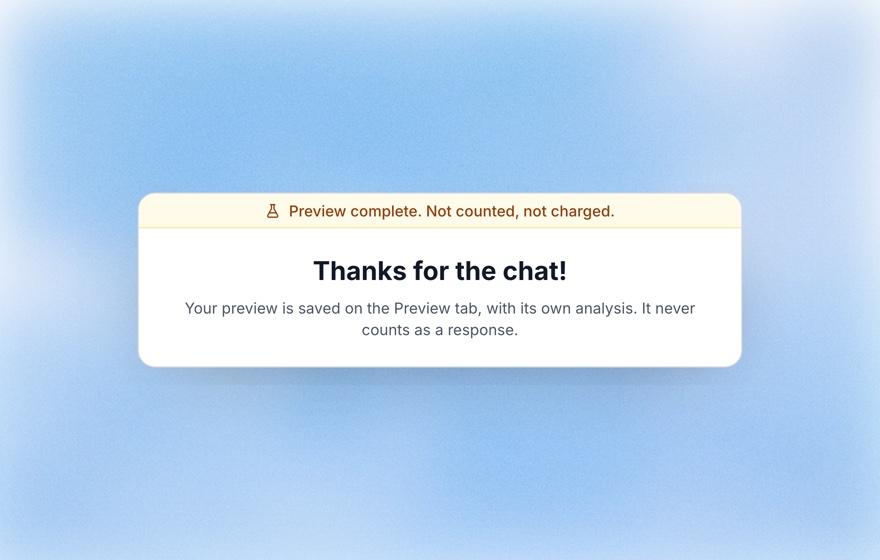
- Take it yourself first. Open the Preview tab and run the whole interview by text or voice. Previews are free, never count as responses and never show up in the report.
- Send the link to five people. Each participant gets a task card with the page, and "I'm done" and "I'm stuck" buttons always on screen. On a desktop browser, Koji asks to record the shared tab and their voice. They can say no and still do the task. Koji only introduces the task, and once they press a button it asks what happened, neutrally, then moves to your next question. It works in text and voice interviews, not phone calls, and on web pages only, not native mobile apps.
- Read the task section of the report. You see how many finished and how many got stuck, the median time on each task, a verdict for each person, a set of recorded moments to watch with what was said at the time, and a chart of where participants went. Finished, stuck and time come straight from the button press, so they're exact. Moments and the page path come from watching the recording, so they're approximate. Watch the clips before you decide.
- Share it. Download the report as an editable slide deck or a PDF for your co-founder or your next investor update.
On cost: each task adds 3 credits to every completed interview, on top of the interview itself (1 credit for text, 3 for voice), so a three-task text study costs 10 credits per person. Check your balance before you send it to more people.
Common mistakes
- Testing with friends. They want you to succeed, they know what you meant, and they'll push through problems a stranger would quit on.
- Telling people how in the task. If the task uses the words on your buttons, you're testing whether people can read, not whether they can use it.
- Helping when they struggle. The struggle is the result. Write down where it happened.
- Running one round and calling it validated. The fix itself can create a new problem. The second round is where you find out.
- Testing everything at once. Three tasks on the core flow beats ten tasks across the product.
- Counting the most vivid moment. One loud complaint can feel like a pattern. Count people, not how memorable it was.
When usability testing will mislead you
A usability test tells you whether people can use your product, not whether they want it. Five people can sail through every task on a product nobody will pay for. Pair it with interviews about the problem and with real behaviour: whether people come back in week two, and whether they pay.
It also misleads when the participants are wrong. Five developers testing a tool for photographers will find different problems from five photographers. And it misleads when people know they're being watched: they try harder and persist longer than they would at home. If three of five struggle in a test, assume more will struggle in real life, not fewer.
AI moderation has its own trade-off. In User Interviews' 2025 report, 80% of research professionals already used AI in their work, but 91% were concerned about the accuracy of what it produced [3]. That's the right attitude here: let the tool run the sessions and draft the summary, then watch the recordings and check the counts yourself before you change the product.
Where this fits
Before this, you probably tested whether your page makes the promise clear: test your landing page before you launch. After it, once people can get through the flow, the next question is why some still don't stick: why new users stall: interview your first 20 signups. For more on sample sizes, see how many users you need for usability testing. The whole early stage is laid out in the founder's research playbook, and Koji for founders shows how the pieces fit together.
FAQ
How many people do I need to usability test an MVP? Five per round, for at least two rounds, and five per distinct type of user. Five finds the common problems on average, but the second round catches what an unlucky first group missed and checks that your fixes worked.
Can I usability test a prototype before I build anything? Yes. A clickable prototype with a share link works the same way: real people, real tasks, and you watching where they get stuck. Keep the tasks to the screens the prototype actually has.
Should I pay people to take part? For strangers, a small thank-you is fair and helps people show up. For your own signups, many will help for free if you keep it short and say why it matters.
Is unmoderated testing good enough, or do I need live sessions? For finding where people get stuck on a simple web flow, unmoderated works well and saves you scheduling. Live sessions are better when the product is complex, when you need to probe deeply, or when your users won't share a screen.
What's the difference between a usability test and a customer interview? An interview asks about the problem and the person's life. A usability test watches them try to use your product. Interviews tell you what to build. Usability tests tell you whether what you built works.
Can an AI moderate a usability test without leading people? It can if it stays out of the way. In Koji, the task card carries the task, and the interviewer only asks what happened after they press "I'm done" or "I'm stuck". Run a preview yourself and read a few sessions to check.
Next step
Pick the one flow from signup to first value, write three tasks in your customer's words, and send them to five recent signups this week. If you want Koji to run the sessions for you, start a study from a free account and add a Task question for each one.
References
- Amplitude. "The 7 percent retention rule." Amplitude blog, 30 September 2025, drawing on the 2025 Product Benchmark Report. https://www.amplitude.com/blog/7-percent-retention-rule
- Maze. "The Future of User Research Report 2026: Trends and insights." Maze, 2026 (survey of nearly 500 researchers, designers and product professionals). https://maze.co/blog/future-user-research-2026/
- User Interviews. "The State of User Research 2025." User Interviews, 2025. https://www.userinterviews.com/state-of-user-research-2025-report
- Nielsen, J. "Why You Only Need to Test with 5 Users." Nielsen Norman Group, 2000. https://www.nngroup.com/articles/why-you-only-need-to-test-with-5-users/
- Nielsen, J., and Landauer, T. K. "A mathematical model of the finding of usability problems." Proceedings of the INTERACT '93 and CHI '93 Conference on Human Factors in Computing Systems, ACM, 1993. https://doi.org/10.1145/169059.169166
- Sauro, J. "Why you only need to test with five users (explained)." MeasuringU, 2010. https://measuringu.com/five-users/
- Faulkner, L. "Beyond the five-user assumption: Benefits of increased sample sizes in usability testing." Behavior Research Methods, Instruments, and Computers, 35(3), 379 to 383, 2003. https://doi.org/10.3758/BF03195514
- Krug, S. Rocket Surgery Made Easy: The Do-It-Yourself Guide to Finding and Fixing Usability Problems. New Riders, 2009. https://sensible.com/
- Sauro, J. "Get comfortable with four UX metrics." MeasuringU, reporting Sauro and Lewis's 2011 analysis of 1,189 tasks from 115 usability tests. https://measuringu.com/get-comfortable-with-four-ux-metrics/
Further reading
- Rocket Surgery Made Easy by Steve Krug: the short, practical book on testing your own product once a month, with scripts and checklists on the author's site.
- Thinking Aloud: The #1 Usability Tool by Jakob Nielsen (Nielsen Norman Group, 2012): why asking people to talk while they work beats any questionnaire, and its limits.
- How to write usability test tasks and scenarios: Koji's guide with weak and strong task examples you can adapt.
- Usability issue severity ratings: a simple way to rank what you found once your list gets longer than five problems.