How to Write Usability Test Tasks and Scenarios (With Examples)
A usability test task is a realistic goal written so participants can act on it without being told how. Rules, a step-by-step method, weak vs strong examples and how many tasks to plan.
A usability test task is a short, realistic goal you give a participant, written so they can act on it without being told how. The task names what the person wants to get done ("Find a blender under $100 with good reviews"). The scenario around it gives just enough context to make that goal feel like theirs. Good tasks never mention the labels, menus or buttons on the screen, because the moment you name the button, you are testing whether people can read, not whether the design works.
This guide covers what separates a good task from a bad one, how to turn user goals into scenarios step by step, the difference between specific and exploratory tasks, how many tasks fit in a session, and how to check your tasks before real participants see them.
Tasks, scenarios and why the wording matters
Jeff Sauro of MeasuringU separates the two terms clearly. A task is what a user needs to do to reach a goal. A scenario adds the context and the details the participant needs to do it: who they are, what they're after, and any constraints such as a budget or a deadline.
Wording matters more than most teams expect, because the task is the one part of the test you fully control. In a well-known write-up from 2012, Jared Spool's team at UIE described how their own task wording had steered participants. When they rewrote the scenario so it no longer echoed the site's vocabulary, people used their own words ("bookcase" rather than "shelves") and some chose to browse the navigation rather than search. The design hadn't changed. The task had.
That is also why task success numbers need care. Across more than 1,100 tasks in his benchmark data, Sauro found an average completion rate of about 78%. That figure is only meaningful if the tasks behind it are fair. A task that leaks the answer will push your number up; a confusing one will push it down. Either way, you learn about your writing instead of your product.
What makes a good usability task
The Nielsen Norman Group's guidance on task scenarios, written by Marieke McCloskey, rests on three rules: make the task realistic, make it actionable, and avoid giving clues or describing the steps. Sauro adds a fourth that matters most in practice: be specific.
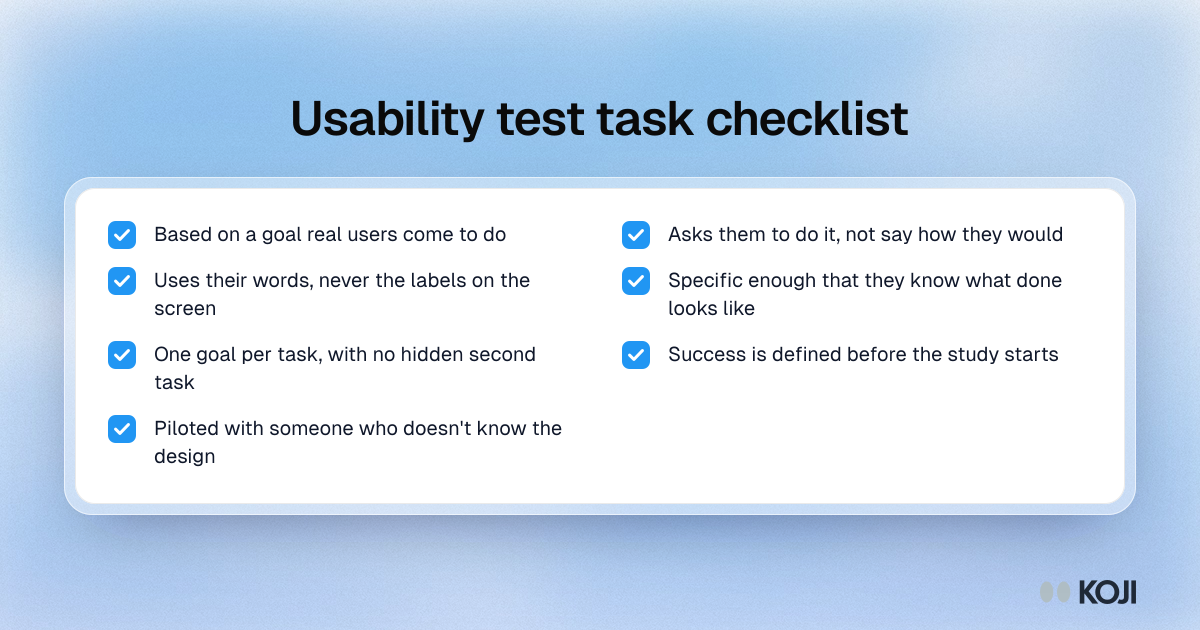
Realistic. Base the task on something real users actually come to do. Steve Krug's method in Rocket Surgery Made Easy starts here: list the most important things people come to your site or product to do, then narrow the list down. If you're unsure what those are, that is a research question in its own right; see top tasks analysis.
Actionable. Ask people to do the thing, not to tell you how they would do it. "Where would you click to change your plan?" invites a guess. "You've decided to move to a cheaper plan. Go ahead and make the change." produces behaviour you can watch.
No clues. Describe the goal in the participant's words, never the interface's. If the button says "Workspace settings", don't write "go to workspace settings". Write "You want your colleague to be able to see your projects."
Specific. Sauro's example: ask for a blender under a set price with high ratings, not "a new kitchen appliance". Vague tasks leave participants unsure what counts as done, so they look to the moderator for help, and the session turns into a conversation about the task instead of an attempt at it.
One goal per task. If a task has an "and" in it, it is probably two tasks. Split them, so a failure on one doesn't hide success on the other.
A clear end state. Decide before the study what success looks like for each task. If you can't say when the participant is done, they can't either.
How to write task scenarios, step by step
1. Start from user goals, not features
List the goals your users have, in their terms. "Send an invoice before the end of the month", "Find out why last week's payment failed", "Share a report with my manager". Leave out features entirely at this stage. A list of features turns into a tour of the product, not a test of it.
2. Pick the goals that matter for this study
You can't test everything. Choose the goals that connect to the decision the team needs to make, plus one or two core goals that should always work. A redesign of the billing page calls for billing tasks, not a general tour.
3. Write the bare task
One sentence, one goal, an action verb, no interface words. "Change the card used to pay for your subscription."
4. Add only the context that changes behaviour
Now build the scenario. Add who the participant is, why they're doing this, and any detail they need to finish: a name, a date, a budget, a file to upload. Sauro's advice is to give enough that people aren't guessing what they're supposed to do, without walking them through every step. If a detail doesn't change what they would do, cut it. Long backstories get skimmed and forgotten.
5. Define success and what you will watch for
Write down the end state that counts as success, and the signals you will note along the way: wrong turns, hesitations, moments where the participant says they're unsure. This is what makes your results comparable across participants. If you're measuring, pair each task with a short rating such as the Single Ease Question; Sauro's data put the average SEQ score at about 5.5 on its 7-point scale.
6. Order the tasks
Start with an easy, low-stakes task so participants settle in. Put tasks that depend on each other in a natural sequence (you can't edit a project you haven't created). Where tasks are independent and you're comparing them, vary the order between participants so fatigue and learning don't always land on the same task.
7. Pilot the tasks
Read them aloud to a colleague who doesn't know the design, then run a full pilot session. You're looking for tasks people misread, tasks that give the answer away, and tasks that take far longer than you planned. Fix them before the first real participant. See pilot studies in user research.

Photo by Content Pixie on Unsplash
Weak tasks and how to fix them
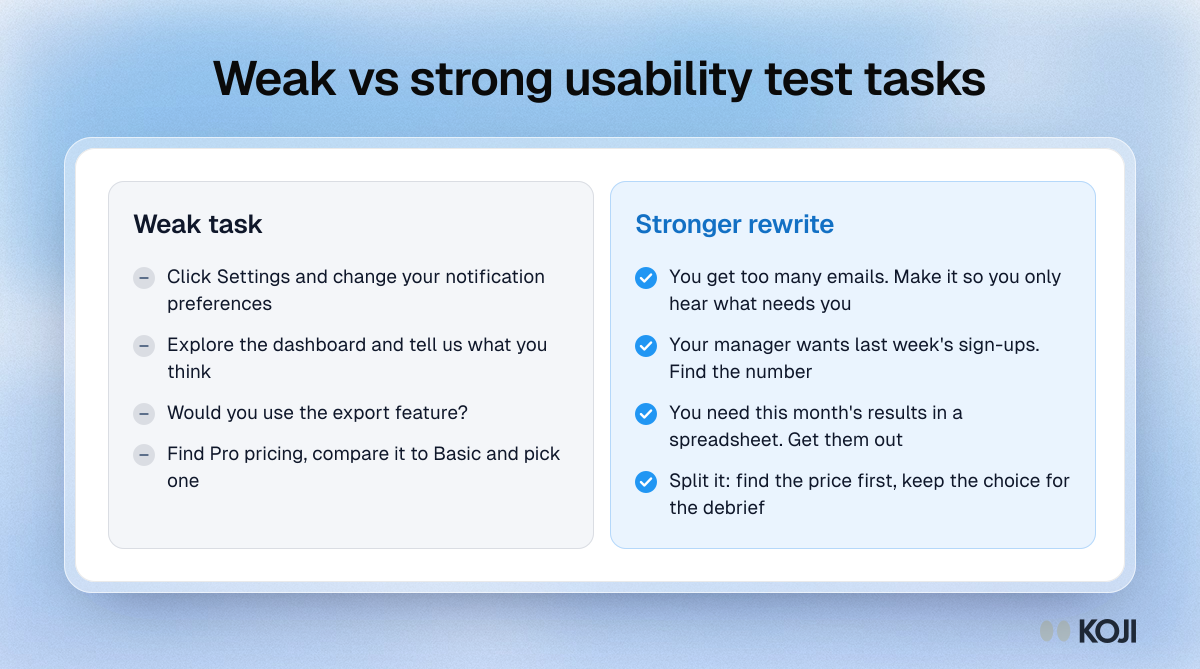
- "Click on Settings and change your notification preferences." This is an instruction, not a task. Rewrite: "You're getting too many emails from the app. Make it so you only hear about things that need your attention."
- "Explore the dashboard and tell us what you think." Not actionable and no end state. Rewrite: "Your manager has asked how many new sign-ups you had last week. Find the number."
- "Would you use the export feature?" A prediction, not a task. Rewrite: "You need this month's results in a spreadsheet for a meeting. Get them out of the product."
- "Find the Pro plan pricing and compare it to Basic and decide which one you'd buy." Three tasks in one. Split it, and keep "decide which one you'd buy" for the debrief.
Specific tasks and exploratory tasks
Most tasks in a usability test should be specific, with a clear goal and end state. They give you comparable results and they're what success rates and time-on-task depend on.
Exploratory tasks have a place too, usually at the start of a session or in early-stage research: "You've heard this tool can help with your team's planning. Take a few minutes to see whether it would." They show you what people look at first and how they form a first impression. Use them sparingly, don't score them as pass or fail, and follow them with specific tasks.
How many tasks, and how many participants
Plan for time, not for a number. A task you expect to take two minutes can take ten when it goes wrong, and those are the sessions you learn most from. Leave room for the introduction, a short warm-up and a debrief at the end, and cut tasks rather than rushing people.
On participants, Jakob Nielsen's 2000 article on testing with five users is still the most cited guidance. Building on his 1993 work with Tom Landauer, he wrote: "After the first study with five participants has found 85% of the usability problems, you will want to fix these problems in a redesign." His advice was to spend a larger budget on several small rounds rather than one big one. That logic only holds when the tasks are good. Five people working through tasks that leak the answer will find very few problems.
Moderated and unmoderated tasks
In a moderated session, you can clarify a task if a participant is genuinely confused (and you should note that you did). In an unmoderated test, nobody can. Sauro's advice is to be more explicit in unmoderated tasks, with clearer end states and any details people need written into the scenario, while still avoiding step-by-step instructions. Have participants confirm when they think they're done, so you capture their own view of success alongside yours. For more, see the usability testing script template.
How Koji helps
Koji is an AI interview platform, not a screen-recording usability tool, so it won't watch someone click through your prototype. It helps with the parts around the test that decide whether your tasks are any good.
Find the real tasks first. Krug's method starts with what people actually come to do. A short Koji study, run by voice or text, asks participants about the last time they used your product or a competitor's and what they were trying to get done. The AI interviewer follows up on each answer, up to the depth you set per question, and the report groups the goals people mention into themes with the supporting quotes. That list is the raw material for realistic tasks.
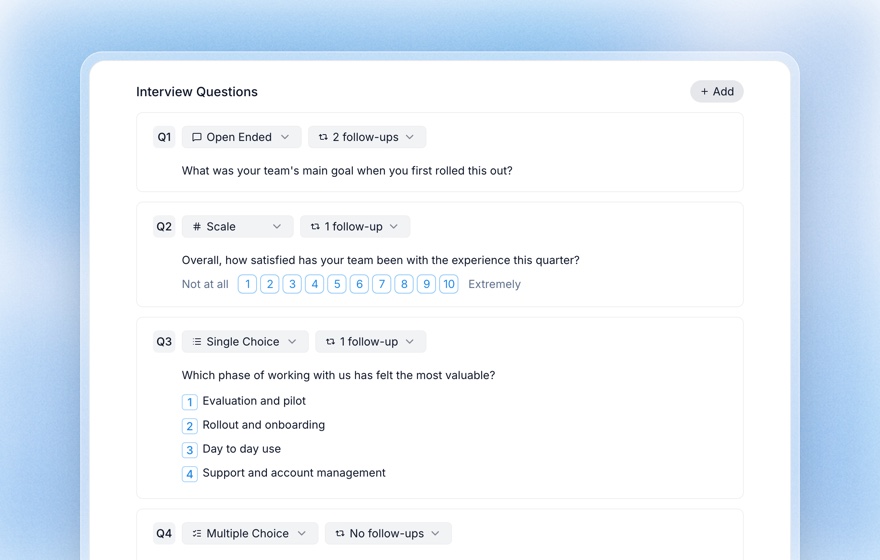
Debrief after the session. Send each participant a short Koji interview after their test to ask what they expected, where they hesitated and how hard each task felt. Structured questions let you add a rating with the range you choose, such as a 1 to 7 ease scale, and the AI asks a follow-up about the score.
Recruit and screen the right people. Screening questions run before every interview, whatever route the participant came in by, so only people who match your criteria take part.
Try it yourself first. The Preview tab lets you take your own debrief interview by voice or text before anyone else sees it. Previews are free and never count as responses.
Related Resources
- Usability testing script template
- Usability testing questions
- Top tasks analysis
- Single Ease Question (SEQ)
- Think-aloud protocol
- Structured questions guide
Sources
- Krug, S. (2010). Rocket Surgery Made Easy: The Do-It-Yourself Guide to Finding and Fixing Usability Problems. New Riders.
- McCloskey, M. (2014). Turn user goals into task scenarios for usability testing. Nielsen Norman Group.
- Nielsen, J. (2000). Why you only need to test with 5 users. Nielsen Norman Group.
- Nielsen, J., & Landauer, T. K. (1993). A mathematical model of the finding of usability problems. Proceedings of INTERCHI '93, 206–213.
- Sauro, J. What is a good task-completion rate? MeasuringU.
- Sauro, J. Seven tips for writing usability task scenarios. MeasuringU.
- Sauro, J. 10 things to know about the Single Ease Question (SEQ). MeasuringU.
- Spool, J. (2012). Guess what?!? Task design is critically important. UIE Brain Sparks.
Related Articles
Single Ease Question (SEQ): The 7-Point UX Metric for Task-Level Usability (2026)
The complete 2026 guide to the Single Ease Question (SEQ): the verbatim 7-point scale wording, Sauro–MeasuringU benchmarks (5.3–5.5 average), correlation with task completion, when to use SEQ vs SUS, and how to bundle SEQ into AI-moderated interviews on Koji to get task-level usability scores in days.
Structured Questions in AI Interviews
Mix quantitative data collection — scales, ratings, multiple choice, ranking — with AI-powered conversational follow-up in a single interview.
Think-Aloud Protocol: How to Run and Analyze Think-Aloud Sessions
A complete guide to the think-aloud protocol — the most widely used usability testing method. Learn how to set up sessions, moderate effectively, analyze verbal data, and run remote think-aloud studies.
Top Tasks Analysis: How to Identify the Few Tasks That Matter Most
A complete guide to top tasks analysis — Gerry McGovern's methodology for finding the small set of tasks customers actually use your product or website to accomplish. Includes how to run a top tasks survey, calculate the long-tail, and validate the findings with AI customer interviews.
Usability Testing Questions: What to Ask Before, During, and After a Test
A complete bank of usability testing questions for the pre-test, in-task, and post-test phases, including screening, think-aloud probes, and standardized post-test metrics like SUS and SEQ.
Usability Testing Script Template: A Free, Ready-to-Use Script for Moderated & Unmoderated Tests (2026)
A complete copy-paste usability testing script - intro, warm-up, tasks, post-task questions, and wrap-up - plus how to run it unmoderated at scale with an AI moderator.