How to Observe User Research Sessions: Rules for Observers and Note-Takers
Getting the team to watch users is one of the best things research can do, and the easiest to spoil. Roles, ground rules for observers, remote observation and how to debrief.
Observing a user research session means watching a usability test or interview live, without taking part in it, so the team sees users struggle and decide with their own eyes. It's one of the most effective things a team can do with research, and also the easiest to get wrong. Done well, observers stay silent and invisible to the participant, write down what they see rather than what they think, pass questions to the moderator instead of asking them, and meet straight after the session to compare notes. Done badly, they laugh, whisper, interrupt, or leave with a single vivid anecdote they treat as the finding.
This guide covers why observation matters, the roles in a session, the ground rules to give observers, how to run remote observation, and how to turn what observers saw into decisions.
Why getting the team to watch matters
The strongest argument for observation comes from Jared Spool's research at UIE. In a 2011 article on what he called "exposure hours", Spool reported that teams where each member spent at least two hours every six weeks watching real users saw far greater improvements to their designs than teams that fell short of that. Teams that watched more often did better still. Spool presented it as a correlation, and a striking one: the gain appeared when the whole team watched, not when only the researchers did.
The UK Government Digital Service took up the same rule in 2014, recommending that everyone in a product team observe user research for at least two hours every six weeks.
The reason is simple. A report tells people what happened. Watching someone fail at a task you built makes the problem real in a way a slide never does, and it settles arguments that would otherwise go round in circles. Steve Krug built his whole low-cost testing method in Rocket Surgery Made Easy around this: test with three participants one morning a month, get as many people as possible to watch, then debrief over lunch.
The roles in a session
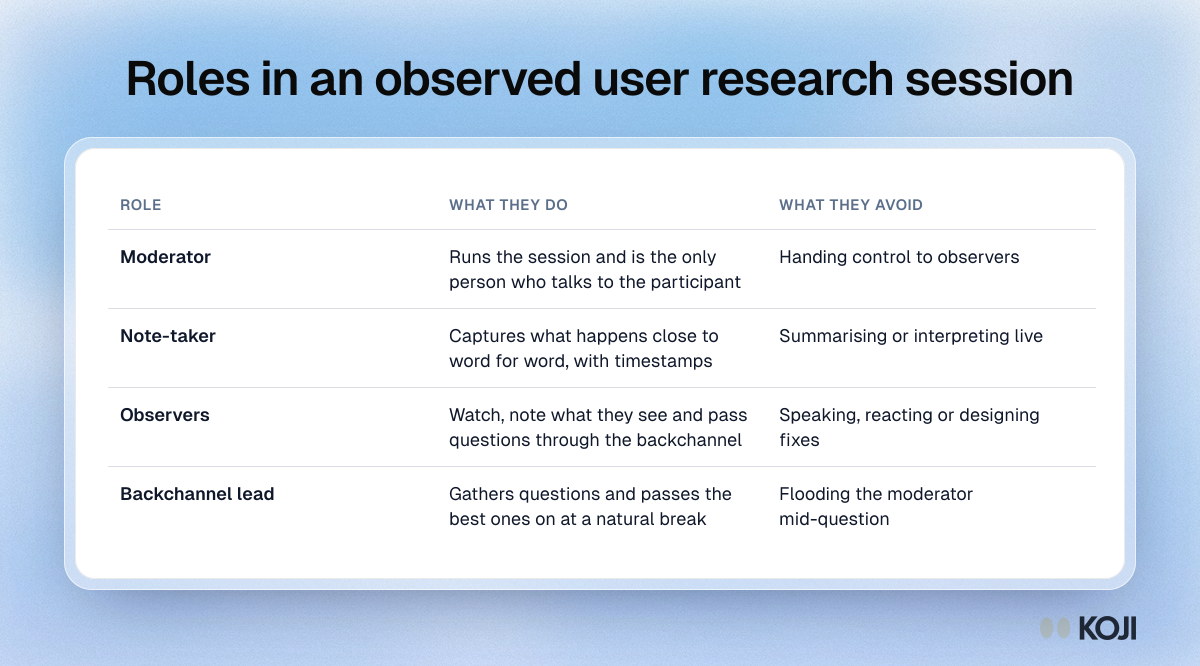
Moderator. Runs the session, talks to the participant and is the only person who does. Decides whether to follow up on observers' questions.
Note-taker. Captures what happens as close to verbatim as possible, with timestamps, so the moderator can concentrate on the participant. One dedicated note-taker per session is the minimum; see note-taking in user research.
Observers. Watch, note what they see and pass questions through the agreed channel. They don't speak to the participant or the moderator during the session.
Backchannel lead (optional). In larger sessions, one person gathers observers' questions and passes the best ones to the moderator at a natural break. This keeps the moderator from being flooded with messages.
Ground rules to give observers
Brief observers before every round, ideally in writing. Krug publishes a one-page handout for exactly this. Among its instructions: "During the break between sessions, use the attached sheet to jot down the three most serious usability problems you noticed in that session." He also asks observers to stay as long as they can, leave quietly if they must, take calls and side conversations outside, and write their questions down rather than ask them.
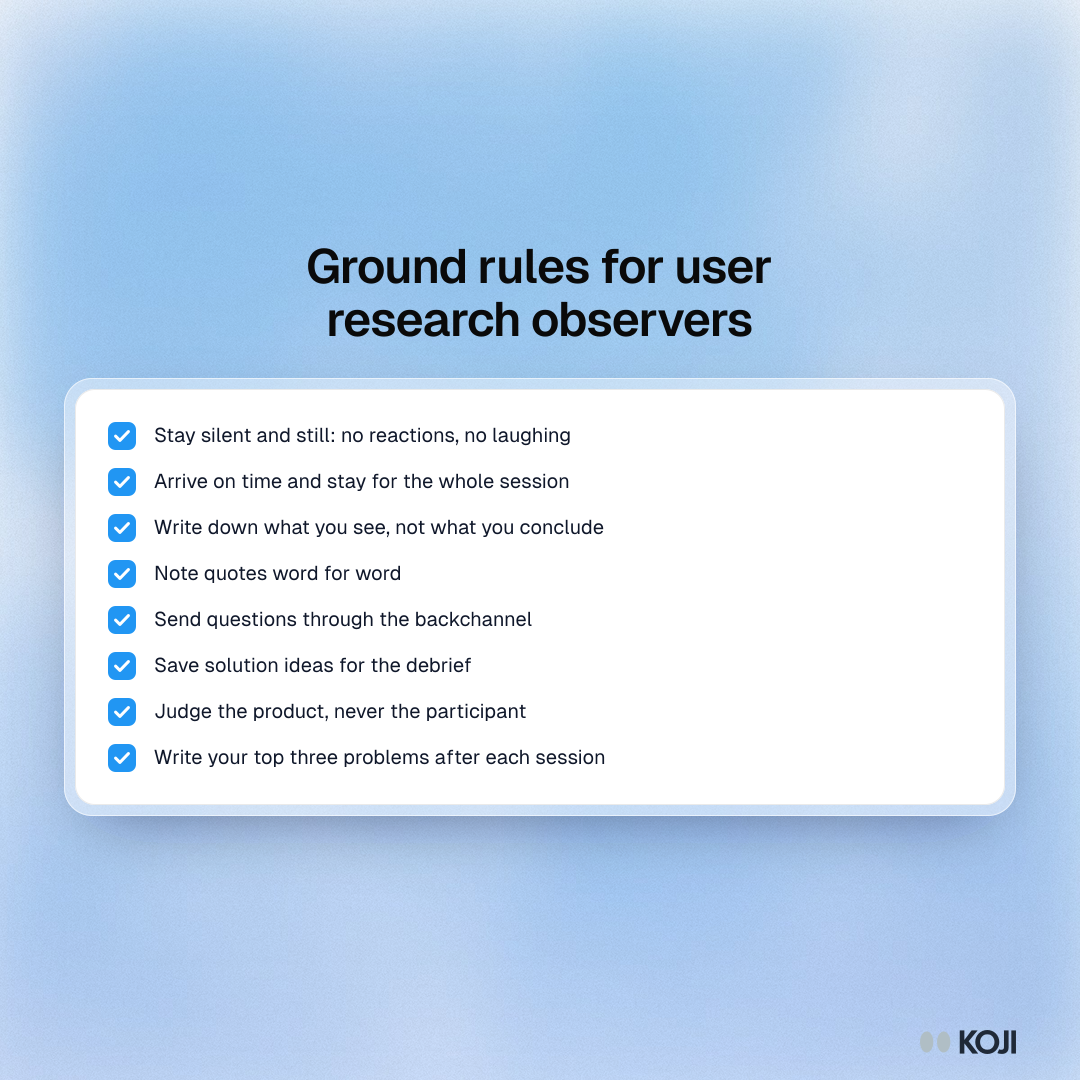
A fuller set of rules that works for most teams:
- Stay silent and still. No reactions, no laughing, no sighs. In a shared room, participants notice, and they change what they do.
- Arrive on time and stay for the whole session if you can. Coming and going is distracting, and the ending is often where the explanation comes.
- Write down what you see, not what you conclude. "Scrolled past the Save button twice" is useful. "The navigation is broken" is a guess.
- Note quotes word for word. A participant's exact phrase is evidence; your paraphrase is an interpretation.
- Send questions through the backchannel. Never directly to the participant, and never in a way that interrupts the moderator mid-question.
- Don't design solutions during the session. You'll stop watching. Save ideas for the debrief.
- Don't judge the participant. The test is of the product, not the person. If they struggle, that's the finding.
- Write down your top three problems after each session. Before you talk to anyone else, so the group's view doesn't overwrite yours.
Protect the participant
Observers change the situation, and the participant has a right to know about them. The Nielsen Norman Group's advice is to be honest: tell participants at the start that colleagues are watching and that the session is recorded, even if the recruitment emails already said so, and remind them they can stop at any time. Never tell a participant that nobody is watching when someone is.
NN/g also gives the moderator authority over observers: "When observers make unethical requests or act in ways that violate proper usability practices, researchers should act to protect the participant." That covers requests to push a participant who is upset, to ask for personal information, or to keep going after they've asked to stop. Agree before the session that the moderator has the final word.
Be realistic about how much observation itself changes behaviour. The famous Hawthorne studies are often cited as proof that being watched transforms results, but when Steven Levitt and John List (2011) reanalysed the original illumination data, they found that the most famous patterns were not supported by it, though they did find more subtle signs of an effect. The lesson for practitioners is moderate: observation can shift behaviour, so keep observers out of sight where you can, and don't treat a nervous first five minutes as typical. See the Hawthorne effect.
Observers bring expectations too
Observers aren't neutral. People see what they expect to see, especially when they built the thing being tested. Robert Rosenthal and Donald Rubin's 1978 review of 345 studies on interpersonal expectancy effects is the classic summary of how an observer's expectations shape what they record and how others behave. In a research session this shows up as the engineer who notices every moment the participant succeeds with their feature, and misses the five minutes of confusion before it.
Three habits reduce it. Ask observers to write observations, not conclusions. Have each person record their top problems independently before the group talks. And look for patterns across sessions rather than acting on a single dramatic moment. More on this in observer bias.
Observing remotely
Most sessions are now remote, which makes observation easier to scale and easier to spoil.
- Keep observers hidden. Cameras off and microphones muted, or better, watching through a separate stream so the participant sees only the moderator.
- Use a separate channel for questions. NN/g suggests a messaging tool such as Slack so observers can talk among themselves and with the facilitator without disturbing the session.
- Tell the participant how many people are watching. Being watched by a row of black squares is less comfortable than being told "two colleagues are listening in".
- Give observers a shared notes space. One document or spreadsheet per study, so notes are in one place when the debrief starts.
Debrief straight after
The debrief is where observation pays off. Hold it right after the last session of the day, while memories are fresh, and keep it short.

Photo by Brands&People on Unsplash
- Everyone reads out their top three problems from each session.
- Group the problems that came up more than once and agree how serious each one is.
- Pick the few that matter most to fix next. Krug's rule is to focus ruthlessly on the most serious problems rather than the long list.
- Record what you agreed and who owns each fix.
A rainbow spreadsheet, Tomer Sharon's method of logging observations in one shared sheet with a colour per participant, works well here: observers fill it in during sessions and the patterns are visible before the debrief begins. For more on running the meeting, see the research debrief guide.
How Koji helps
Koji runs AI-moderated interviews by voice, text or phone. Participants take them in their own time, so there is no live session to sit in on, and no observers in the room to change the conversation. Observation moves from the session to the evidence.
Every transcript is open to the team. Members of a study's workspace can read each interview's full transcript and its individual analysis: key findings, pain points, sentiment and a quality rating. The exposure Spool describes came from watching, and reading isn't the same thing. Still, asking each person on the team to read a few full transcripts every week puts them in direct contact with what customers actually say.
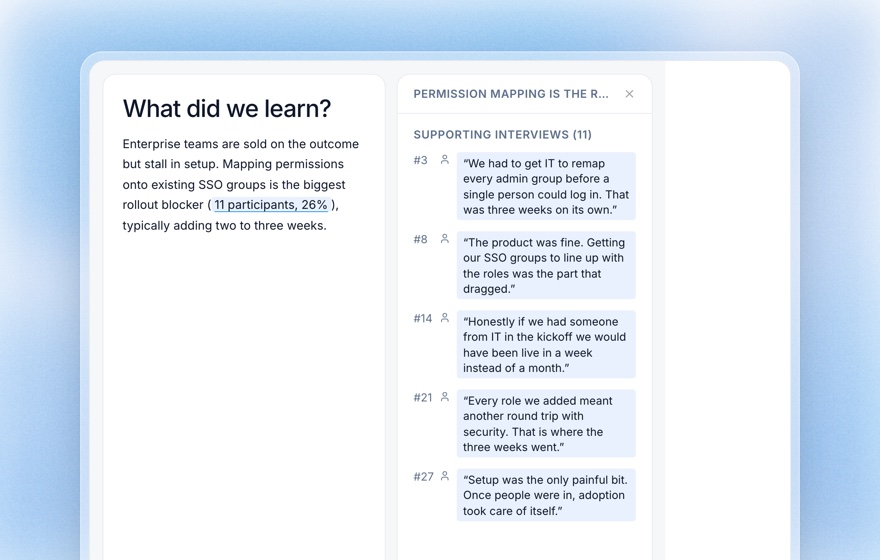
Findings link back to quotes. Koji's report groups what participants said into themes across all interviews, and each finding links to the supporting responses. That's the same discipline the debrief asks of observers: a claim, and the evidence behind it.
Share with the people who should be watching. Studies can be shared with specific teams in the workspace, and reports can be published as a public page for stakeholders who don't use Koji.
Run it yourself first. The Preview tab lets anyone on the team take the interview exactly as a participant would, by voice or text, without using credits. It's a quick way for a stakeholder to experience the study before reading the results.
Related Resources
- Note-taking in user research
- Observer bias
- The Hawthorne effect
- Rainbow spreadsheet
- Research debrief guide
- Structured questions guide
Sources
- Government Digital Service (2014). Have you had your recommended dose of research? GOV.UK User Research blog.
- Krug, S. (2010). Rocket Surgery Made Easy. New Riders. Including the handout "Instructions for usability test observers".
- Levitt, S. D., & List, J. A. (2011). Was there really a Hawthorne effect at the Hawthorne plant? An analysis of the original illumination experiments. American Economic Journal: Applied Economics, 3(1), 224–238.
- Nielsen Norman Group (2016). Team members behaving badly during usability tests.
- Rosenthal, R., & Rubin, D. B. (1978). Interpersonal expectancy effects: The first 345 studies. Behavioral and Brain Sciences, 1(3), 377–415.
- Sharon, T. (2013). The rainbow spreadsheet: A collaborative lean UX research tool. Smashing Magazine.
- Spool, J. (2011). Fast path to a great UX: Increased exposure hours. UIE.
Related Articles
The Hawthorne Effect: How Being Observed Changes Research Results
The Hawthorne effect is when people change their behavior simply because they know they are being watched. Learn where it came from, how it quietly distorts usability tests and interviews, and the proven ways to design research that captures real behavior.
Note-Taking in User Research: How to Capture Insights Without Missing the Interview
A complete guide to note-taking methods for UX researchers — from verbatim transcription to structured templates — and how AI-moderated interviews like Koji eliminate the cognitive tradeoff between listening and writing entirely.
Observer Bias in Research: How the Researcher's Expectations Skew What They See
Observer bias is when a researcher's expectations unconsciously shape what they record and how they interpret it. Learn how it works, the evidence behind it, and how to design it out — including with a neutral AI moderator.
The Rainbow Spreadsheet: A Fast Way to Synthesise Usability Sessions as a Team
A rainbow spreadsheet lets a team colour-code what each participant does during usability sessions, so the most common issues are visible by the last session. How to set it up and run it.
Research Debrief: How to Synthesize and Share Findings After Every Study
A complete guide to running research debriefs — turning raw interview data into stakeholder-ready insights. Includes a debrief template, synthesis techniques, and how Koji automates the hardest parts.
Structured Questions in AI Interviews
Mix quantitative data collection — scales, ratings, multiple choice, ranking — with AI-powered conversational follow-up in a single interview.