You have a landing page, or a draft of one, and you are about to pay for traffic or post it where people will see it once. The short answer: before you launch, show the page to about 15 people in your target group for five seconds each, then ask what they remember and who they think it is for. By the end of this guide you can run that test this week, read the answers against clear rules and decide whether to change the page, the audience or the idea.
When you need this
You are at the stage where the idea is clear enough to put on a page, and nobody has told you if the page says what you think it says. The signs are familiar: you have been staring at the headline for two weeks, your co-founder and three friends said "looks great", and you have no way to tell if that means anything.
Guessing is expensive for a specific reason. Unbounce's benchmark of more than 41,000 landing pages puts the median SaaS page at a 3.8% conversion rate, against 6.6% across all industries [1]. At 3.8%, 1,000 paid visitors give you about 38 sign-ups if the page is average. If the page is unclear, you find out after you have paid for the thousand visitors, and you still do not know why it failed.
A five-second test gives you the "why" before the traffic. It is also the cheapest honest check on whether your positioning has landed. You will not learn if people will pay (more on that below), but you will learn if they understand.
The method in brief
The method has two parts. Show the page for a short, fixed time. Then ask open questions about what the person saw. Koji's reference guide to the 5-second test covers the method itself, and the landing page testing guide covers the longer version for a live page. This playbook is the founder's decision version: who to show, how many, what to ask and how to decide.
Why five seconds? Research on first impressions shows that people form a view of a page very fast. Lindgaard and colleagues found that visual appeal ratings after 50 milliseconds correlated strongly with ratings after 500 milliseconds [2]. That is about looks, not about whether the message was clear, so do not read it as proof that five seconds is a magic number. It does tell you that the first look counts for a lot, and that what you want to measure (what stuck) can be measured after a short view.
Attention also falls fast down the page. Nielsen Norman Group's 2018 eye-tracking study found that people spent about 57% of their viewing time above the fold and 74% in the first two screenfuls [3]. The top of your page does most of the work. That is where this test points.
A five-second test is one tool among several. Here is where it sits relative to the others you might reach for.
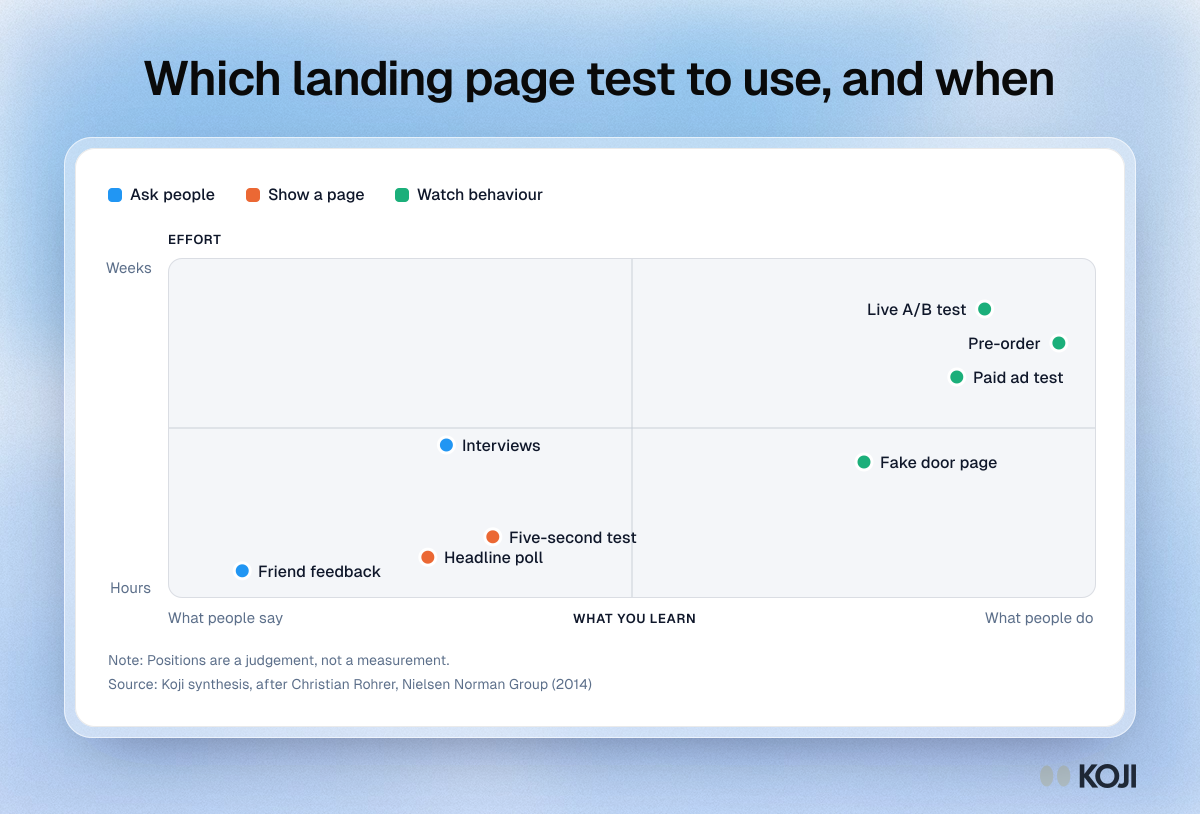
Read the map left to right. The further right, the more it shows what people actually do, and the more time and money it takes. A five-second test sits on the left and in the cheap corner. That is the point: use it first, to check the page is understood, then use a method on the right to check the idea is wanted. If you skip the left side, a fake door test that fails tells you almost nothing, because you cannot tell a bad idea from a confusing page. For the wider picture, see concept testing and how founders validate product ideas.
Step by step
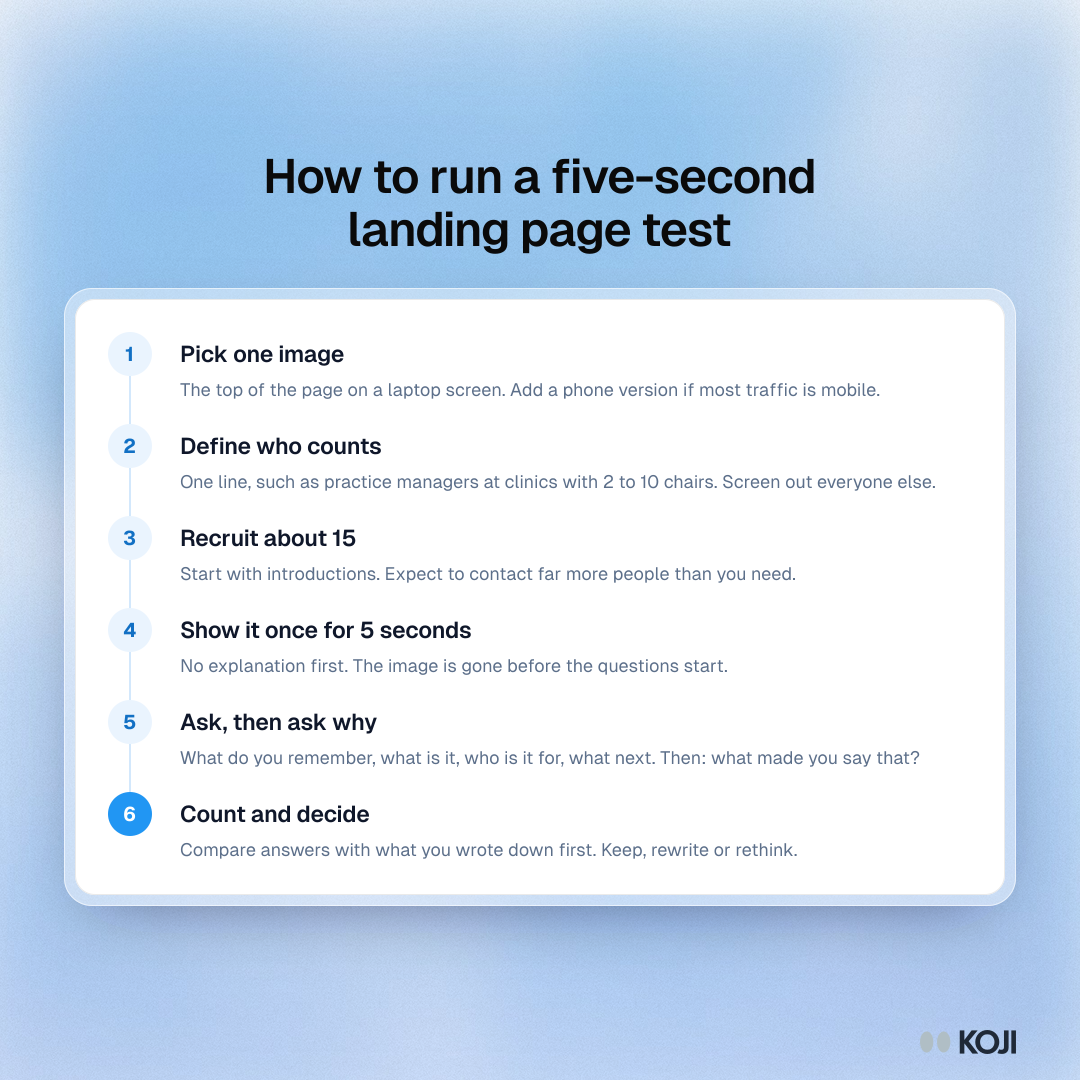
Here is the whole run on one page. The steps below explain each one.
1. Pick one page and one question
Test one image at a time: the top of the page as it appears on a laptop screen, plus a separate image for a phone if most of your traffic will be mobile. The question you are answering is narrow: do the right people understand what this is, who it is for and what to do next?
Write down the answer you hope for before you run anything. If you want people to say "it books appointments for dental practices" and you do not write that down, you will hear "scheduling software" and call it a pass.
2. Decide who counts
Test people who match your target customer, not whoever is quickest to reach. Five seconds from your sister tells you about your sister. Write a one-line definition (for example, "practice managers at dental clinics with 2 to 10 chairs") and use a screening question to keep out everyone else.
3. Recruit about 15
Practitioner guides for five-second tests settle on about 15 to 20 people for directional results [4][5]. There is no peer-reviewed minimum for this method, so treat 15 as a working number. It is also in line with the research on qualitative saturation, where themes in interviews tend to stabilise between 9 and 17 interviews [6]. When the same misreading shows up in 5 of 15 sessions, you do not need 50 to know it is real.
Getting 15 completed sessions takes more than 15 messages. Pin's 2026 benchmark of more than 4 million outreach messages found a 4.96% average reply rate for cold email and 17.08% for LinkedIn messages [7]. That dataset is recruiters writing to job candidates, so it is only a rough guide, but the arithmetic is sobering: 15 replies at 17% is about 90 LinkedIn messages, and at 5% it is about 300 emails. And a reply is not a finished session. Start with the people you can reach through introductions, and read how to find 20 people to interview when you have no audience for the 14-day plan.
4. Show the page, then ask
Show the image once, for five seconds, with no explanation. Then ask the questions below, in this order. The order matters: asking "who is this for?" before "what do you remember?" lets people answer from the wording of your question instead of from the page.
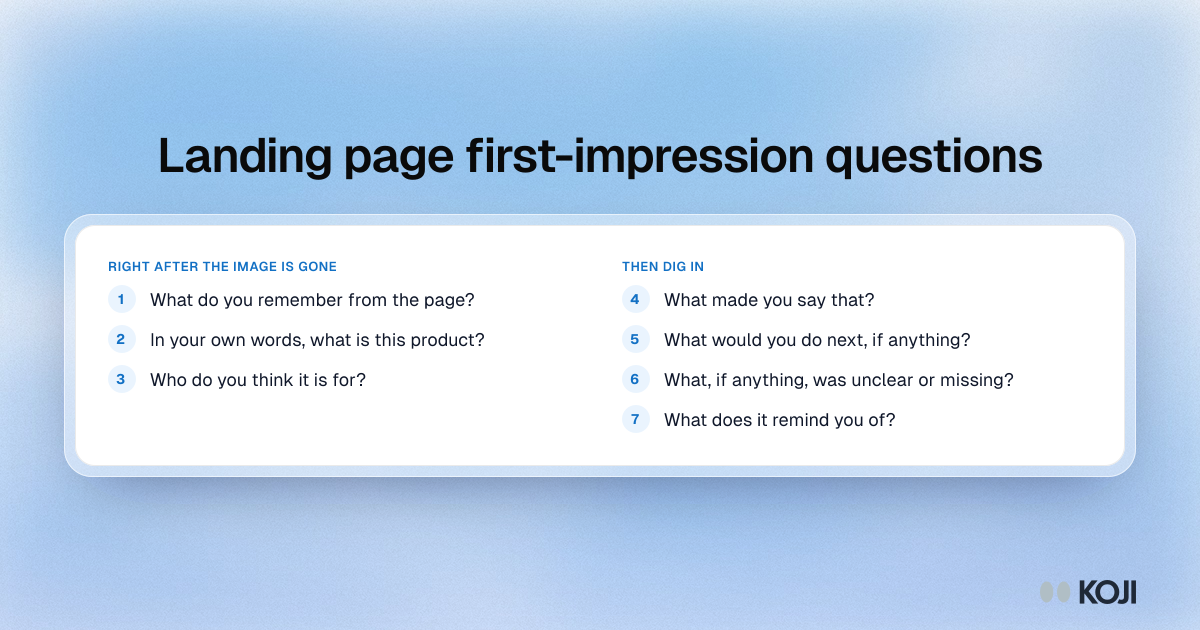
Follow up on every answer with "what made you say that?" The reasons are the useful part. "It looks like a CRM" is a finding; "I did not like it" is not.
5. Run it in a day or two
Collect all 15 in a window of two or three days so you can read them together and then change the page once.
A worked example
Say you are a two-person team building appointment software for dental clinics. Your headline reads "Smarter scheduling for modern practices", with a screenshot of a calendar below it.
You show the top of the page for five seconds to 15 practice managers. These are illustrative results, the kind of spread you might see:
- 6 say "scheduling software" and can say it is for clinics.
- 4 say "a calendar app" and cannot say who it is for.
- 3 say something about an AI receptionist, which is not what you build.
- 2 remember only the picture.
On "what would you do next?", 5 of 15 would click the button, and 6 say they would "look for pricing". Their reasons help most: three say "modern practices" sounds like a design studio, and two say the calendar looks like something their practice already has.
The decision: only 6 of 15 got the product and the audience right. You do not change the product or the price. You change the headline to name the audience and the job, "Fewer no-shows for dental clinics", add the clinic type in the first line under it, and run the test again with 15 new people. This is a two-day fix, found before you spent anything on ads.
Reading the results and deciding
Count the answers against what you wrote down in step 1. These thresholds are rules of thumb from practice, not research findings, so adjust them to your own risk:
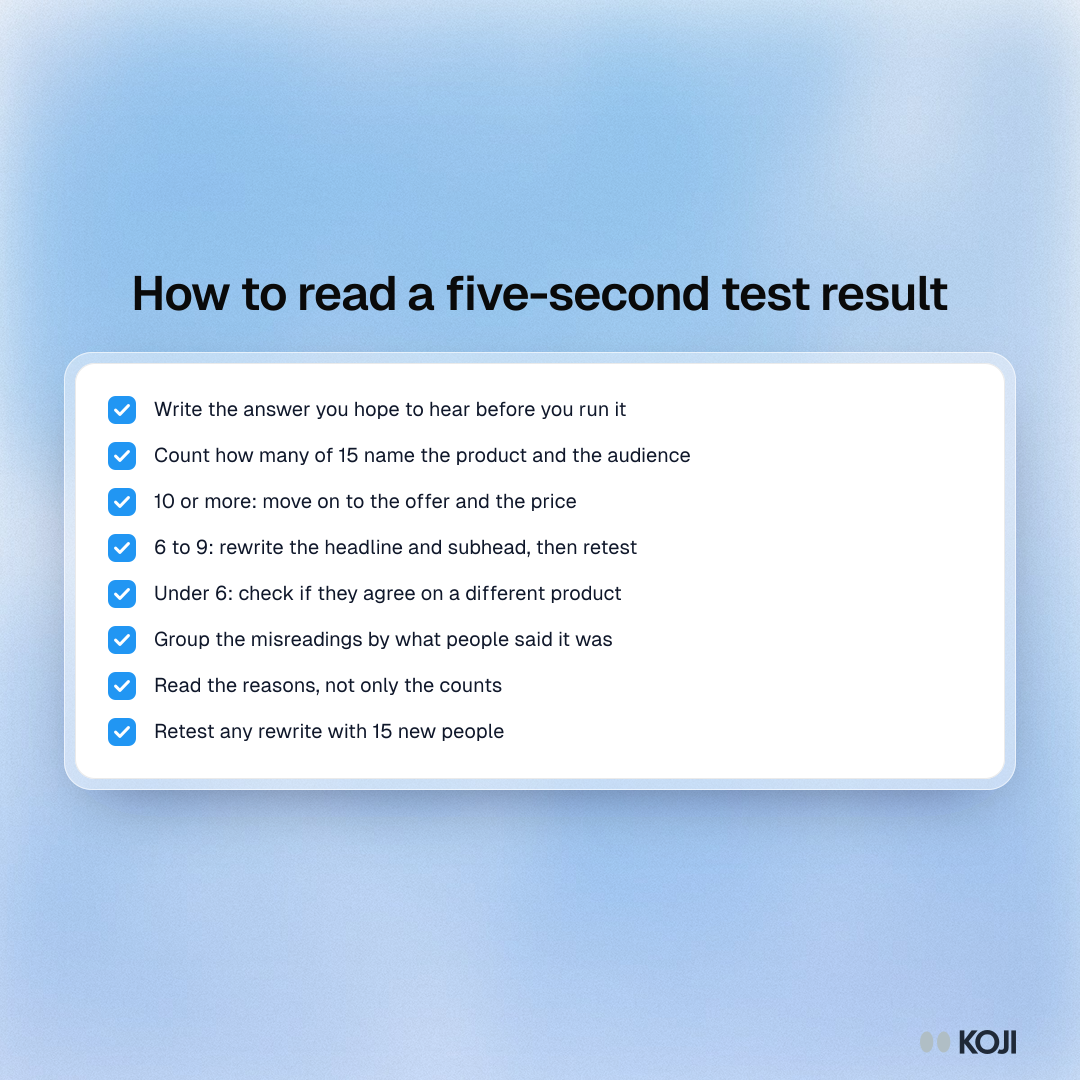
- 10 or more of 15 describe the product and the audience correctly. The page works for the top fold. Move on to testing the offer or the price.
- 6 to 9 of 15. The message is half there. Rewrite the headline and subhead, and test again with new people. Do not tweak the design yet.
- Fewer than 6. Look at what they said it was. If they agree with each other about something other than your product, you may have a positioning problem: the audience sees a different job to be done. If they all disagree, the page is unclear. Both mean "stop and rewrite", but they lead to different rewrites.
- People understand it but would not act. That is a different problem. It is about the offer, not clarity. Test the price next (see price your first product with 30 customer conversations).
A related warning from a 2026 five-second study of 500 US participants, reported by a startup blog, is that roughly one in three visitors could not say who a business was for after five seconds, and audience clarity was the weakest of the scores [8]. I could only read the study secondhand, so treat it as a pointer rather than a benchmark. It does match what founders see: the product is usually clearer than the audience.
Run it this week with Koji
You can do all of this by hand with a slideshow, a timer and a notebook. It works. The part Koji speeds up is the part that is tedious by hand: showing the image once for a fixed time, asking the follow-ups for you in text or voice, and putting 15 sessions together at the end.
- Describe the study. Tell the research assistant what you want: "test my landing page for dental practice managers with a five-second view". It drafts the brief and the questions, and you can edit any of them.
- Attach your image to the first question. Any question can carry one image (PNG, JPEG or WebP, up to 4 MB). Set it to be visible for 3, 5, 10 or 15 seconds. Add a short description of what the image shows: voice interviews and screen readers use it.
- Let Koji run the sequence. Koji tells the participant it will show an image and ask about it once it is gone. They tap to open it, it shows full screen once for the time you set, and then the question appears. Because Koji knows what the image shows, its follow-ups are about the image. Timed images work in text and voice interviews, not in phone calls.
- Screen who gets in. Add a screening question so only people who match your definition take part.
- Share the link. Send the interview link to the people you recruited, or post it where your customers already are. Preview the whole flow yourself first.
- Read the report. You get the themes, how many people said each, and the quotes behind them, so you can count correct answers and read the reasons. Download the report as an editable slide deck or a PDF to share with a co-founder.
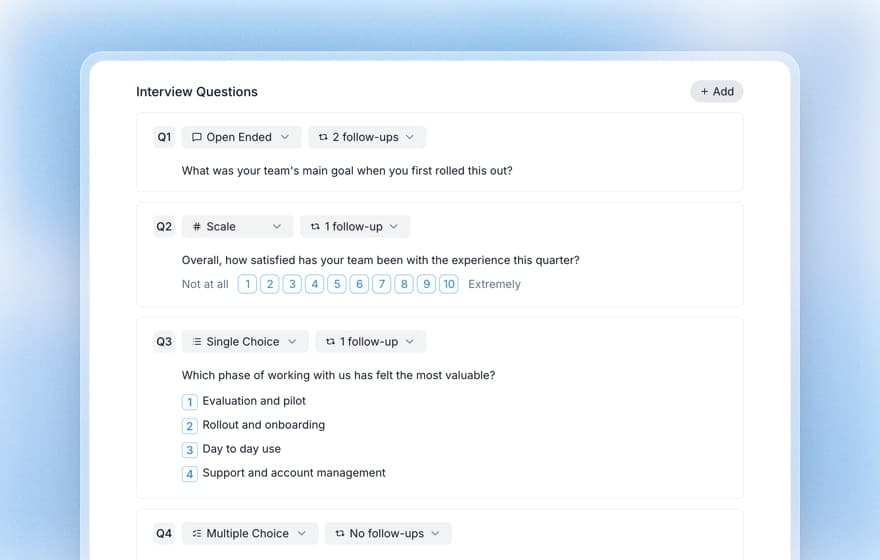
Once the page is understood, you can reuse the same setup for the next question. Show the concept, then add a price test question to find where interest drops as the price rises (it needs about 30 interviews to read well). Treat that as directional and confirm with real money, as the section on where research misleads explains.
Common mistakes
- Asking leading questions. "Do you think this is clear?" invites a yes. Ask "what is this?" instead.
- Testing friends and colleagues. They know too much, and they are kind.
- Changing the page between sessions. You end up with 15 sessions on 5 different pages. Collect all 15, then change.
- Testing the whole page in five seconds. Test the top. Use a longer view or a live session for the rest.
- Reading a pass as demand. A page that is understood can still sell something nobody wants.
- Skipping the second round. After a rewrite, test again with fresh people. The only proof that the new headline is better is a new group understanding it.
When research will mislead you
Five seconds measures understanding and recall, not usability, trust or persuasion. The guides agree on this: the method measures immediate comprehension and recall, not usability, persuasion or conversion [4][5]. People who say they would "probably click" are also telling you about their intent in a hypothetical moment, not their behaviour.
Pair it with a signal that costs the participant something: a waitlist with an email, a pre-order, a deposit, a booked call. Camuffo and colleagues' randomised trials of early-stage firms found that founders who formed a clear hypothesis and then tested it made better decisions than those who did not [9]. A five-second test is the first of those tests. A pre-order is the one that settles the money question.
And keep the test fair to the page. A very busy page might need more than five seconds to read. Try 10 seconds as a second pass if people say they ran out of time.
Where this fits
Before this, you need people to test with: how to find 20 people to interview when you have no audience. After this, you test willingness to pay: price your first product with 30 customer conversations. The whole route, stage by stage, is in the founder's research playbook, and Koji for founders shows how the pieces fit together.
FAQ
How many people do I need for a five-second test?
About 15 who match your target customer is a sensible start. Practitioner guides suggest 15 to 20 for directional results, and 20 or more per version when tests run unmoderated. There is no formal minimum for the method, so use more if your audience is split into groups.
Is five seconds the right time?
It is the usual default, and it fits a first impression. If your page is dense or people say they ran out of time, run a second round at 10 seconds. Koji offers 3, 5, 10 and 15 seconds.
Should I test the whole page or just the top?
Just the top first. That is where most of the attention goes [3], and where your headline, subhead and call to action live. Test lower sections with a longer view or a live walkthrough.
Can I run this without a tool?
Yes. Use a slideshow, a timer on your phone, and a notes page with the questions in order. It takes longer to run and to combine the notes, but the method is the same.
What if people understand the page but do not sign up?
Then clarity is not your problem. Test the offer and the price, and use a signal that costs something, such as a pre-order or a deposit.
Your next step
Write the one-line definition of your target customer, screenshot the top of your page, and send 10 introduction requests today. When the first five say yes, set up the test.
References
- Unbounce, "SaaS Conversion Rate Benchmarks," Unbounce Conversion Benchmark Report (Q4 2024 data; 41,000+ landing pages), 2024. unbounce.com/conversion-benchmark-report/saas-conversion-rate
- Gitte Lindgaard, Gary Fernandes, Cathy Dudek and J. Brown, "Attention web designers: You have 50 milliseconds to make a good first impression!," Behaviour & Information Technology 25, 2006, pp. 115-126. doi.org/10.1080/01449290500330448
- Nielsen Norman Group, "Scrolling and Attention," Nielsen Norman Group, 2018. nngroup.com/articles/scrolling-and-attention
- CleverX, "Five second testing: how to measure first impressions in UX research," CleverX blog, accessed 2026. cleverx.com
- Userlytics, "Five second test," Userlytics research glossary, accessed 2026. userlytics.com
- Monique Hennink and Bonnie Kaiser, "Sample sizes for saturation in qualitative research: A systematic review of empirical tests," Social Science and Medicine 292, 2022. pubmed.ncbi.nlm.nih.gov/34785096
- Pin, "Recruiting Outreach Benchmarks 2026: The Full Data Report," Pin, 2026 (4 million+ messages). pin.com/blog/recruiting-outreach-benchmark-report
- MEAN CEO, "Website First Impression Statistics (2026), Startup Edition," reporting a Revamp five-second study of 500 US participants, June to July 2026. blog.mean.ceo
- Arnaldo Camuffo, Alessandro Cordova, Alfonso Gambardella and Chiara Spina, "A scientific approach to entrepreneurial decision-making: Large-scale replication and extension," Strategic Management Journal 45(6), 2024, pp. 1209-1237. repositorio.ie.edu
Further reading
- The 5-second test guide: the method on its own, with scoring ideas for visual hierarchy.
- Landing page testing guide: what to do when a live page gets traffic but does not convert.
- The Mom Test guide: how to ask about behaviour so you hear facts, not compliments.
- Concept testing methodology: the wider family of methods this test belongs to.