A usability test debrief is the short interview straight after each task, where you find out why someone failed, hesitated or took the long way round. Run with an AI moderator that hands over the task, stays quiet while people work and asks what happened the moment they finish, the debrief stops being the part you rush at the end of a session and becomes part of every task, for every participant. By the end of this playbook you'll have a debrief method you can run this week, a rule for when a "success" isn't one, a copy-ready guide and the exact setup in Koji.
Say you're the only researcher on a product team. Design wants results on the new invite flow by Friday's review. Last month's unmoderated test gave you a 60% completion rate and a folder of recordings nobody had time to watch, so the team argued about the cause and shipped a guess. This time you want the number and the reason, from the same people, in the same week.
Why the usability test debrief matters now
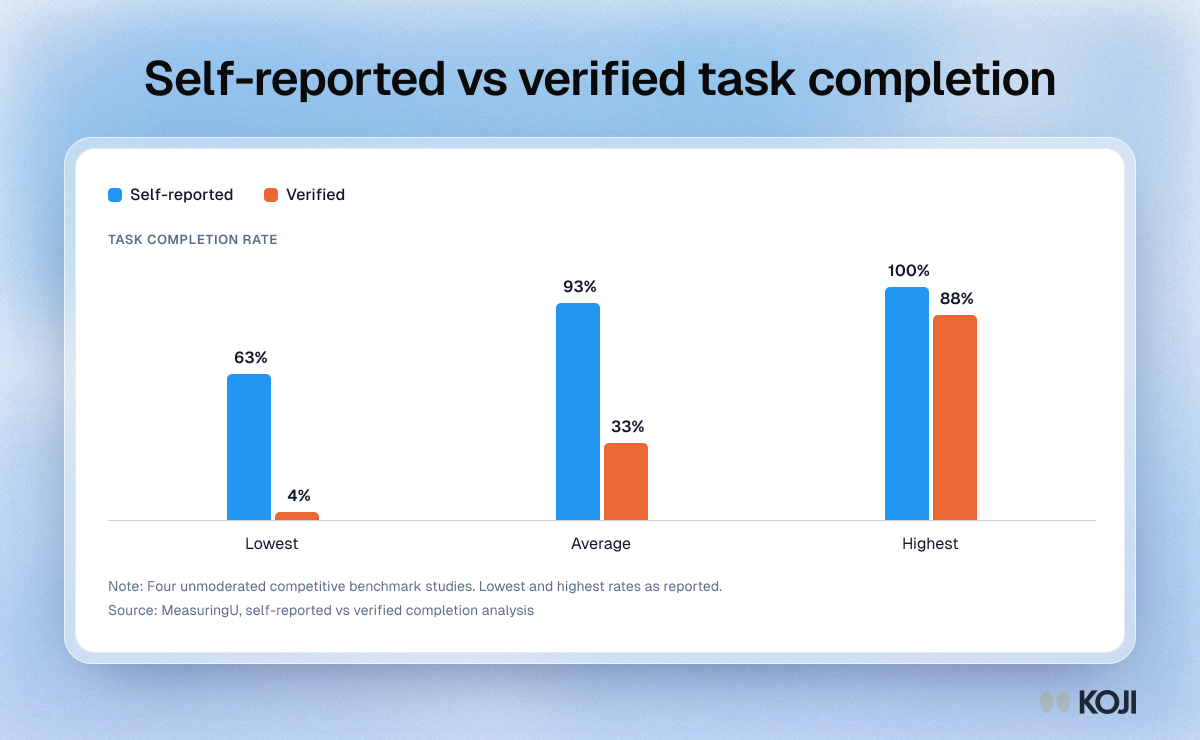
The first reason is that participants are poor judges of their own success. MeasuringU looked at four unmoderated competitive benchmark studies and found self-reported task completion averaged 93%, while verified completion averaged 33% (MeasuringU). Self-reported rates ranged from 63% to 100%, verified rates from 4% to 88%. People press "done" when they think they've finished, and in an unmoderated test with no follow-up, that button is all you have.
It gets worse when people feel sure. In a MeasuringU analysis of 174 tasks, 1,200 users and 14 websites and products, about 13% of task experiences were what Jeff Sauro calls disasters: the participant failed and said they were extremely confident they had succeeded (MeasuringU, Measuring User Interface Disasters). Across 19,576 task observations in another analysis, 14% of people who failed a task still gave it the top satisfaction score (MeasuringU). A post-task rating on its own will not catch them.
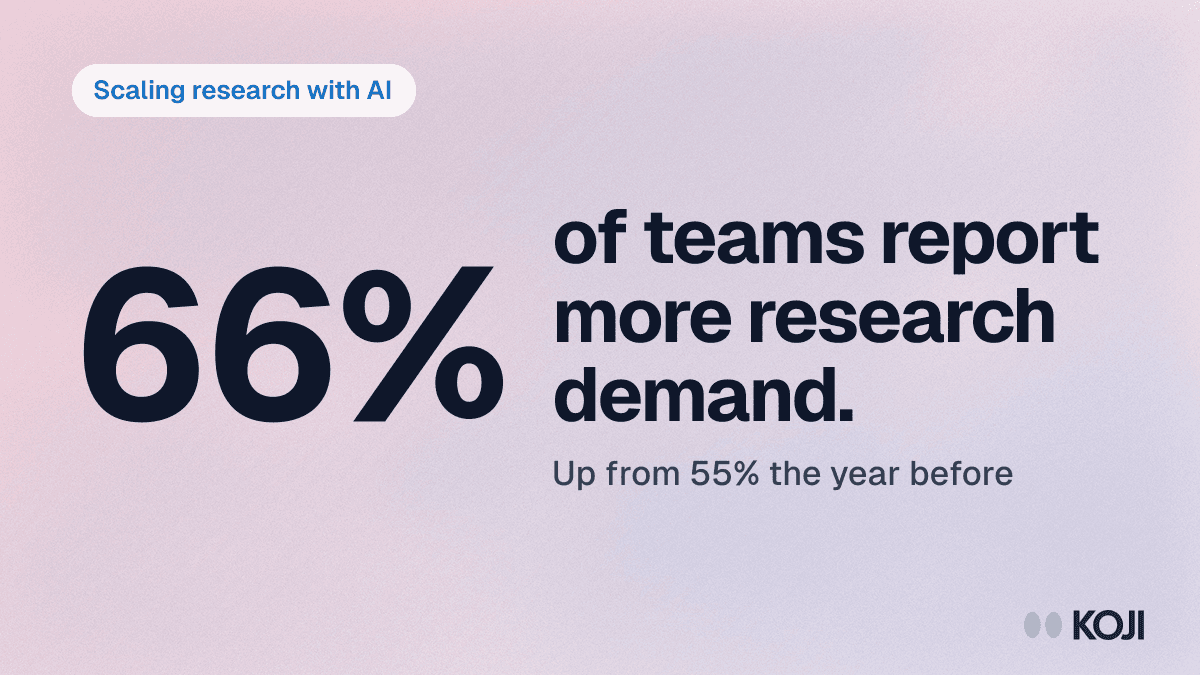
The second reason is load. In Maze's Future of User Research Report 2026, a survey of nearly 500 researchers, designers and product professionals, 66% said demand for research had grown in the past 12 months, up from about 55% a year earlier, and 69% now use AI in at least some studies (Maze, 2026). Evaluative work is where that demand piles up, because every sprint ships something testable. When you're stretched, the debrief is what gets cut.
And there's now real evidence on AI moderation of usability tests. At CHI 2026, Zhu and colleagues compared an AI audio moderator with a human moderator in think-aloud usability testing in a randomized controlled trial with 60 participants (PolyU research record). The question has moved from "can it be done" to "how do you run it well".
For context on what a normal result looks like: across 1,189 tasks from 115 usability tests, MeasuringU found an average completion rate of 78% (MeasuringU), and the average Single Ease Question score sits around 5.5 out of 7 (MeasuringU, Evolution of the SEQ). If your flow lands well below either, you have a problem. The debrief tells you which one.
Skip it, and you report a completion rate people will argue about, fix the symptom someone guessed at, and run the same test again next quarter.
What good looks like
Here is how researchers who do this well run it. We call it the Pressed, Saw, Said check: for every task, compare what the participant pressed, what the recording shows and what they told you.

Photo by Vitaly Gariev on Unsplash
Debrief every task, not the session. A debrief at the end of a 40-minute session gets a blur. Ask about each task straight after it, while they still remember where they looked first.
Ask about expectations before reactions. "What did you expect to happen when you clicked Share?" reveals the mental model. "How did that feel?" mostly gets politeness.
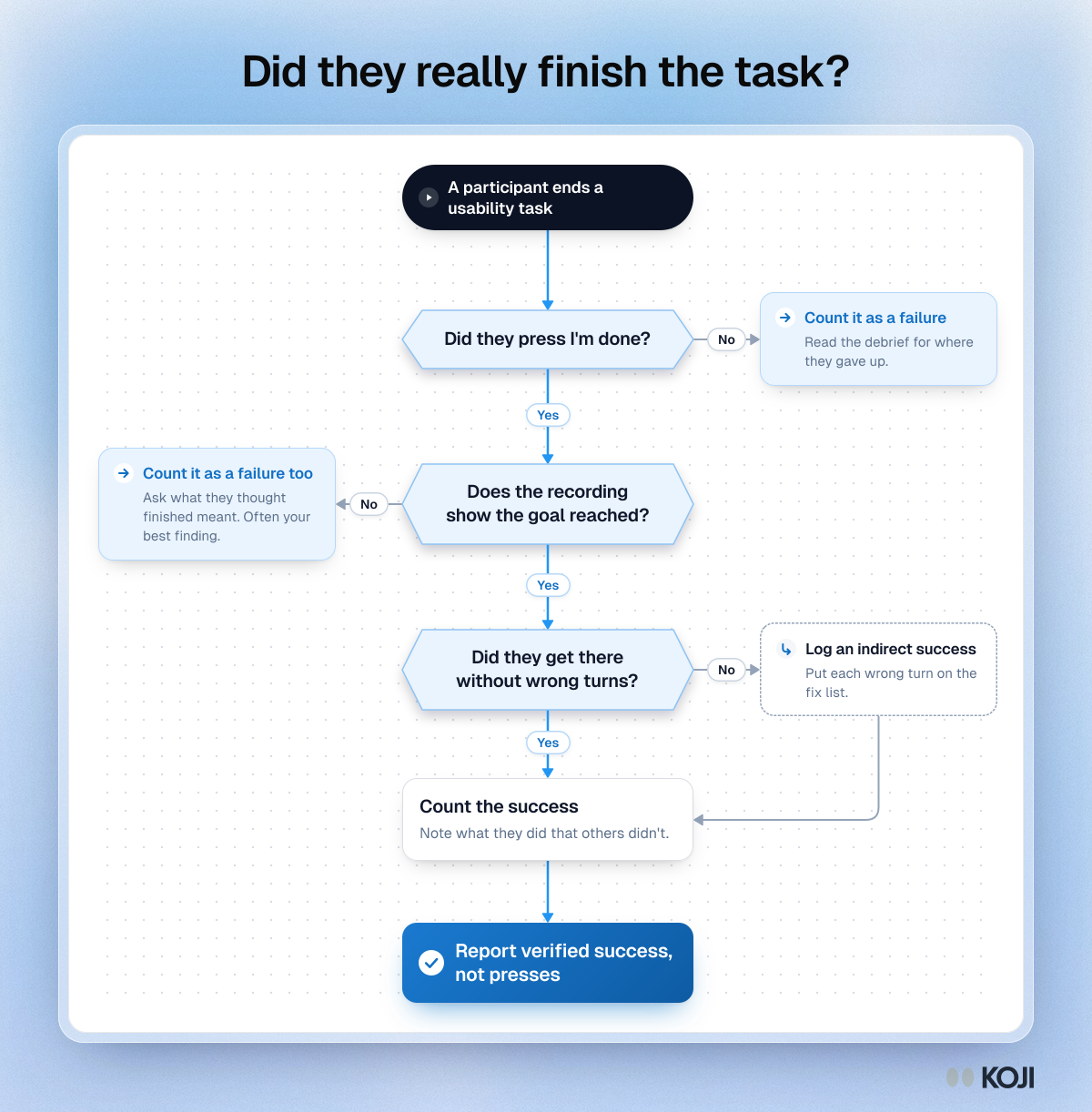
Never take "done" at face value. The recording decides the success rate. The interview explains the gap. If someone pressed done but never reached the goal, count it as a failure and ask what they thought "finished" meant. That answer is often your best finding.
Separate direct from indirect success. Someone who got there after three wrong turns didn't have the same experience as someone who went straight there. Report both, because the wrong turns are your fix list.
Pair one ease rating with one confidence question. Ease (the SEQ) tells you how hard it felt. Confidence tells you whether they'd trust the result. A failed task with high confidence is the one you would never hear about otherwise.
Size by what you'll claim. Five people per segment are enough to find the big problems, in Jakob Nielsen's long-standing guidance (NN/g). If you'll put a completion rate in front of leadership as a number, plan on 20 or more and give a confidence interval with it.
Common mistakes:
- Reporting the button presses as the completion rate
- Writing tasks that name the button ("Use Share to invite...")
- Asking "Was that easy?" instead of asking what they expected
- Debriefing once, at the very end
- Watching only the failures, so you never learn what the fast people did differently
- Changing the task wording halfway through a round
When a success isn't one
Before you report a completion rate, run every participant through the same three checks. If they pressed I'm stuck, it's a failure, and the debrief tells you where they gave up. If they pressed done but the recording shows they never reached the goal, it's a failure too, and the most useful one to read. If they got there after wrong turns, it's an indirect success: count it as a success, and put the wrong turns on the fix list. If someone didn't share their screen there's no recording to check, so lean on the debrief and their confidence answer.
How to set up the test and debrief in Koji, step by step
In Koji the task and the debrief are one study: a Task question hands the participant a real web page, and Koji asks what happened as soon as they press I'm done or I'm stuck.
- Start the study. From the dashboard's template gallery, filter to UX Researchers and pick Evaluative Post-Test Interviews. Or paste this brief into the "What do you want to research?" box: "Find out whether people can [do the task] on [page] and why those who fail or hesitate do, so we can fix the root cause before [release]."
- Shape the brief. Set the decision to inform ("Which issues in the [flow] are critical, and what causes each"), the target participant and a guardrail: the interviewer must never hint at the right path.
- Add a Task question. Paste the page address into Task page: a live site, a staging build, a competitor's site or a prototype share link. Write the task as a goal in the user's words. If the page needs a login, switch on the option to always open it in a new tab. Task questions carry a Beta tag, and each task adds 3 credits to every completed interview.
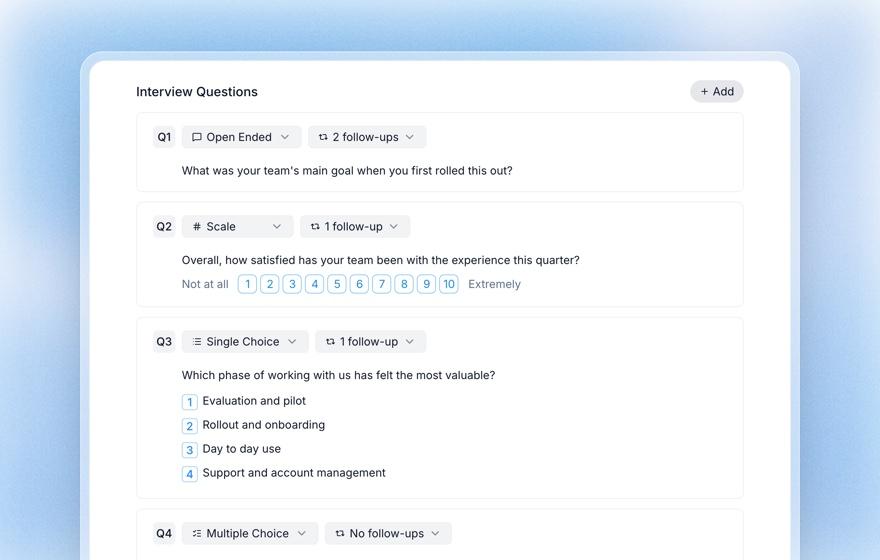
- Add the debrief questions after it. Add the SEQ as a Scale question on the 1 to 7 range, with "Very difficult" and "Very easy" as end labels, and a single-choice confidence question. Set the follow-up depth per question, and add probing guidance such as "ask what they expected before asking how it felt".
- Choose voice or text. Both work. On desktop, Koji offers to record the shared tab and the participant's voice, and people can decline and still do the task. In voice, Chrome and Edge on desktop can keep Koji in a small floating window while the page is open. A text interview with one task uses 4 credits, a voice interview 6.
- Invite people. Add a screening question for the segment you need. Email your own users from Participants with reminders (Insights plan and up), give each person their own invite link from a CSV (Interviews and Enterprise), or recruit from Koji's panel on a paid plan.
- Preview it yourself. Previews are free and not counted. Run the task once as a participant to check the page opens and the card reads clearly.
- Read the results. The report's task section shows how many finished and got stuck, the median time on task, how many shared their screen, a reel of recorded moments with what was said, and a flow of the pages people visited. On the Interviews table, each person's task details show Koji's verdict from the recording (Direct success, Indirect success or Failed) next to what they pressed, with time, pages visited and wrong turns. That's your Pressed, Saw, Said check, already lined up.
Which plan? Free gives you 10 credits at signup, enough for two pilot interviews with one task in text. For a real round of 20, budget about 80 credits in text, since only interviews that score 3 or more on quality use credits or reach the report (how quality scores work). Interviews (79 credits a month, 3 seats) adds personal invite links for matching people to your CRM list.
Copy this interview guide
Paste this into any tool. Swap the bracketed parts and keep the wording fixed for the whole round.
Opening: "Thanks for helping. I'll give you something to try on a website. There are no wrong answers. If something is confusing, that's the site's fault, not yours, and it's exactly what we need to know."
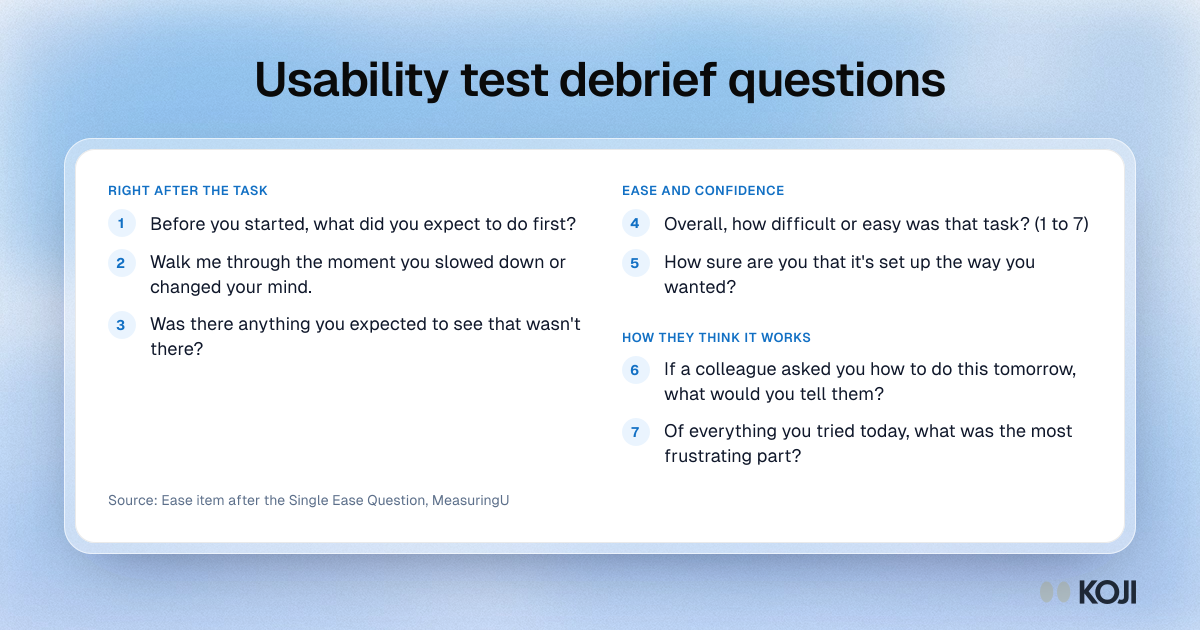
- Task. "[Goal in their words, e.g. You want a colleague to see this project but not edit it. Set that up.]" Follow-up: "Tell me about a moment where you weren't sure what to do next."
- Open. "Before you started, what did you expect to do first?" Probe: "What made you expect that?"
- Open. "Walk me through the moment you slowed down or changed your mind." Probe: "What were you looking for right then?"
- Scale 1 to 7. "Overall, how difficult or easy was that task?" Probe: "What would have made it one point easier?"
- Single choice. "How sure are you that it's set up the way you wanted?" Not sure, fairly sure, completely sure. Probe: "What would you check to be certain?"
- Open. "If a colleague asked you how to do this tomorrow, what would you tell them?" Probe: "Where would you tell them to look?"
- Open. "Was there anything you expected to see that wasn't there?" Probe: "Where did you expect it?"
Closing: "Of everything you tried today, what was the most frustrating part, and is there anything we didn't ask about?"
What you get
By the end of the round you have, for each task:
- A completion rate you can defend: finished and stuck counts, plus the verdict from the recordings, so "pressed done but failed" cases are counted as failures and nobody can wave them away.
- The gap list: every person whose button and recording disagree, with their own explanation. These are the disasters MeasuringU warns about, and the first thing to fix.
- Median time on task, to compare against the next round.
- The clips that make the case: the reel of recorded moments, each with what the participant said, which is what convinces a design review faster than a slide of percentages.
- A readout: download the report as slides or a PDF and lead with one task, its verdicts and three clips.
The designer gets the gap list the same afternoon. The PM gets one slide: can people do it, how long it takes, and the one fix that matters most.
The same playbook elsewhere
The Pressed, Saw, Said check works anywhere people report their own success. Product managers run the same task-plus-debrief study on a staging build before a release. Researchers measuring a redesign can add the task to both rounds of a before-and-after study. And if your team is still deciding whether to trust AI moderation at all, the AI moderator pilot playbook shows how to test it against your own moderators first. Every researcher playbook is at /use-cases/researchers.
Why Koji for usability test debriefs
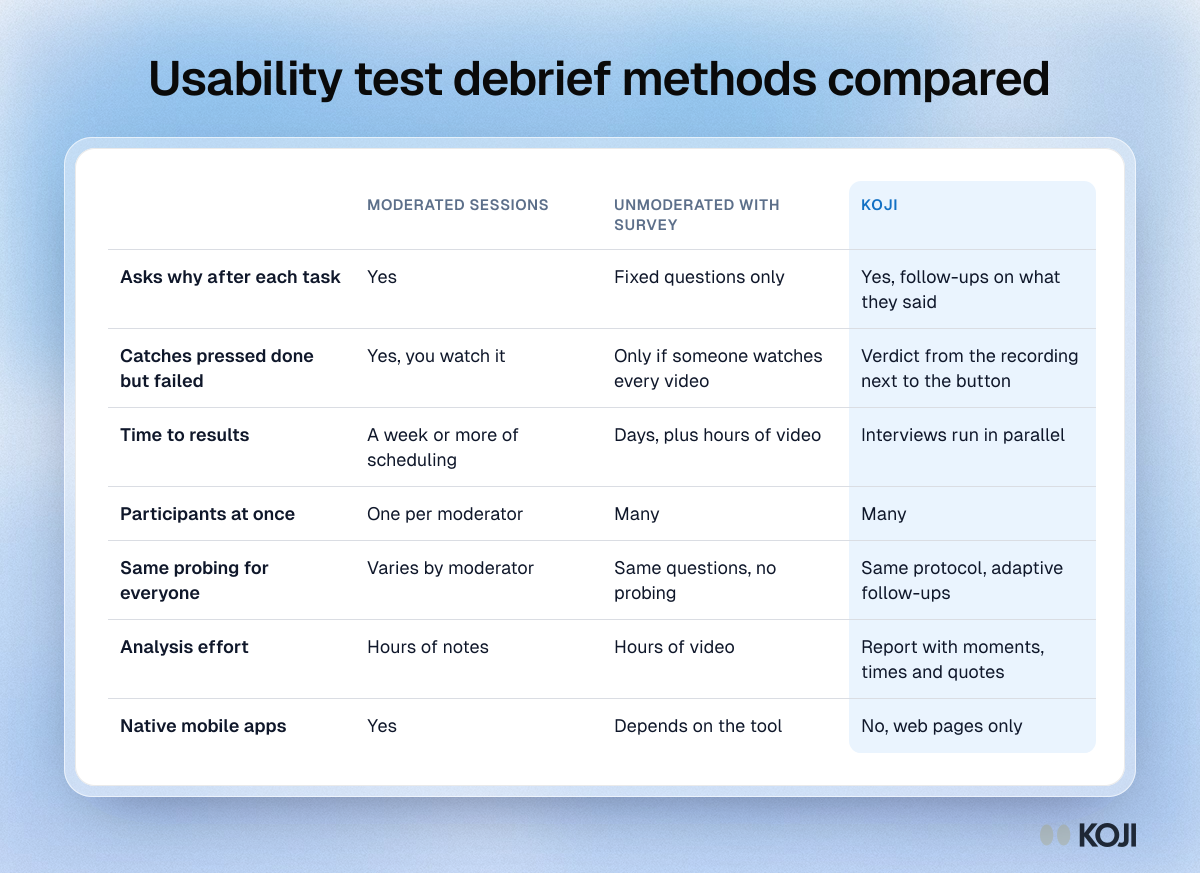
Here is how the realistic options compare on what a debrief needs.
| Moderated sessions | Unmoderated test with a post-task survey | Koji | |
|---|---|---|---|
| Asks why after each task | Yes | Fixed questions only | Yes, follow-ups on what they said |
| Catches "pressed done but failed" | Yes, you watch it | Only if someone watches every video | Verdict from the recording next to the button |
| Time to results | A week or more of scheduling | Days, plus hours of video | Interviews run in parallel |
| Participants at once | One per moderator | Many | Many |
| Same probing for everyone | Varies by moderator | Same questions, no probing | Same protocol, adaptive follow-ups |
| Analysis effort | Hours of notes | Hours of video | Report with moments, times and quotes |
| Native mobile apps | Yes | Depends on the tool | No, web pages only |
Why we'd run it in Koji:
- The debrief is built into every task. Koji asks what happened as soon as they press I'm done or I'm stuck, so no participant skips it.
- False successes surface on their own. The task details put Koji's verdict from the recording next to the button the participant pressed.
- The moderator stays neutral. Koji introduces the task, the card carries it, and while people work it never says where to click or whether they're on the right track.
- Tasks and questions live in one study. Mix tasks with open questions, ratings, choice questions and price tests, instead of stitching a test tool to a survey.
- Low-effort interviews stay out. Interviews scoring under 3 on quality don't reach the report or use credits.
Questions you might have about AI interviews
Will an AI lead people to the answer? The interviewer is set up not to. It introduces the task in one sentence, the card holds the instructions, and while people work it stays quiet. It never explains how to do the task or hints whether they're on track. Run a preview yourself and listen for it.
Will people share their screen? It's optional and asked in the browser's own prompt. Those who decline still do the task, and you still get the outcome, the time and the debrief, though no recorded moments or page flow for them.
Can I trust the verdict and the moments? Outcome and time are exact: they come from the button press. The verdict, moments and page path come from watching the recording, so treat them as approximate and check the clip behind any finding before you act on it.
When Koji may not be the right fit
If you're testing a native mobile app, use a mobile testing tool: Koji's Task questions open web pages, and screen recording needs a desktop browser that can share a tab. If you need click maps, first-click tests or tree tests, use a dedicated platform, because Koji doesn't run those. And for a deeply exploratory session on a messy early prototype, where you want to change the plan mid-conversation, a live moderator is still the better choice.
Metrics to track
- Verified completion rate per task, and the gap between pressed and verified
- Share of direct versus indirect successes
- Median time on task, round over round
- Mean SEQ per task, against the 5.5 average
- Share of failed tasks with "completely sure" confidence
- Number of gap-list issues fixed before the next round
Frequently asked questions
What is a usability test debrief? The short interview after a usability task, where you ask what the participant expected, where they hesitated and how sure they are of the result. It explains the behaviour the recording shows.
Should I debrief after each task or at the end? After each task. The details of one task blur into the next, and a single end-of-session debrief blends everything together.
How many participants do I need? Five per segment find most of the big problems. If you'll report a completion rate as a number, plan on 20 or more and show a confidence interval.
What do I do when someone says they finished but didn't? Count it as a failure in the completion rate, then read their explanation. In MeasuringU's data, self-reported completion averaged 93% against 33% verified, so this will happen often.
Can I run a usability debrief on a Figma prototype? Yes, if the prototype has a share link that opens in a browser. Paste the link as the task page and write the task as a goal.
Run your first debriefed round this week
Sign up free, open the template gallery, start from Evaluative Post-Test Interviews and add a Task question with your page, or paste the brief from step 1. Run two previews, then invite your first five. For more on how researchers use Koji, see Koji for researchers, and for the measurement itself, the Single Ease Question guide, how to write usability tasks and usability metrics explained.