Interview Guardrails: Set What Your AI Interviewer Avoids
How to set guardrails in Koji: the rules that keep your AI interviewer away from pricing, confidential plans and sensitive topics in text, voice and phone interviews.
Guardrails are the list of things your Koji AI interviewer should avoid during an interview: topics it mustn't raise, promises it mustn't make, details it mustn't share. You set them in the Studio, on the Questions tab, in the Guardrails box at the bottom, one guardrail per line. Save your changes, then publish (or republish) the study, and every new interview follows them, whether it runs by text, by voice or as a phone call. Guardrails are available on every plan.
This guide shows where guardrails live, how to add and change them by hand or with the AI Assistant, and how to write ones the interviewer can actually follow.
Why guardrails matter
A human moderator walks in with a briefing: don't mention the price change, don't name other clients, don't get drawn into a support ticket. An AI interviewer needs the same briefing, written down.
Without it, the interviewer will happily follow an interesting thread wherever it goes, which is usually what you want. Following up on what people say is the whole point of an AI-moderated interview, and it's what a static form from SurveyMonkey, Typeform or Qualtrics can't do. But some threads carry risk:
- Commercial risk. A participant asks about pricing or a roadmap date, and an unscripted answer becomes a promise.
- Confidentiality. Unreleased features, other customers' names, a deal that isn't public yet.
- Sensitive personal data. Under the GDPR, data about health, religion, political opinions, sexual orientation and a few other areas is "special category" data (Article 9) with stricter rules. If your research doesn't need it, tell the interviewer not to ask for it.
- Research quality. An interviewer that offers opinions or suggests answers biases what you hear.
Guardrails let you keep the follow-up depth that makes AI interviews useful while fencing off the areas you never want to enter.
Where to find guardrails
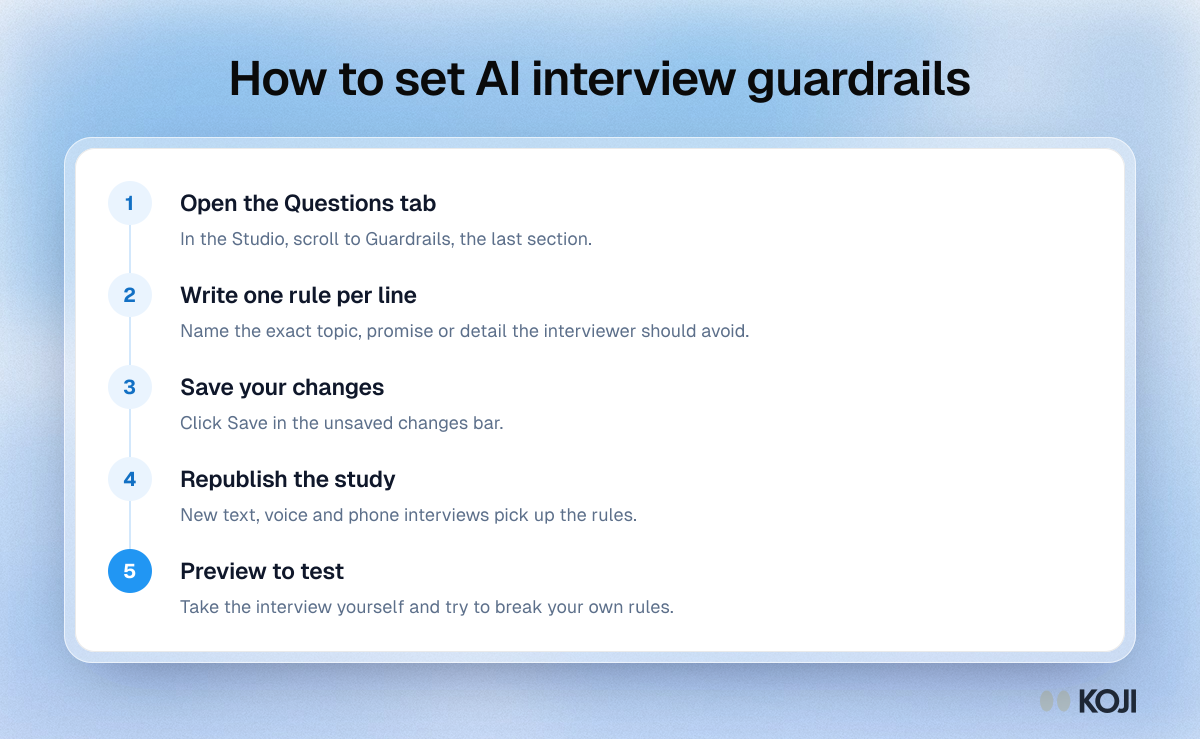
- Open your study and go to Studio.
- Select the Questions tab.
- Scroll to the last section, Guardrails. Hover the help icon and you'll see "Things the interviewer should avoid".
The Questions tab runs in interview order, so guardrails sit below the parts of the conversation they constrain: Screening Questions (when your study has them), Opening Approach, Interview Questions, Topics to Explore and Closing Approach.
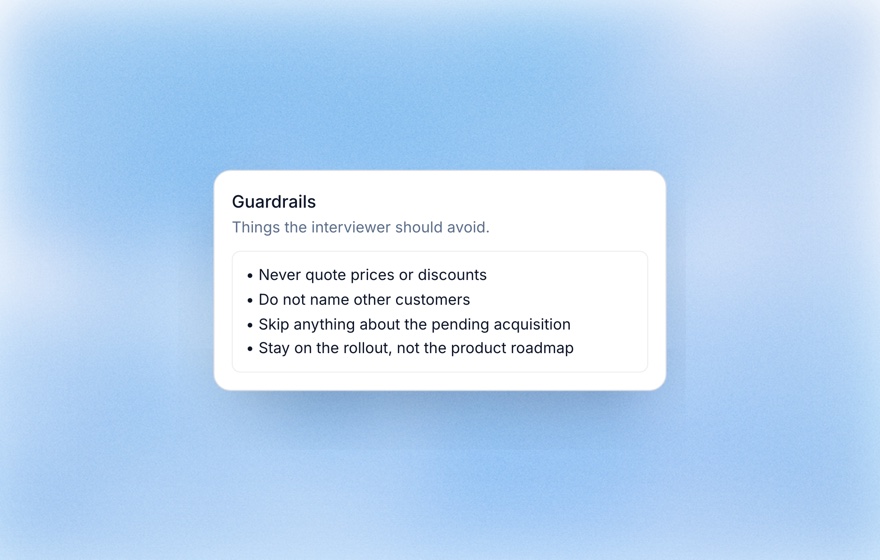
Add or edit guardrails by hand
The Guardrails box is a bulleted list:
- Click into the box (it starts empty with the placeholder "Enter a guardrail...").
- Type your first guardrail.
- Press Enter to start a new bullet for the next one.
- To remove a guardrail, delete its text. Pressing Backspace at the start of a line removes that whole line.
- Click Save in the Unsaved changes bar. Discard throws away your edits.
- Click Publish (or Republish on a live study) so new interviews pick up the change.
There's no fixed limit on how many guardrails you can add in the Studio, but a short, specific list works better than a long one. If you publish with unsaved edits, Koji warns you that publishing will use the last saved version and offers Save & Publish.
Archived studies are read-only, so their guardrails can't be edited.
Let the AI Assistant draft or change them
You don't have to write guardrails yourself. With the AI Assistant open beside your brief, ask in plain language:
- "Add a guardrail: don't quote any prices or discounts."
- "Suggest guardrails for interviews with enterprise customers."
- "Drop the guardrail about the beta."
The assistant keeps your existing guardrails and changes only what you asked for. The chat shows a step such as "Updated guardrails" so you can see what changed. It won't touch your guardrails unless you ask, and it may suggest a few when it first drafts a study.
Changes the assistant makes are saved to the brief straight away. You still need to Republish for live interviews to follow them. To clear every guardrail at once, delete them in the box yourself.
A useful habit: if you want the interview to start or end differently, ask the assistant to rewrite the Opening Approach or Closing Approach rather than adding a guardrail. Guardrails are for what to avoid; the opening and closing say what to do.
The Analyse for Suggestions button can also propose guardrail changes based on the rest of your brief, which you can review before applying. Studies started from a template often come with a few guardrails already filled in, so check them against your own situation.
If you build studies through the AI-assistant (MCP) connection, you can set guardrails there too: up to 10, of up to 300 characters each, and sending a list replaces the current one. See the MCP overview.
How guardrails reach your interviews
When you publish, Koji passes your saved guardrails to the interviewer for every way people can respond: text interviews, voice interviews and phone calls all get the same rules. That has two consequences:
- Edits don't apply to live interviews until you republish.
- Unsaved edits are never published. Save first, or use Save & Publish.
If you leave Guardrails empty, the interviewer still follows built-in good-practice rules for your study's research method. Your own guardrails add to that with what only you know: your product, your customers and your boundaries.
Writing guardrails that work
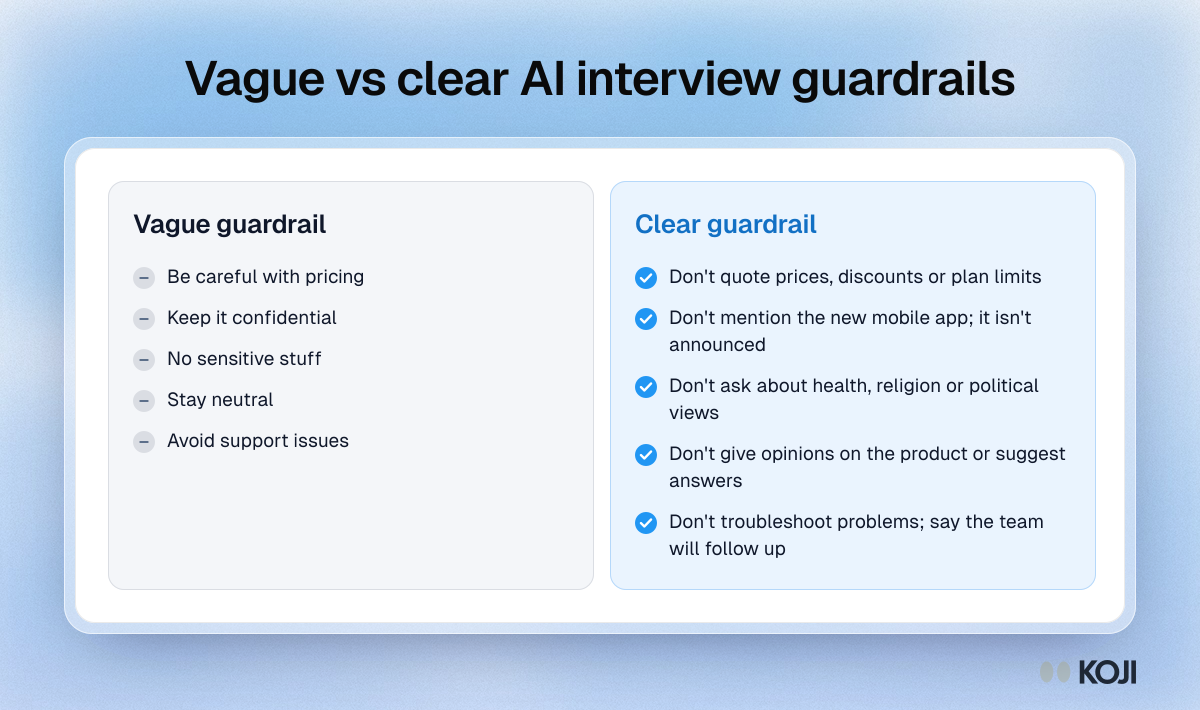
A guardrail is an instruction to an interviewer who has never met your company. The clearer it is, the more reliably it's followed.
| Vague | Clear |
|---|---|
| Be careful with pricing | Don't quote prices, discounts or plan limits |
| Keep it confidential | Don't mention the new mobile app; it isn't announced |
| No sensitive stuff | Don't ask about health, religion or political views |
| Stay neutral | Don't give opinions on the product or suggest answers |
| Avoid support issues | Don't troubleshoot problems; say the team will follow up |
A few rules of thumb:
- One rule per line. Each bullet becomes a separate instruction.
- Name the thing. "Don't mention Project Atlas" beats "don't discuss unreleased work", because the interviewer can't guess what's unreleased.
- Say what to do instead when it helps. "Don't troubleshoot; say the team will follow up" gives the interviewer a graceful way out when a participant pushes.
- Don't use guardrails to remove questions. If a topic shouldn't come up at all, take it out of Interview Questions and Topics to Explore first.
- Keep the list short. Five sharp guardrails beat twenty overlapping ones.
Test your guardrails before launch
After republishing, open the Preview tab on your study's Interviews page and take the interview yourself. Try to break your own rules: ask the interviewer what the product costs, or name a competitor, and see how it responds. Previews are free and never count as responses. See Previewing your interview.
Then read the first few real transcripts. If the interviewer drifted somewhere you didn't expect, add a guardrail, save and republish. New interviews will follow it.
Guardrails and the rest of your brief
Guardrails work alongside the other controls on the Questions tab:
- Interview Questions set what's asked. Koji's structured question types (open-ended, scale, single choice, multiple choice, ranking and yes/no) give you measurable answers alongside the conversation. See the structured questions guide.
- Follow-ups on each question set how deep the interviewer probes: None (skip) or 1 to 3 follow-ups, with optional custom follow-up guidance.
- Topics to Explore list open areas where the interviewer can follow interesting threads.
- Opening Approach and Closing Approach shape how the conversation starts and ends.
Think of it this way: questions and topics point the interviewer toward what you want to learn, and guardrails mark the places it shouldn't go.
Related Resources
Related Articles
Editing the Brief Manually
How to directly edit your research brief to fine-tune questions, methodology, target audience, and more.
Previewing Your Interview Before You Share It
Use Koji's free Preview tab to take your own AI interview by text or voice before launch. Previews never use credits, never count as responses and never appear in reports.
Publishing Your Study
What happens when you publish, what to check before going live, and how to share your interview link.
Structured Questions in AI Interviews
Mix quantitative data collection — scales, ratings, multiple choice, ranking — with AI-powered conversational follow-up in a single interview.
Understanding the Research Brief
A walkthrough of every section in your Koji research brief and how to read it effectively.
Working with the AI Consultant
Tips and strategies for chatting effectively with Koji's AI Consultant to design a strong research study.