The buyer picked you, the champion said yes, and the deal still slipped a quarter because it sat with security, legal, procurement or finance. Approval-gate interviews are short, neutral conversations with the champions of those deals and with the reviewers who run each gate, so you learn what every gate needs from you and when. Run them as AI-moderated interviews and you can hear from 20 or 30 people in a week instead of the three your reps had time to call. By the end of this playbook you will have a four-gate method, an interview guide you can paste into any tool, and the exact setup in Koji.
Why approval gates matter now
Your forecast treats "vendor selected" as nearly closed. Buyers no longer see it that way, and the 2026 data says the part of the deal you cannot see has become the hardest part.
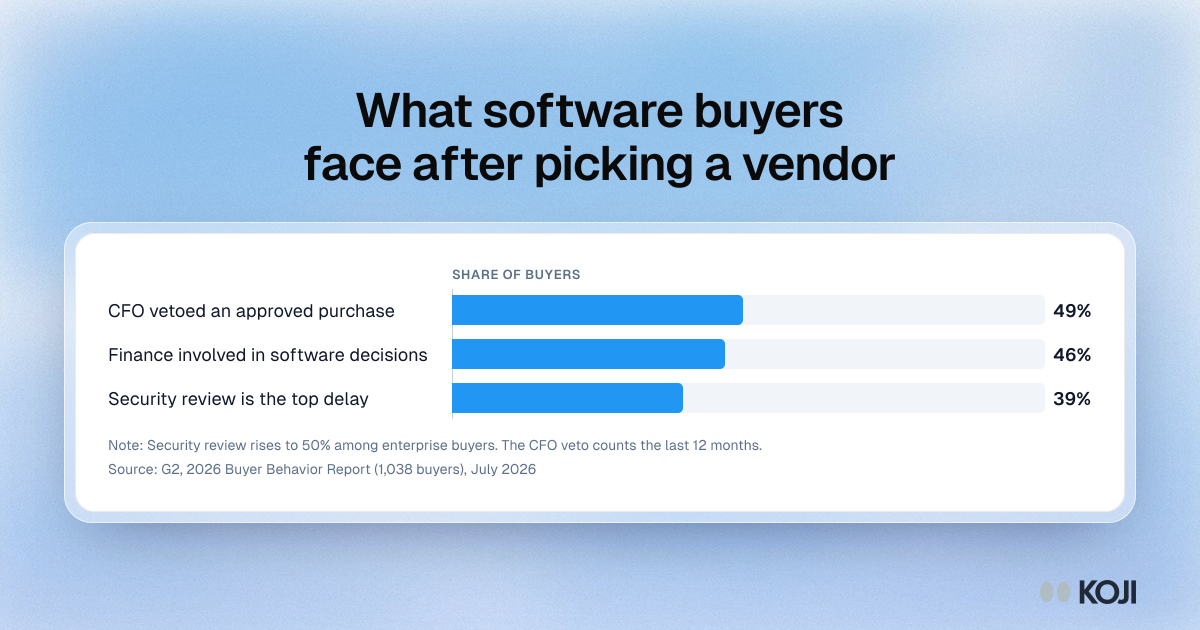
Security review is the biggest delay after selection. G2's 2026 Buyer Behavior Report surveyed 1,038 B2B software decision-makers in June 2026. 39% named IT security review as the single biggest source of delay between selecting a vendor and completing the purchase, rising to 50% among enterprise buyers. Source: G2, 2026 Buyer Behavior Report, July 2026.
Finance can undo an approval. In the same survey, 49% of buyers said their CFO had vetoed an already-approved software purchase in the previous 12 months, and finance involvement in software decisions rose from 31% to 46% in a single year. Your champion's "yes" is now a draft. Source: G2, July 2026.
More people get a say, and they disagree. Forrester's 2026 State of Business Buying puts a typical purchase at 13 internal stakeholders and 9 external influencers, and finds procurement professionals are decision-makers in 53% of buying cycles, involved from the start. Source: Forrester, January 2026. Gartner's 2026 Tech Buying Behavior Study found that 68% of buying teams experience unhealthy conflict, which goes with three times more project delays and seven times more purchase regret. Source: Gartner, 2026 Tech Buying Behavior Study.
Helping the group agree pays off. At its May 2026 sales leader conference, Gartner reported that buying groups with low dysfunction were 13 times more likely to report a high-quality deal, and that buyers who spent more time with supplier reps reported the least dysfunction. Source: Gartner via Business Wire, May 2026.
Put those together and the gap is plain. Your reps sit in the evaluation. They do not sit in the security review, the redline call or the budget meeting where the CFO asks what happens if you do nothing. The cost of not asking is a forecast that keeps counting selected deals as safe, slipped close dates you explain with "legal is slow", and quarter after quarter of the same stall.
What good looks like
Revenue teams that fix this treat the back half of the deal as its own research problem, with its own people and questions. We call the method the four-gate review: one study of the champions whose deals slipped, one of the reviewers who run each gate, both read gate by gate.

Photo by Romain Dancre on Unsplash
1. Name the four gates. Security (the security questionnaire, the trust review, now often an AI section), legal (the MSA, the DPA, redlines), procurement (vendor onboarding, sourcing rules, competitive quotes) and finance (budget owner sign-off, the CFO, ROI proof). Every slipped deal sits in one of them, sometimes two.
2. Build a gate log before you interview anyone. For each deal that reached "selected" or "verbal" in the last two quarters, write down which gate it entered, the date, and the date it left or died. If your CRM does not track it, ask the reps; it takes an afternoon. This log is your sampling frame and your baseline.
3. Start with the gate that hurts most. Our working rule: if one gate holds 3 or more of your last 10 slipped deals, interview that gate first. If the stalls are spread out, run all four at once.
4. Interview three groups, not one. Champions of slipped deals (8 to 12) tell you what happened inside. Reviewers at customers you already won (6 to 10, one or two per gate) tell you what made them say yes, because they have already been through your review and have no deal to protect. Reviewers in your target market who have never seen you (8 to 10) tell you how they judge vendors like you, without the politeness of an existing relationship. Around 25 interviews is enough to see patterns per gate.
5. Keep reviewer interviews short. A security analyst or procurement manager will give you 12 to 15 minutes, not 45. Ask about what they did, not what they think of you: the last vendor they fast-tracked, the last one they sent back, and why.
6. Turn findings into a gate kit. For each gate, write one page: what the reviewer needs, at which stage, from whom on your side. That page goes into the mutual action plan, the champion's internal pitch and the sales engineer's checklist.
Common mistakes:
- Accepting "legal is slow" or "budget freeze" as the answer. Ask what legal was waiting for, and what got the budget instead.
- Treating security as the sales engineer's problem alone. The questionnaire is a symptom; the cause is often when it arrived and who answered it.
- Interviewing reviewers in a live deal as a sales tactic. They can tell, and it costs you the deal and the honesty.
- Asking reviewers to rate your trust center. Ask what they opened, what they skipped and what they asked for anyway.
- Leaving finance out. With half of buyers reporting a CFO veto, the finance reviewer belongs in every round.
Who to interview, and when
Most teams wait for the quarter-end post-mortem. By then the champion has moved on and the reviewer cannot remember your file. Interview when a selected deal has sat in one gate for three weeks or more, and keep checking every two weeks until it does or it closes.
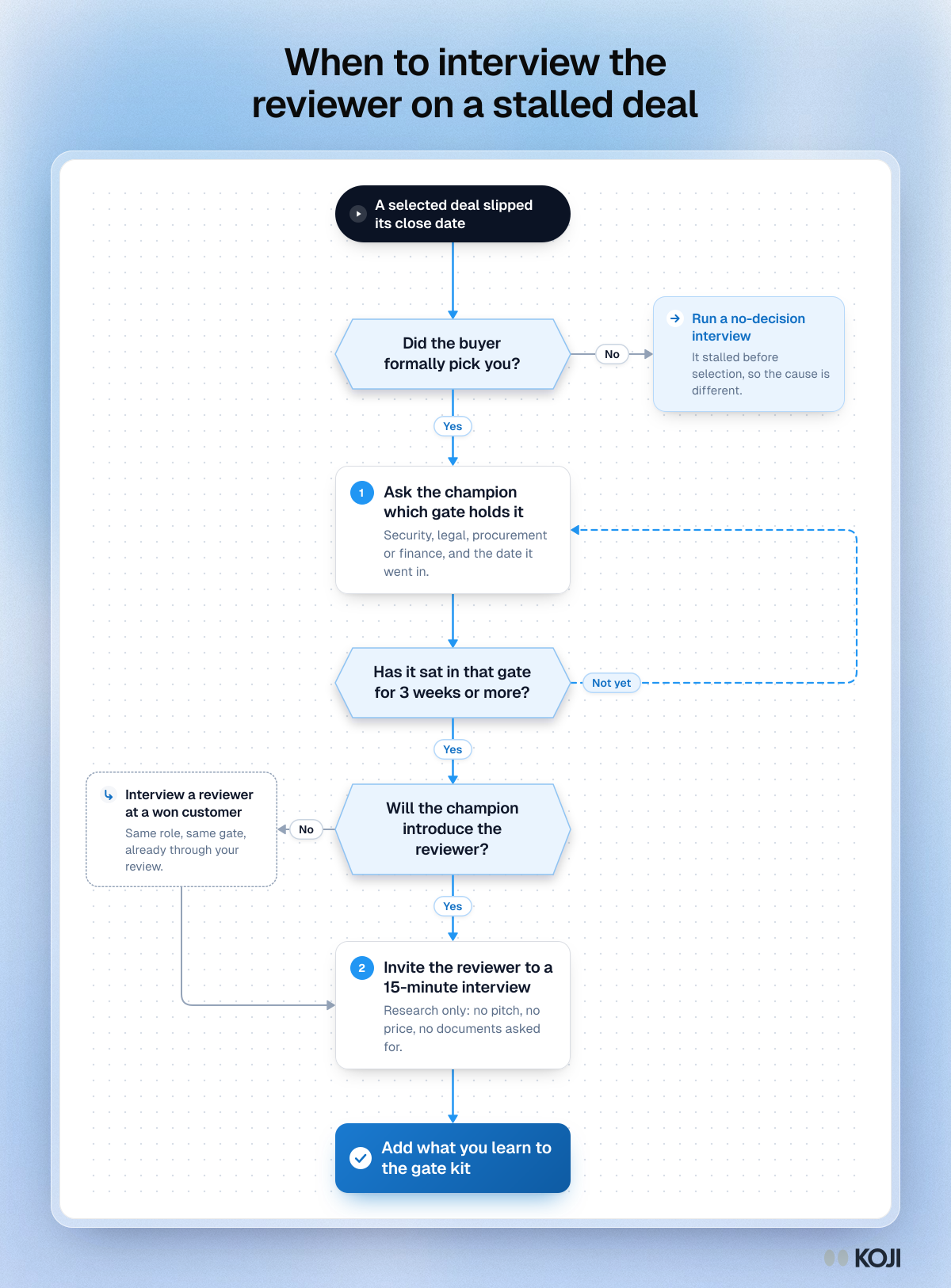
If the buyer never formally picked you, it is a different problem with a different playbook: see no-decision loss interviews. If the champion will not introduce you to the reviewer, do not push. Interview a reviewer in the same role at a customer you already won; they went through the same gate and will tell you what made it easy.
Timeline for one round:
- Day 0: pull the gate log and pick the gate (or gates).
- Days 1 to 3: build both studies, preview them, send the champion invites.
- Days 3 to 10: reviewer invites go out; reminders on day 7.
- Day 14: read the report per gate.
- Day 21: the gate kit is in the mutual action plan and the next pipeline review.
How to set it up in Koji, step by step
Koji is built for this shape of work: many short, neutral conversations with busy people, read together. You can try it on the Free plan with the 10 credits you get at signup. For a full round, the Interviews plan (€79 a month, 79 credits, 3 seats) covers it: a text interview uses 1 credit and a voice interview 3, and only interviews with a quality score of 3 or more use credits or reach the report. Previews of your own interview are free.
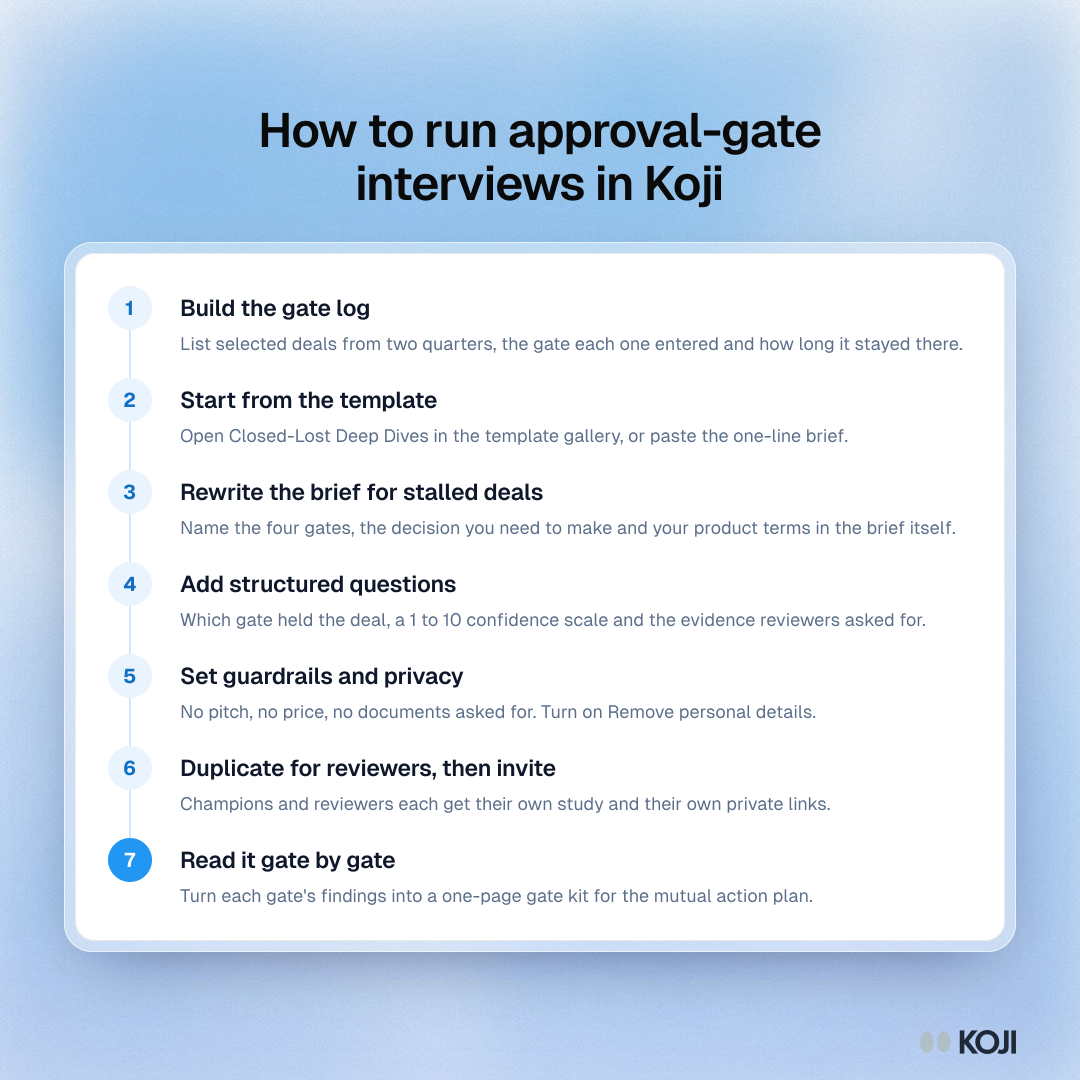
- Start from the template. On the dashboard, choose Start from a template, filter for GTM Teams and open Closed-Lost Deep Dives. It gives you a brief and questions to edit. Or paste the one-line brief from the guide below into "What do you want to research?".
- Rewrite the brief for stalled deals. Set the problem to "Deals we were selected for are slipping or dying in security, legal, procurement and finance review, and we don't know what each gate needs." Name the decision ("what goes into our gate kit and when we send it"), your hypothesis, and the participant: someone who ran or sponsored a software purchase in the last six months. Write the gate names and your product's terms into the brief itself, because the interviewer works from the brief and the questions.
- Add structured questions where you need a number. A single choice for which gate held the deal, a 1 to 10 scale for confidence, a multiple choice for the evidence the reviewer asked for. Add a screening question on role so each person gets the right path. See the structured questions guide.
- Set guardrails and privacy. In guardrails, tell the interviewer not to pitch, not to discuss price or contract terms, and never to ask for security documents or anything confidential. Then open Branding & Settings, go to Privacy and turn on Remove personal details, so names, emails and employers come out of each transcript when the interview ends. More on guardrails in setting interview guardrails.
- Duplicate the study for reviewers. Use Duplicate on the study card for a second study with the same brief and settings, then swap in the reviewer questions. Champions and reviewers need different questions, and two reports read more clearly than one.
- Preview, then invite. Take each interview yourself in the Preview tab, by text and by voice. Let participants choose: reviewers often answer by text between meetings.
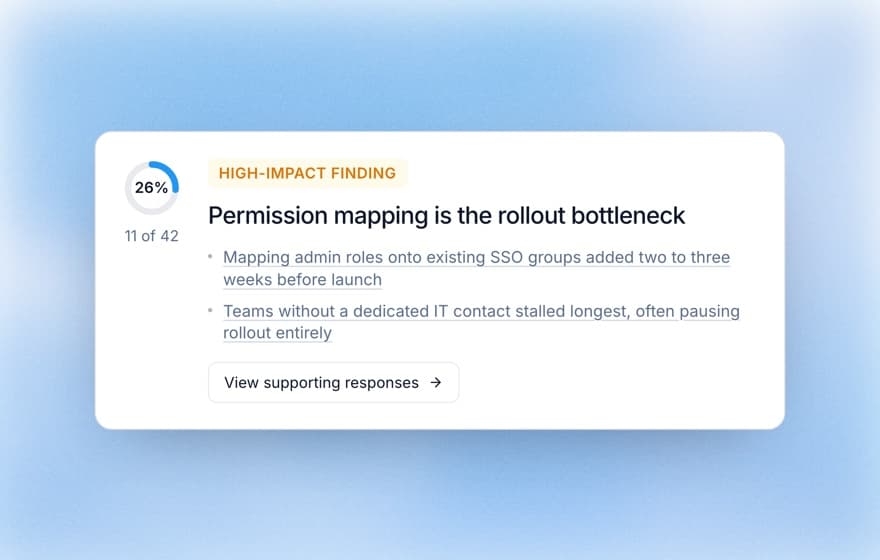
- Read the report gate by gate. Findings show the share of participants behind them, with the quotes in a side panel. Download the report as slides or a PDF for the pipeline review.
Sending the invites
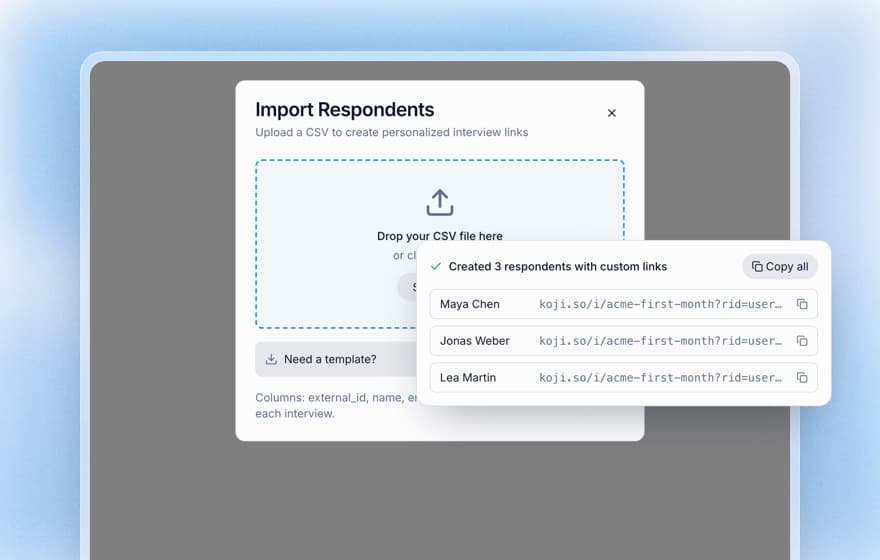
For champions and reviewers at won customers, export the contacts from your CRM and upload the CSV on the Self-recruit tab. Each person gets a private link, and you can download the list with each person's status to update the CRM; personal links are on the Interviews and Enterprise plans (how personal links work). Send the email from the account owner, not a bot, with two lines on why you are asking and how long it takes. On paid plans you can instead add the people to Participants as an audience and send the invitation and one reminder from Koji, with delivery and opens tracked per person (Insights includes 20 emails a month, Interviews 50).
For reviewers outside your customer base, open Participants and choose Find people: search professional profiles by job title, seniority, industry and company size (for example, security and procurement leads at 200 to 2,000 person software companies), preview matches for free, and pay 1 credit for each person delivered with a verified work email. That is on paid plans. For strangers, turn on an incentive in study settings (from €10 to €500 a person, paid plans); for customers' staff, check their gift policy first, since many security and procurement teams cannot accept one. The B2B recruiting guide covers the outreach.
Copy this interview guide
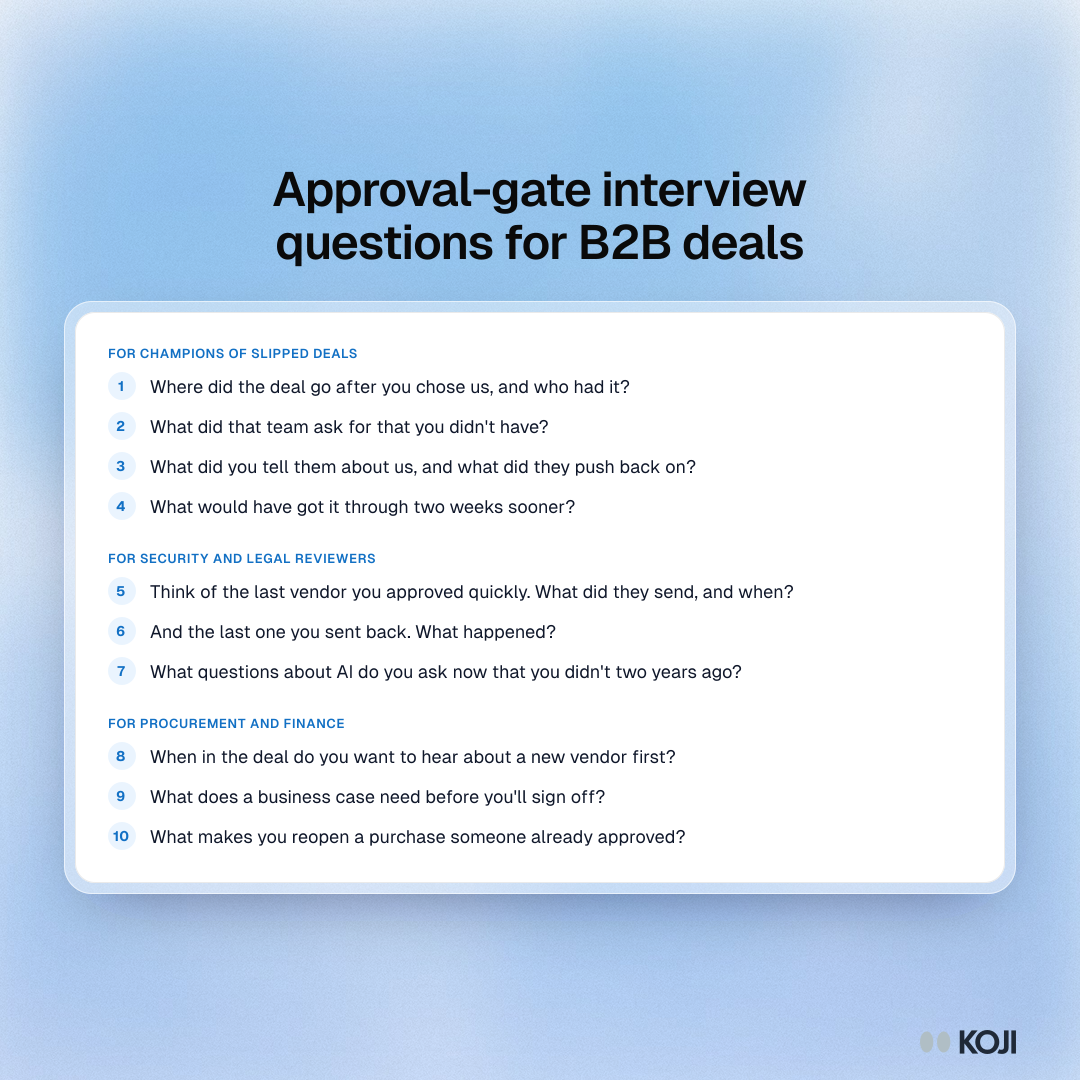
Paste this into Koji or any interview tool. It is written for the reviewer study; for champions, swap questions 2 and 5 for the champion questions in the image below.
Research brief (one line): "Find out what security, legal, procurement and finance reviewers need from a software vendor, and when, so selected deals stop stalling after the champion says yes."
Opening line: "Thanks for making time. We're not selling anything today. We want to learn how your team reviews software vendors so we can make that part easier for people like you. It takes about 15 minutes."
- "Which part of a software purchase do you own?" (single choice: security review, legal and contracts, procurement, finance or budget sign-off, other). Probe: "Who else signs off before you do?"
- "Think of the last vendor you approved quickly. What did they send, and when?" (open). Probe: "What did that save you?"
- "And the last one you sent back or slowed down. What happened?" (open). Probe: "What would have changed your answer?"
- "When in the deal do you want to hear about a new vendor for the first time?" (single choice: before the shortlist, during evaluation, after selection, at contract). Probe: "What goes wrong when you hear later?"
- "Which of these do you ask almost every vendor for?" (multiple choice: security questionnaire, SOC 2 or ISO report, DPA, AI and data-use answers, references, ROI case, price benchmarks). Probe: "Which one takes longest to get right?"
- "How confident are you, from 1 to 10, that a vendor's sales team understands your review?" (scale). Probe: "What would move that up by two points?"
- "What questions about AI do you now ask that you didn't ask two years ago?" (open). Probe: "What answer ends the conversation?"
- "If a vendor could do one thing to make your review faster without cutting corners, what would it be?" (open). Probe: "Who on their side should do it?"
Closing question: "Is there anything about how vendors approach your team that we should have asked about?"
What you get
The report gives you themes with the share of participants behind each one, the charted answers to your structured questions and the quotes behind every finding. Read it per gate and you get three things the next day.
In the pipeline review, you can replace "stuck in legal" with a reason and an owner. In enablement, the gate kit becomes a page in the mutual action plan: the security packet goes out at the technical win, not after the verbal; the finance one-pager answers the question the CFO will ask; legal gets your DPA before it asks. In forecasting, the gate log tells you how long each gate really takes, so a deal entering security review in the last month of the quarter stops being a commit.
The same playbook elsewhere
Customer success meets the same gates at renewal, when procurement reopens a contract the champion thought was safe. Founders meet them on their first enterprise deal, with no security team and no trust center. Due diligence teams meet them from the other side, asking a target's customers what the vendor review was like. In every case the rule holds: ask the people who run the review what they did, soon after they did it, with no deal on the table. For the earlier stages of the same buyer journey, see AI shortlist interviews and buying group mapping.
Why Koji for approval-gate interviews
| CRM stage data | Rep debrief with the champion | Win/loss interview service | Koji | |
|---|---|---|---|---|
| Whose view | The rep's | The champion's, through the rep | Buyer's, through a consultant | Champions and reviewers, in their own words |
| Reaches the reviewers | No | Rarely | Sometimes, if they agree to a call | Yes, by link, at a time that suits them |
| Time to results | Instant, little signal | Days, a few deals | Weeks per programme | About two weeks per round |
| Depth | A stage and a date | Depends on the rep | Deep, 25 to 30 minute calls | Follow-up questions on every answer |
| Scale | Every deal | A handful | Priced per interview | Dozens of short interviews at once |
| Analysis effort | Reports you build | Notes to read | Consultant writes it up | Themes with supporting quotes |
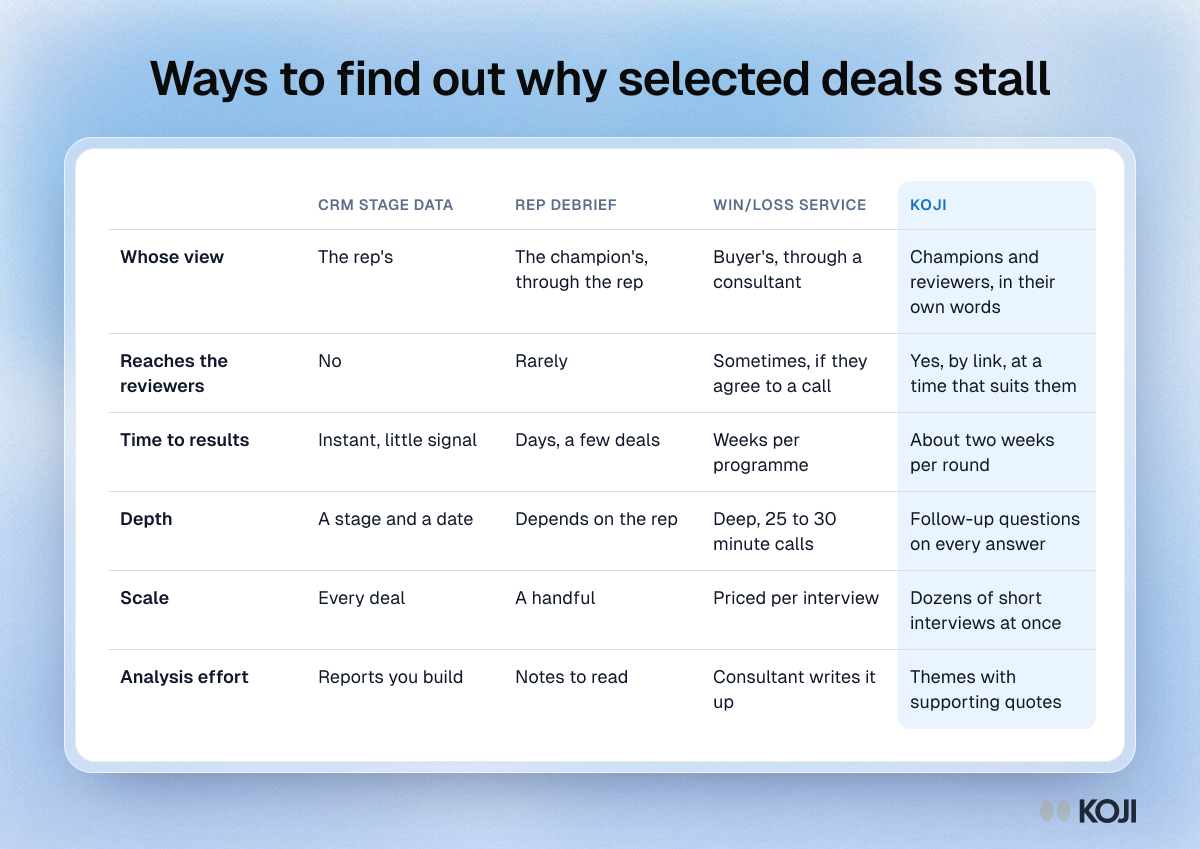
Win/loss services such as Clozd run deep live interviews with trained interviewers, typically 25 to 30 minutes, and also offer asynchronous recorded interviews; Clozd does not publish its pricing. Trust center and questionnaire tools such as SafeBase help you answer security reviews faster. Neither tells you what each gate needed and when it needed it, which is the job here. For tools that analyse your own sales calls, see Koji vs Gong.
Four reasons, each tied to what Koji does today:
- Reviewers answer when it suits them. Voice or text, on their own time, from a private link, so a 15-minute interview fits between two reviews.
- Follow-ups on every answer. "Legal was slow" turns into what legal was waiting for.
- Numbers and reasons in one interview. Choice and scale answers are charted, open answers are themed, and you can see both per gate.
- Privacy you can switch on. Remove personal details strips names, emails and employers from transcripts before analysis, which matters when people talk about colleagues and other vendors.
Questions you might have about AI interviews
"Will a security reviewer talk to an AI?" Some will prefer it: no sales call, no calendar slot, and they can answer in text. We can't promise a response rate. Send a small batch first, from a named person, and say it takes 15 minutes.
"Will it feel like a sales tactic?" Not if you set it up as research. Guardrails stop the interviewer from pitching or discussing price, and you can take the interview yourself in preview, free and uncounted, before anyone else sees it.
"What happens to what reviewers tell us?" Turn on Remove personal details for the study, review responses before sharing them (automatic removal can miss things), and read AI interview data privacy and security before you invite anyone.
When Koji may not be the right fit
If you sell five seven-figure deals a year, each with a named security lead you already know, a senior human conversation will do more than any interviewer, and the relationship is the point. If your stalls come from one recurring legal clause, fix the clause first. Koji fits the middle: dozens of selected deals a quarter, reviewers nobody on your team has met, and not enough hours to call them all.
Metrics to track
- Slip rate after selection: deals that reached "selected" and missed their close date, as a share of all selected deals.
- Days in each gate, median and longest, from the gate log.
- Share of slipped deals per gate, round by round.
- Response rate by group: champions, won-customer reviewers, outside reviewers.
- Stage at which the security packet goes out, before and after the gate kit.
- CFO or finance reversals per quarter.
FAQ
How many approval-gate interviews do I need? About 25 across the three groups: 8 to 12 champions, 6 to 10 reviewers at won customers and 8 to 10 outside reviewers. Fewer than 15 and you are reading anecdotes.
Should I interview reviewers while the deal is still open? Only with the champion's introduction, and only as research. By default, interview reviewers at customers you already won.
When should I send the invite? When a selected deal has sat in one gate for three weeks or more. Waiting for the quarter-end review loses the details.
Which plan do I need? You can try it on Free with the signup credits. For a full round, Interviews fits: 79 credits a month, voice and text, and personal links from a CSV.
Is this the same as win/loss analysis? No. Win/loss asks why a buyer chose you or someone else. This asks why a deal you had already won stalled before the signature.
What do I do with the findings? Write one page per gate, put it in the mutual action plan, and run the same study next quarter to see whether days in each gate went down.
Start your first study
Open the Closed-Lost Deep Dives template in Koji and adapt it with the guide above, or paste the one-line brief into "What do you want to research?". See how other revenue teams use Koji on the GTM teams page, and find every playbook for this audience at /use-cases/gtm-teams. For the method behind it, read the win/loss analysis guide.