A post-implementation review (PIR) tells you whether a go-live changed what the business case said it would, and why or why not. Run it as AI-moderated interviews with three groups, sponsors, the delivery team and the people who use the system every day, and you get every voice in a week instead of the three people who turned up to the lessons-learned meeting. By the end of this playbook you can run a full PIR at day 60 to 90, sort every gap into the right fix, and take a findings deck to the steering committee.
Why post-implementation reviews matter now
Delivery is no longer the hard part. Benefits are. PMI's 2026 Pulse of the Profession found that 31% of complex projects fail to achieve the full scope of their intended benefits, more than twice the rate for projects overall, and PMI's summary puts the overall failure rate at 13%. The same report says more than half of all projects now count as complex.
The usual reason is people, not code. Panorama Consulting's 2026 ERP Report, based on 170 responses collected between January 2025 and January 2026, found that fewer than a quarter of organizations put an intense focus on organizational change management during implementation. Opkey's 2025 State of Cloud and ERP Operations survey of 100 IT leaders found that 41% say poor end-user adoption threatens their technology investments.
And how well you manage that people side shows up in results. In Prosci's Best Practices in Change Management research (12th edition, more than 10,800 respondents), 13% of projects with poor change management met or exceeded objectives, against 39% with fair, 73% with good and 88% with excellent change management.
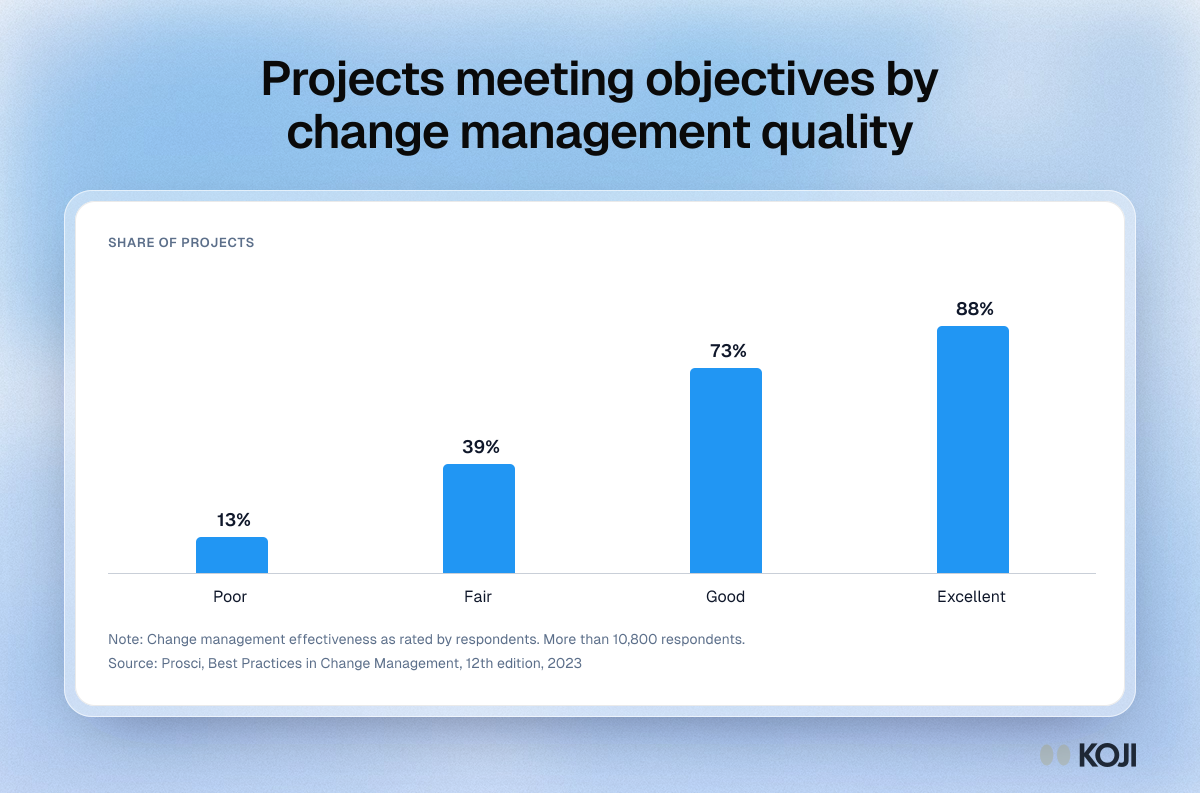
A PIR is where you find out which of those bars your project sits on. Skip it, or run it as one meeting with the sponsor, and the gap between "live" and "working" stays invisible until the benefits report comes in short. By then the workarounds have set.
What good looks like
I run every PIR the same way. Call it the three-lens review: the same core questions, asked separately of three groups, then compared.

Photo by Kelly Sikkema on Unsplash
Lens 1, sponsors and business owners (4 to 6 people). They own the business case. Ask which promised benefits they can already see.
Lens 2, the delivery team (5 to 8 people). Project manager, analysts, developers, testers, the change lead, the vendor's consultants. Ask which decisions look different with hindsight.
Lens 3, end users (15 to 30 people, across every role and site). This is the lens most PIRs skip, and it is the one that explains the benefits gap. Pick at least three per role, and include the night shift and the second site.
Timing: day 60 to 90 after go-live. Mind Tools' guidance is to wait for at least one full, successful cycle of business before you review. For a finance system that means after the first month-end close; for a quarterly process, after the first quarter-end. Earlier, you measure hypercare noise. After 120 days, people forget the old way.
Anchor on the business case. Pull the three to five promised benefits ("cut invoice approval from 9 days to 3") and give each one a question for the people who should feel it.
Ask about the last time. "Tell me about the last invoice you approved" gets the real path. "How is the new system?" gets "fine".
Ask about workarounds by name. Research on process mining has shown that workarounds make event logs diverge from how work is really done. The system log says the process is running. Only the people tell you about the spreadsheet beside it.
Common mistakes:
- Running the PIR as one meeting, without end users.
- Asking the project team to interview the users. People do not tell the team that built it that it does not work.
- Reviewing deliverables, not outcomes. "All 42 requirements delivered" says nothing about whether approvals got faster.
- Waiting for the benefits report. By then the cause is a year old.
- Ending with a lessons list nobody owns.
- Treating every complaint as a defect. Many are adoption gaps.
Sort every gap before you report it
Each kind of gap has a different owner and fix, so sort them before you report. The template's probe rule is the core: a solution gap (the wrong thing built) is not an adoption gap (the right thing built, not used as intended). I add the process gap, where the system works and the policy around it does not.
First check it is a real pattern (the decision rule below). Then take each gap through three questions, in order:
- Was the need in the requirements? If not, it is a requirements gap: log it for the next release and for the next project's elicitation.
- Was it built as specified? If not, it is a solution gap: raise a defect with the delivery team.
- Do users know how to do it in the system? If not, it is an adoption gap: targeted training or a job aid for that role, not a code change.
- If all three are yes and people still work around it, it is a process gap: the policy, approval rule or handoff around the system needs to change, and that has a business owner, not an IT one.
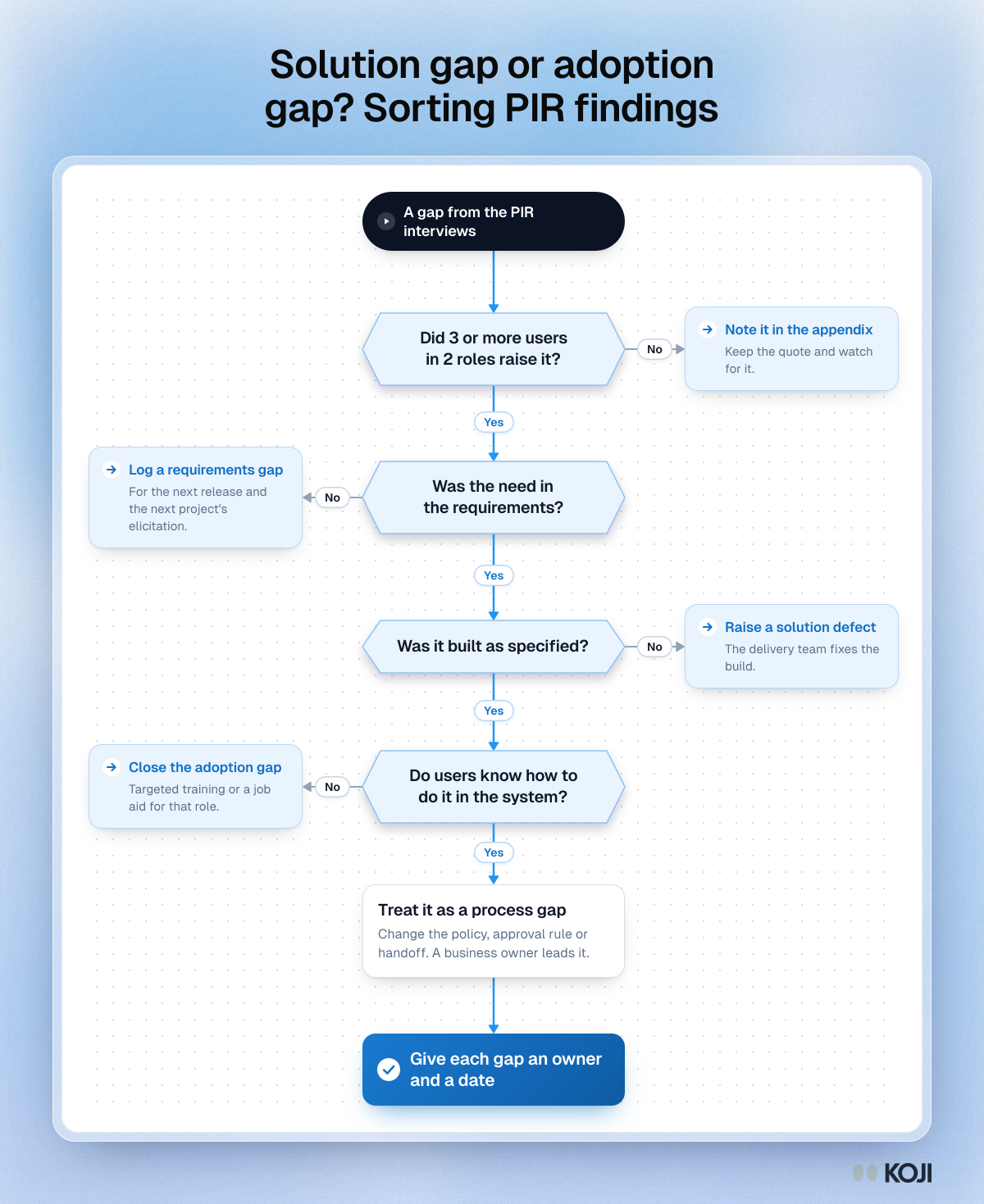
The decision rule: a gap goes to the remediation backlog only when three or more end users in at least two roles describe it. One person's complaint goes in the appendix with their quote. A gap that only the delivery team raises is a lesson for the next project, not a fix for this one.
How to set it up in Koji, step by step
Text interviews work on every plan, including Free, which gives you 10 credits at signup. Voice interviews need the Interviews plan or Enterprise. Use text for people at desks and voice for sponsors and people on the floor.
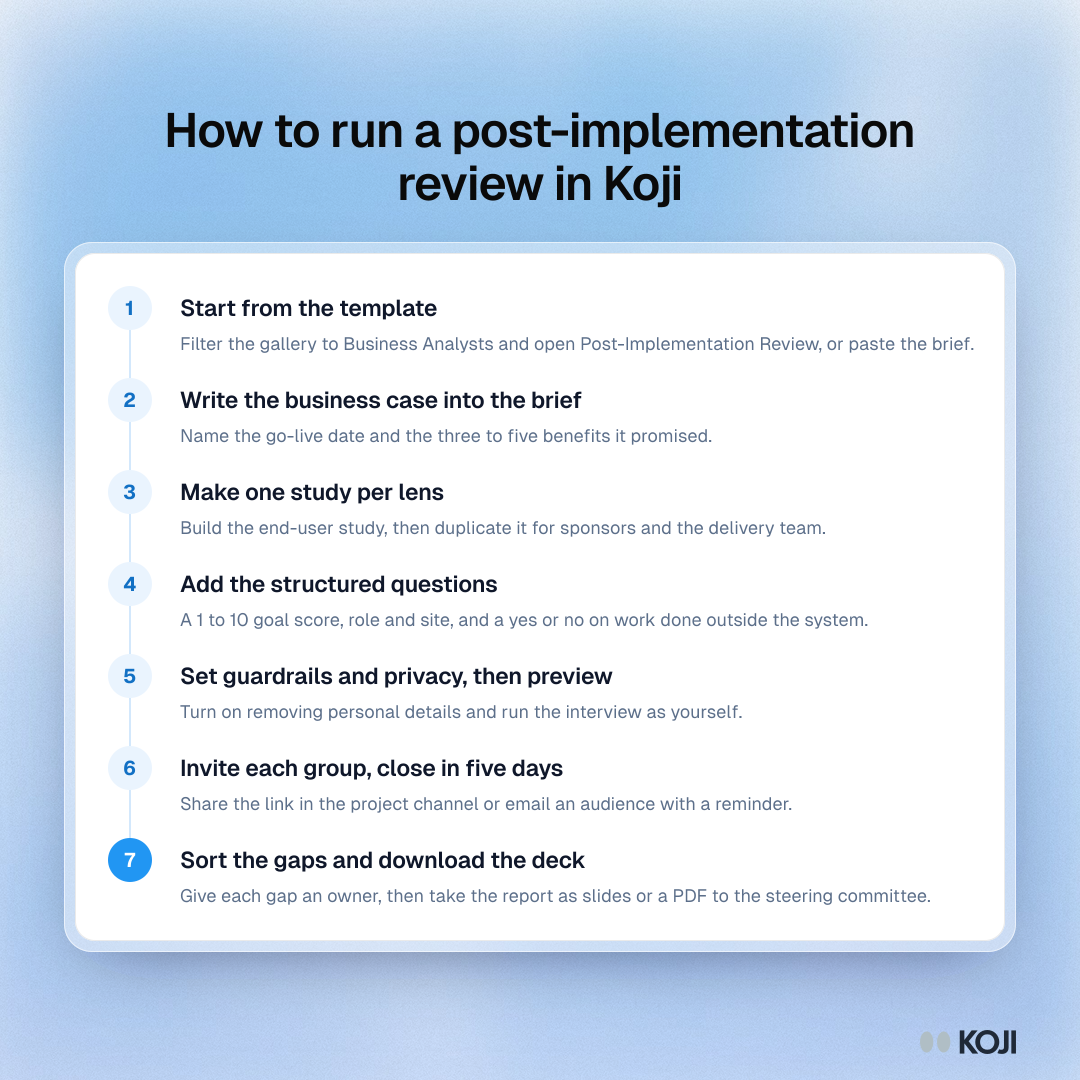
- Start from the template. In the dashboard's template gallery, filter to Business Analysts and open "Post-Implementation Review". Its brief frames a learning conversation, not an audit. Or paste the brief below into the "What do you want to research?" box and let Koji draft one.
- Put the business case into the brief. Name the project, the go-live date and the three to five benefits it promised. You can upload the business case and the requirements as context files (PDF, TXT, JSON or MD), and the research assistant uses them to draft the brief and questions. The interviewer does not read those files during an interview, so write each benefit into the question that asks about it.
- Make one study per lens. Build the end-user study first, then duplicate it from the dashboard and adjust the questions for sponsors and for the delivery team. Three studies give three reports to compare.
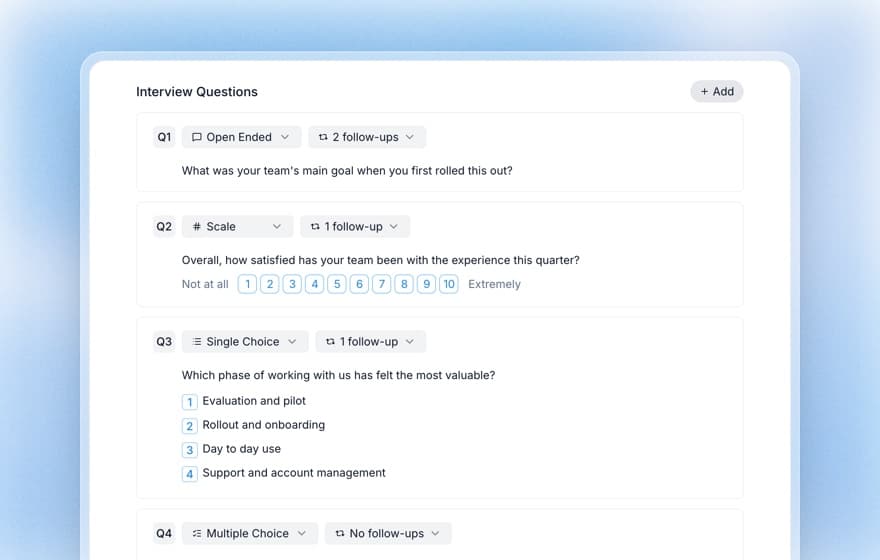
- Add structured questions where you need a number. Keep the template's 1 to 10 question on how well the project met its goal, add a single choice question for role and site, and a yes/no on whether they use anything outside the system for this work. Set follow-up probing to 2 on the workaround and "what is working less well" questions. The interviewer can ask up to three follow-ups per question; see how AI follow-up probing works.
- Set guardrails, privacy, then preview. The template already stops the interviewer promising fixes or sharing what others said. Add topics to avoid, such as a vendor dispute. Turn on removing personal details if names of colleagues will come up. Run a preview as yourself: it is saved with its own analysis and not counted as a response.
- Invite each group. Share the interview link in the project's Teams or Slack channel, or add the users as an audience in Participants and email them an invitation and a reminder from the study (Insights plan and up). On Interviews or Enterprise, import a CSV to give each person their own link. Close fieldwork in five working days.
The settings that matter for a PIR
Tell people in the invitation who reads the results and that this is about the next project, not about them. That one line is what gets the workaround stories.
Copy this interview guide
Paste this brief into the "What do you want to research?" box:
It is [60 to 90] days since [system] went live for [teams]. Find out whether it delivered [benefit 1, 2 and 3] for the people who use it, where the work still happens outside the system and why, and what we should change, so the steering committee can decide what to fix now and what to carry into the next project.
Opening line: "We're reviewing [project] now that it has been live for a while. This is to improve how we run projects, not to assess you, and nothing you say is attributed to you by name."
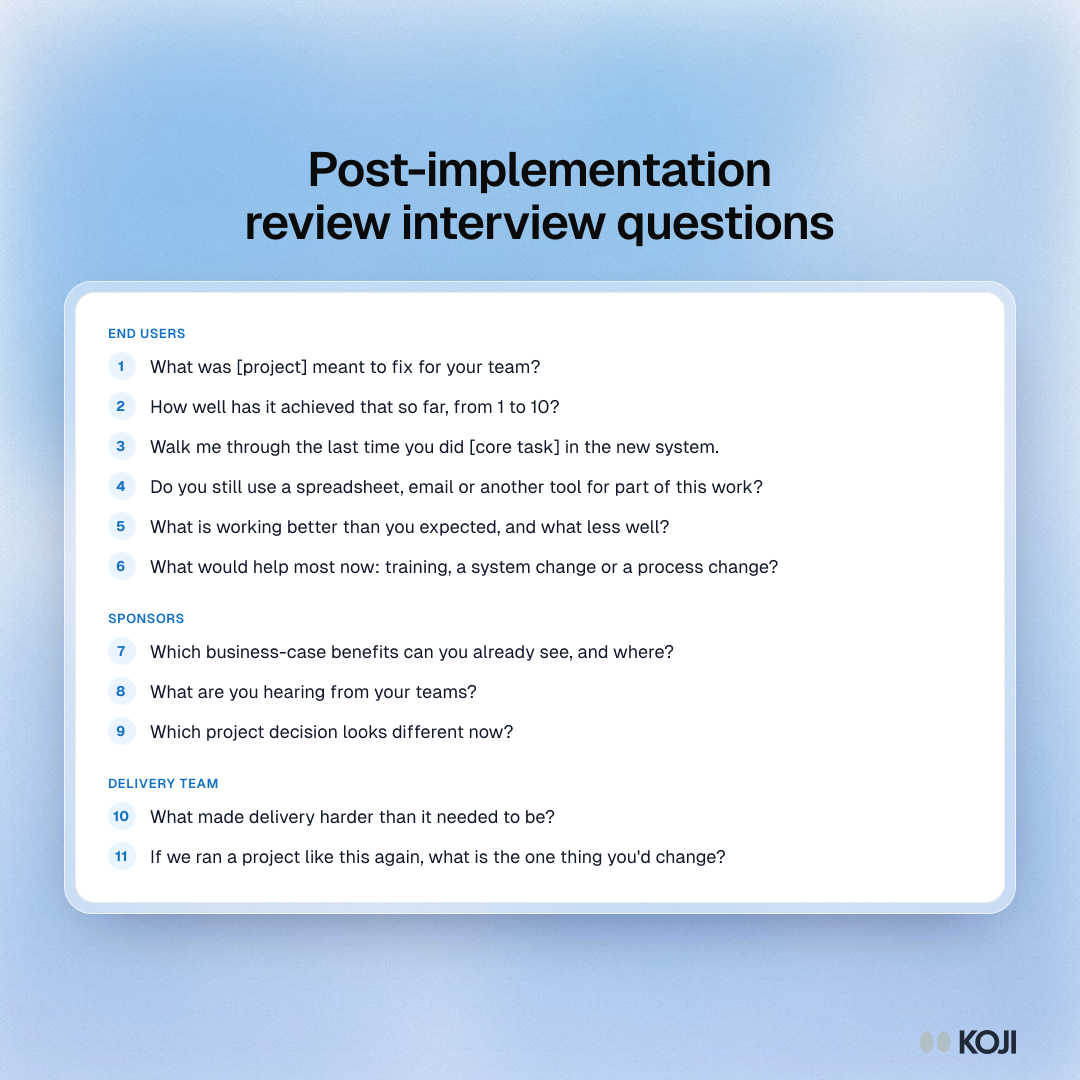
- (Open) "In your own words, what was [project] meant to fix for your team?" Probe: "What did that look like before go-live?"
- (1 to 10 scale) "How well has it achieved that so far? 1 is not at all, 10 is fully." Probe: "What would move it up two points?"
- (Open) "Walk me through the last time you did [core task] in the new system, start to finish." Probe: "Was there a step that happened outside it?"
- (Yes/no) "Do you still use a spreadsheet, email or another tool for any part of this work?" Probe: "What does it do that the system doesn't?"
- (Open) "What is working better than you expected, and what less well?" Probe: "When did that last cost you time?"
- (Open) "Is there anything you need that the system doesn't do, or does differently from how you work?" Probe: "Was that ever raised during the project?"
- (Single choice) "What would help most now? Training on a specific task / A change to the system / A change to the process or policy / Nothing, it works." Probe: "Which task, change or rule?"
- (Open) "If we ran a project like this again, what is the one thing you'd change about how it was done?" Probe: "Why that one?"
Closing question: "Is there anything about how this went live that the project team should know and hasn't asked?"
For sponsors, swap questions 3, 4 and 6 for: "Which business-case benefits can you already see, and where?", "What are you hearing from your teams?" and "Which project decision looks different now?". For the delivery team, ask what made delivery harder than it needed to be.
What you get
Each interview gets its own quality rating, key findings and pain points. The report pulls the open answers into themes with the share of participants behind each one, charts the scale, single choice and yes/no answers, and links every finding to the supporting responses. See how to analyse AI-moderated interview results.
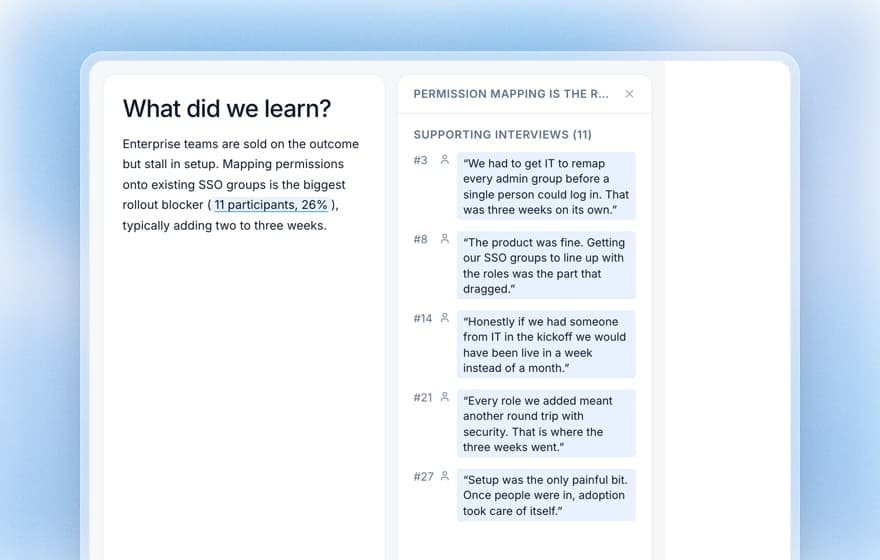
The day after fieldwork closes, you build one table: each promised benefit, what each lens says about it, the gaps sorted into solution, adoption and process, and an owner for each. Download the report as an editable PowerPoint deck or a PDF and use it as the backbone of the steering committee pack. Instead of "users seem unhappy", you say "the approval benefit is real for head office and missing at the two regional sites, because their managers approve on mobile and the mobile flow was cut in phase 2. Here are four quotes."
The same playbook elsewhere
The PIR is one version of a "did the change work?" study, and other roles run the same play. UX researchers measure a redesign before and after; see the before-and-after redesign study. Customer success teams ask accounts what changed at renewal; see renewal risk interviews. Founders hear a pilot's end users before the sponsor decides; see enterprise pilot interviews. Borrow their baseline: if you ran AI-drafted requirements validation before build, you already know what "working" meant to users.
Why Koji for post-implementation reviews
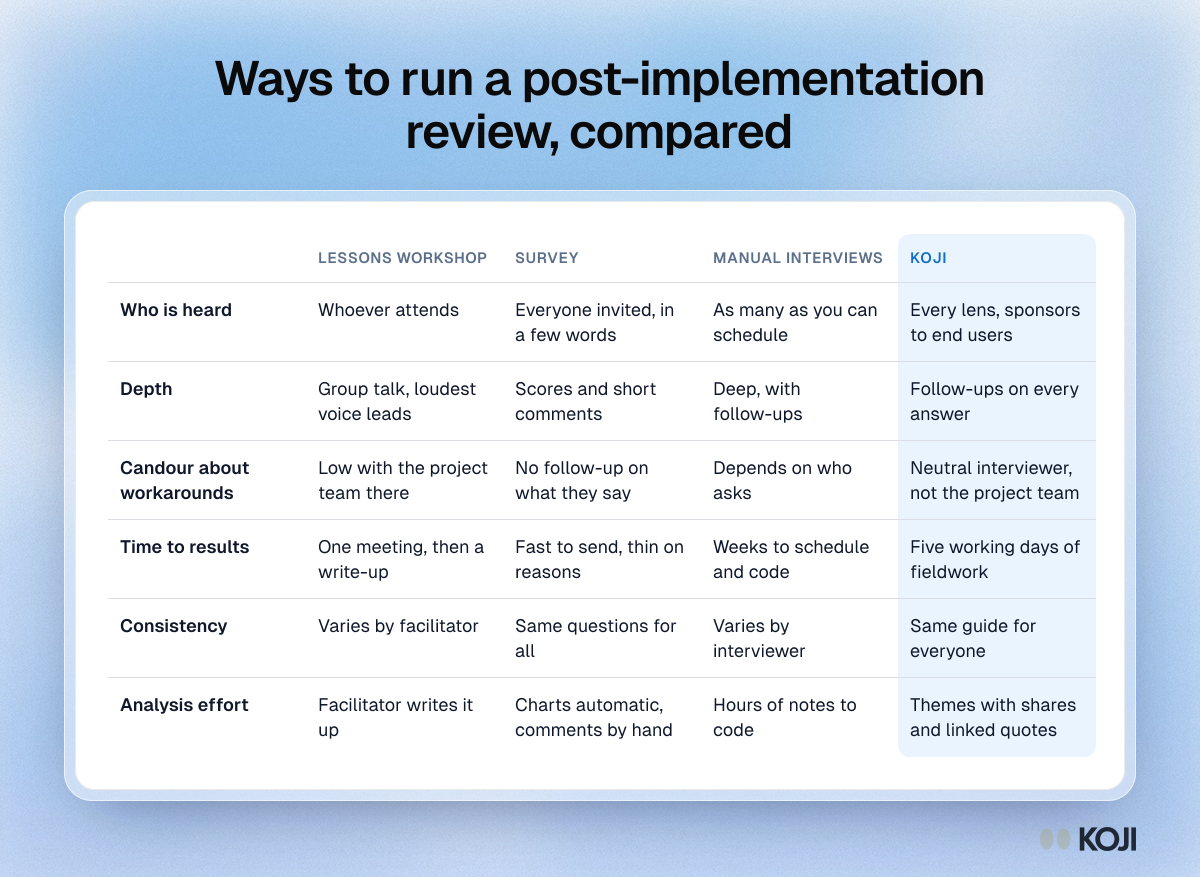
Pricing for these alternatives varies and is not always public, so the table compares what each method gives you. A workshop hears whoever attends, a survey gets scores without the reasons, and manual interviews go deep but take weeks to schedule and code.
- Every lens, in one week. 30 end users do not need 30 calendar slots. See asynchronous interviews.
- A neutral interviewer. Nobody from the project team is asking, so "I still do it in Excel" gets said.
- Every "less well" gets a "why". Up to three follow-ups per question bring the last real example.
- The same guide for everyone. A difference between the regional sites and head office is a difference in the work, not in who interviewed them.
- Evidence that survives the steering committee. Themes come with the share of participants behind them and links to the quotes, and the report downloads as slides.
Questions you might have about AI interviews
Will people describe their real workarounds to an AI? They describe them when they believe it is safe. Say in the invitation who reads the results and that nothing is attributed by name, and turn on removing personal details so names, emails and employers are taken out of transcripts when each interview finishes. It can miss some details, so check quotes before you share them. For evidence on how people respond, read will customers open up to an AI interviewer.
Can it follow a step-by-step account of a process? Yes, if you ask for one. Question 3 asks for the last time, start to finish, and follow-ups pick up the step that happened outside the system.
Is it safe to record how people really work? Read the AI interview data privacy and security guide before you invite anyone, and use guardrails to keep out topics you do not want covered. Only conversations that pass the quality gate use credits.
When Koji may not be the right fit
If the change touched one team of eight people, a 45-minute retrospective does the job. If the question is purely quantitative (did cycle time fall?), pull it from the system's own data first and interview only to explain the number. To watch someone use the system, sit with them. Koji fits when the change reached dozens of people across roles and sites, and you need all of them heard before the steering committee.
Metrics to track
- Each business-case benefit: realised, partial or missing, by lens
- Share of end users who use something outside the system for the core task
- Average 1 to 10 score on goal achievement, by role and site
- Gaps by bucket (solution, adoption, process), and how many closed by day 180
- Lessons carried into the next project's plan, with an owner
FAQ
When should I run the post-implementation review? At day 60 to 90, after one full business cycle such as the first month-end close. Earlier, you measure hypercare noise.
How many people should I interview? Four to six sponsors, five to eight from the delivery team and 15 to 30 end users, with at least three per role.
Should the project team run it? They should own the actions, not ask the questions. People are more candid with a neutral interviewer.
Can I run a PIR on the Free plan? Yes, with text interviews and the Post-Implementation Review template. Voice interviews and CSV import need the Interviews plan or Enterprise.
What does it cost in credits? A text interview is 1 credit and a voice interview is 3. Only conversations that pass the quality check use credits.
Does this replace the benefits report? No. The benefits report says whether the numbers moved. The PIR says why, and what to change.
Start your review
Open the template gallery, filter to Business Analysts, pick Post-Implementation Review and paste the brief above. More on the role is on the Koji page for business analysts, and every playbook for analysts is in the use case library. If adoption is what worries you before go-live, the change readiness survey guide covers measuring it ahead of the PIR.