An agency client deliverable built from AI-moderated interviews is a decision-led debrief: a short deck in the client's language, an evidence trail behind every claim, and a plain statement of how the work was done, AI included. AI-moderated interviews change the job because the interviews run in parallel instead of on one moderator's calendar, and the deck arrives as a first draft. That shifts the agency's value from assembling slides to judging what matters. By the end of this playbook you will be able to run the Five-Day Debrief Pack: from the last interview to a debrief your client can act on, with the AI disclosure clients now expect.
Read this next to the agency use-case library, which collects every playbook for research, brand and creative agencies.
Why the deliverable matters more now
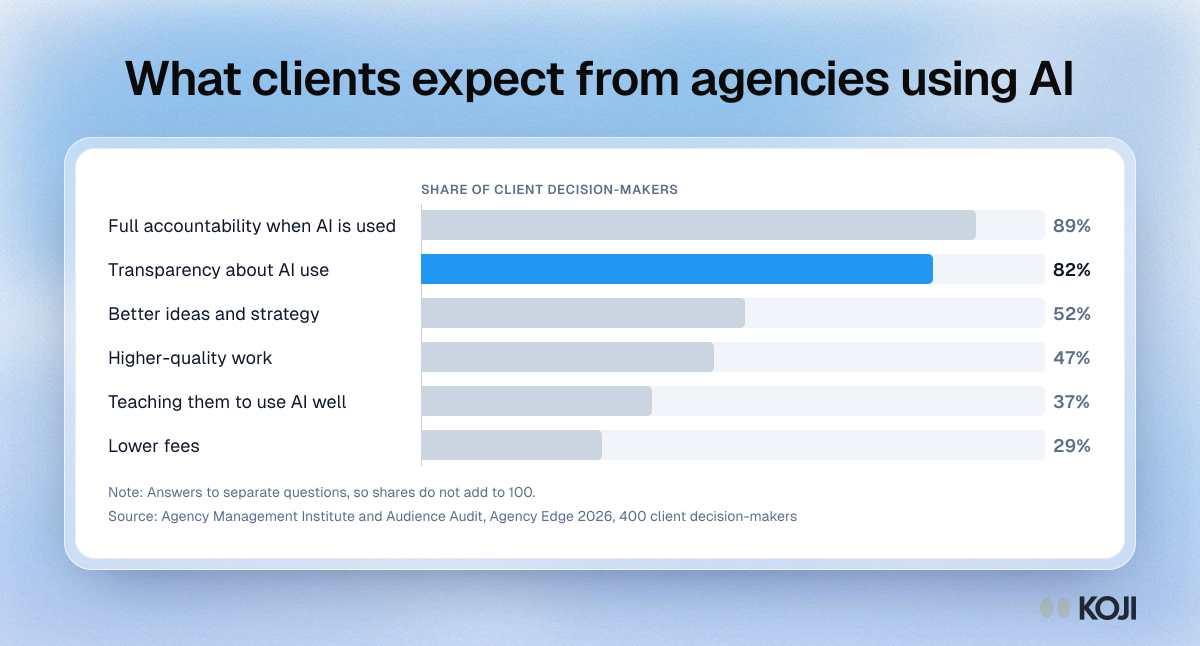
Clients are not asking agencies to be cheaper because of AI. They are asking for better thinking and more openness. In the Agency Edge 2026 study by Agency Management Institute and Audience Audit, which surveyed 400 client-side decision-makers, only 29% said they expect agencies to reduce fees as AI use grows. 52% want better ideas and strategy, and 47% want higher-quality work (Agency Management Institute, 2026).
The same study found that 89% of clients want full agency accountability even when AI is used, and 82% want transparency about AI use. Roughly a third say their agency only "sort of" communicates how AI is used, when and why (Agency Edge 2026).
The industry codes now say the same thing. The 2025 ICC/ESOMAR International Code sets out transparency duties towards clients for the use of AI in data collection, analysis, reporting and interpretation (Greenbook, 2025). A joint guidance note from MRS and ESOMAR goes further on practice: agencies should be clear with clients about "what AI tools have been used in their project, at what stage and for what purpose", and it recommends making disclosure of the platforms an agency uses the norm when contracts are agreed (MRS and ESOMAR, Client Data, AI, and the Boundaries of Consent).
Two more numbers explain why the evidence trail matters. In Greenbook's 2025 GRIT Insights Practice Report, 40% of researchers named data quality as a top barrier (Greenbook, 2025). And Qualtrics' 2026 Market Research Trends report, based on more than 3,000 researchers, found traditional teams were nearly twice as likely as AI-first teams to see flat or falling demand for their research, 37% against 20% (Qualtrics, 2025).
Put together: clients will buy AI-assisted research, but they judge you on whether you can stand behind every slide. The cost of a weak deliverable is not a bad meeting. It is a client who decides the AI did the work and asks why they are paying you.
What good looks like: the Five-Day Debrief Pack
We've watched the same pattern sink good fieldwork again and again: the study is solid, the deck is a transcript summary with a logo on it, and the client's real decision never gets named. The Five-Day Debrief Pack fixes that by making the decision the spine of everything. It has five parts.

- A decision page. One slide, first, that names the decision the client has to make and your recommendation. Everything else supports it.
- Three to five headline findings. Each one a full sentence that says what was found, with the share of participants behind it and one verbatim quote. Koji's export gives you up to eight insight slides. Keep the ones that bear on the decision in the main body and move the rest to the appendix.
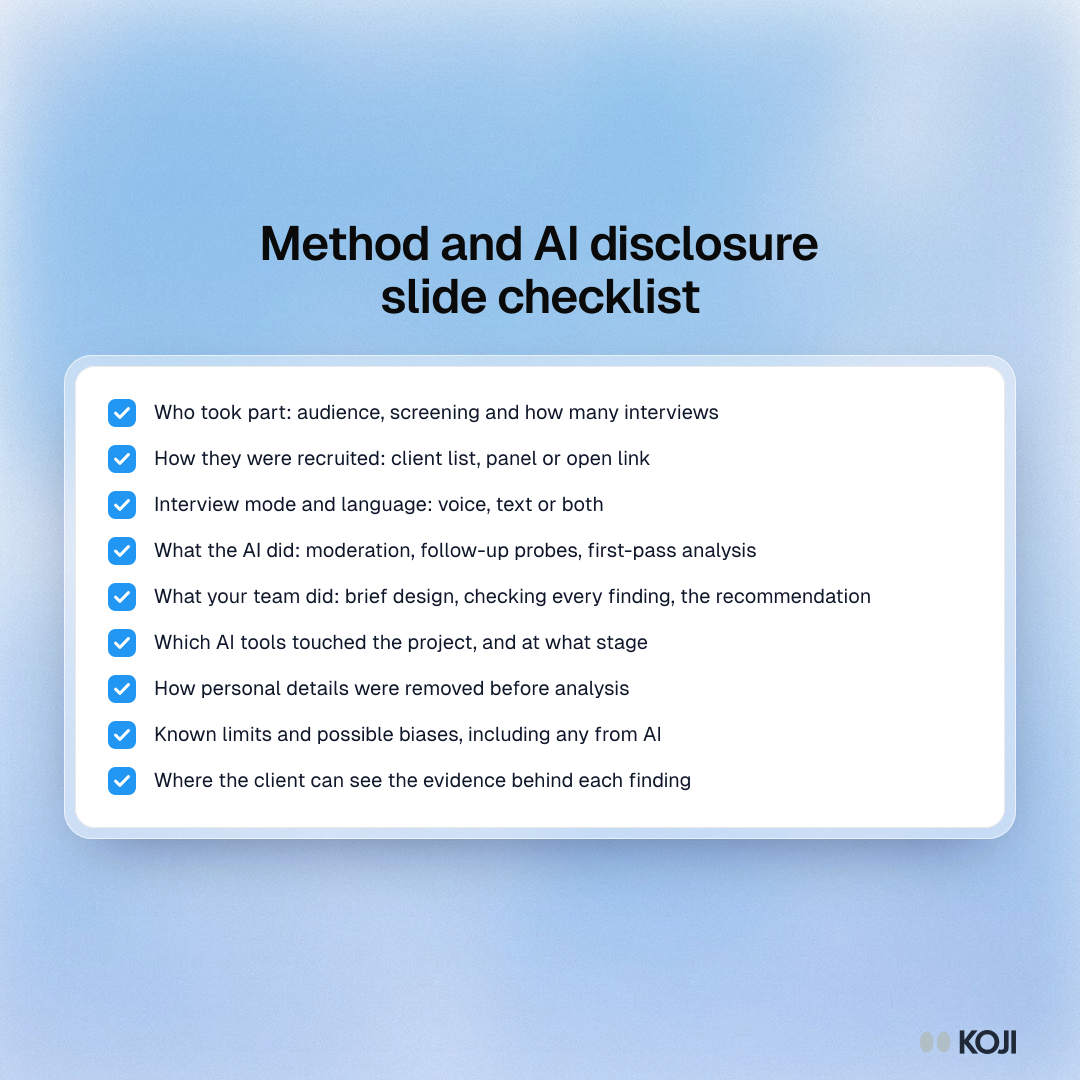
- A method and AI slide. Who you spoke to, how they were recruited, how many interviews, voice or text, the language, what the AI did and what your team did. This is the slide clients now look for.
- An evidence appendix. Per-question slides with their charts, personas, and the quotes behind each headline, so a sceptical stakeholder can check your work.
- A clean data handover. By default: the PDF report and cleaned quotes. Raw transcripts only if the contract says so, and only after personal details are removed.
Run it on a fixed clock. Count back five working days from the debrief date. Day 1: read the report and check every finding against its quotes. Day 2: download the deck and cut it to the decision. Day 3: add the method and AI slide and build the appendix. Day 4: pre-wire the sponsor with the three headlines. Day 5: run the debrief live, then send the PDF and the data handover.
Our rule for strength of evidence: a finding backed by fewer than three participants goes in as a signal to watch, never as a headline. Say so on the slide.
What goes on the method and AI slide
Write it the way you would want to read it as a client. Short, specific and checkable.
Common mistakes
- Shipping the export as the deliverable. The downloaded deck is a strong first draft. Sending it unedited tells the client the machine did the thinking.
- Leading with method. Decision first, findings second, method third. Clients who want the method will look for it.
- Headlines that are topics. "Pricing" is a topic. "Trial users drop off at the first bill, not the first week" is a finding.
- Quotes with names on them. Participant names and employers in a client deck is a data protection problem waiting to happen. Turn on Remove personal details before fieldwork starts.
- Hiding the AI. If a client finds out later that an AI moderated the interviews, every finding loses credibility. Say it up front and say what your team checked.
- Emailing the deck without a debrief. A 45-minute live session where the sponsor hears the findings first gets decisions made. An attachment gets skimmed.
How to set it up in Koji, step by step
Say your agency is running a study for a subscription skincare brand that wants to know why trial customers do not convert to a paid subscription. Here is the Koji setup, end to end.
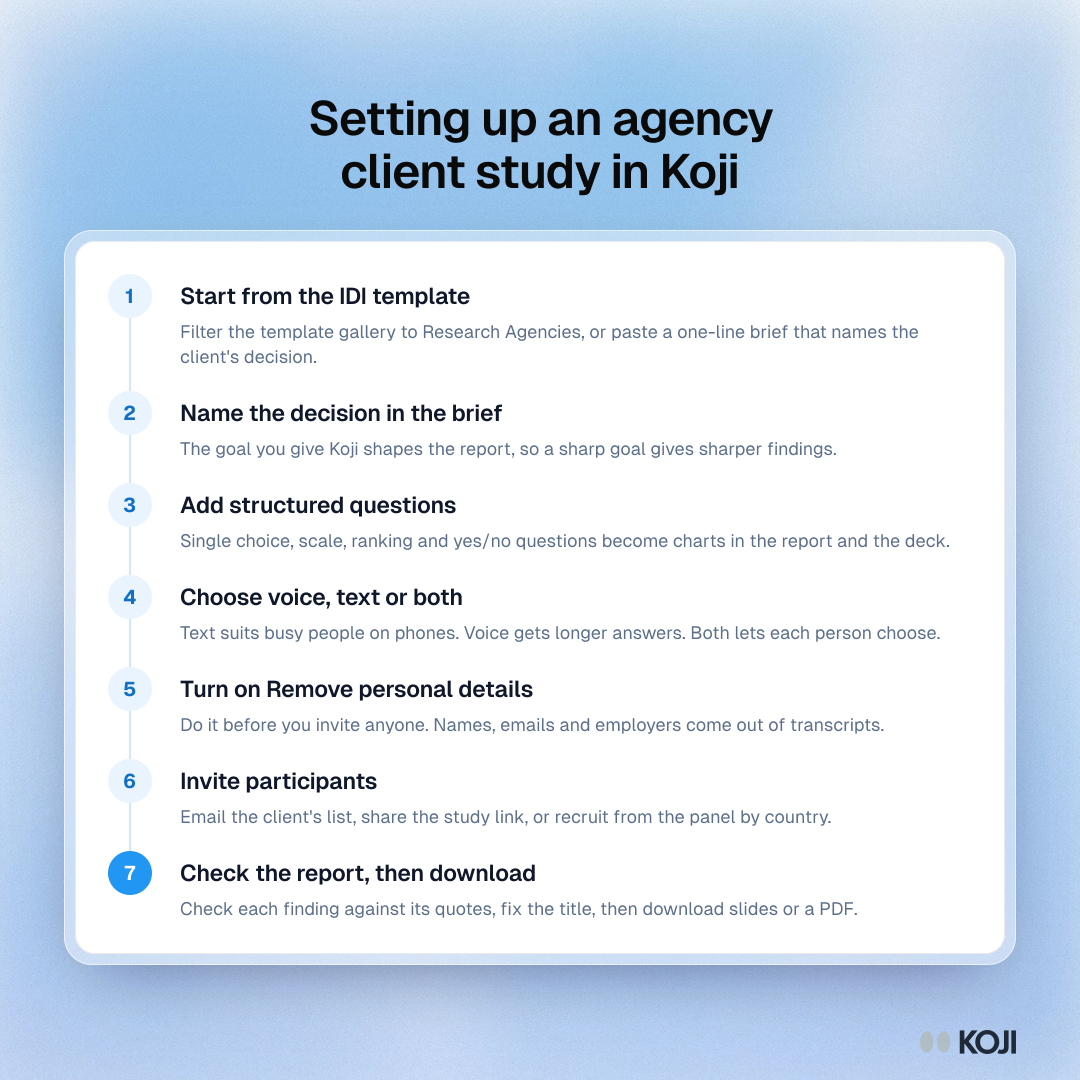
- Start from the template. In the dashboard's template gallery, filter to Research Agencies and pick the In-Depth Interview (IDI) Template. Or paste this brief into the "What do you want to research?" box: "Find out why trial customers of a subscription skincare brand do not convert to paid, what they compared us with, and what would have changed their mind, so the client can decide whether to change the trial length or the first-box offer."
- Shape the research brief. Koji drafts the goal, the participant profile and the questions. Name the client's decision in the brief: Koji writes the report around the goal you give it, so a sharp goal gives you sharper findings.
- Add structured questions where a slide needs a number. Koji supports single choice, multiple choice, scale, ranking and yes/no questions alongside open ones, and each structured question becomes a chart in the report and an editable chart in the deck.
- Choose voice or text. Text suits busy consumers on their phones. Voice gets longer, richer answers. You can offer both and let each participant choose.
- Turn on Remove personal details in the study's privacy settings before you invite anyone. Koji then strips names, emails, phone numbers, postal addresses and employers from transcripts when each interview finishes. It applies to interviews that finish after you turn it on, and it can miss things, so still check quotes before they go to the client.
- Invite participants. Email the client's trial list from the study's Self-recruit tab (recruitment email is on paid plans), share the study link, or recruit from Koji's research panel by country.
- Read the report before you download anything. Open each finding, check its supporting quotes, and fix the report title so it says what was found.
- Download and edit. Use the download button for an editable PowerPoint deck or a PDF of the full report. Then do the agency work: write the decision page, cut to your headlines, add the method and AI slide, and move the rest to the appendix.
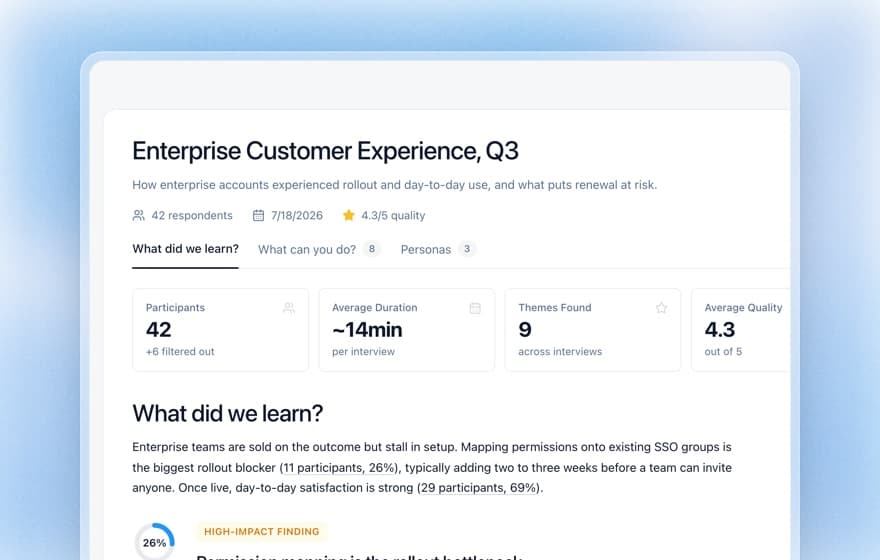
What the deck contains. A cover with the report's photo and the participant count, an "at a glance" slide on who you heard from, an executive summary, up to eight insight slides each with a participant quote, one slide per question with its chart, persona slides, recommendations three to a slide, and a closing slide. The charts are native PowerPoint charts, so you can restyle them in your client's template. The deck opens in PowerPoint, Keynote and Google Slides. Two things to change every time: the closing slide credits Koji, so replace it with your own, and the quote slides label each quote with the participant's name if they gave one, so check every label.
Which plan. Report downloads, report publishing, Remove personal details and free read-only workspace viewers are on every plan, including Free, which comes with 10 interviews to try it. Recruitment email and panel recruitment need a paid plan. Brand themes, which put your client's logo, colours and font on the interview itself, are available on Enterprise plans.
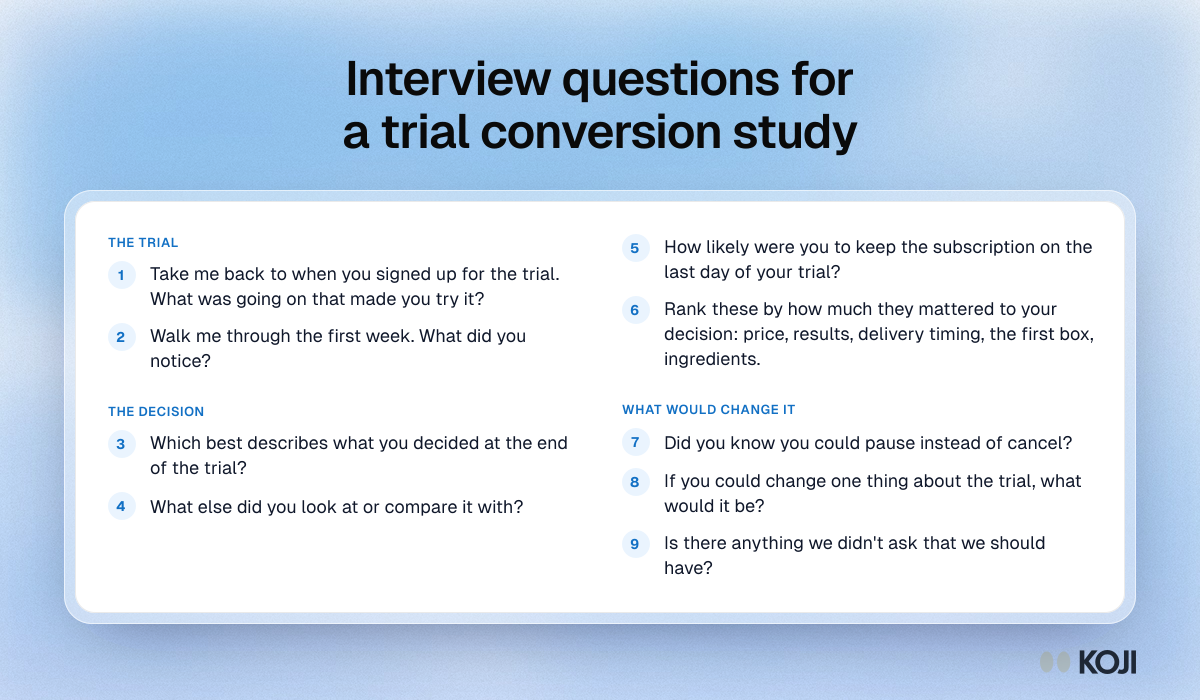
Copy this interview guide
A guide built for the deck: each question maps to a slide. Paste it into any tool, or into Koji's brief.
Opening line: "Thanks for taking part. We're talking to people who tried [brand] recently to understand how the trial went for you. There are no right answers, and we're not the brand itself, so be as candid as you like."
- Open. "Take me back to when you signed up for the trial. What was going on that made you try it?" Probe: "What were you using before?"
- Open. "Walk me through the first week. What did you notice?" Probe: "Was there a moment it felt worth it, or not?"
- Single choice. "Which best describes what you decided at the end of the trial?" (Kept it, Cancelled before paying, Paid once then cancelled, Still deciding) Probe: "What tipped it?"
- Open. "What else did you look at or compare it with?" Probe: "What did that offer that we didn't?"
- Scale, 1 to 10. "How likely were you to keep the subscription on the last day of your trial?" Probe: "What would have moved that up by two points?"
- Ranking. "Rank these by how much they mattered to your decision: price, results, delivery timing, the first box, ingredients." Probe: "Why is the top one on top?"
- Yes/no. "Did you know you could pause instead of cancel?" Probe: "Would that have changed anything?"
- Open. "If you could change one thing about the trial, what would it be?" Probe: "Why that one?"
Closing question: "Is there anything we didn't ask that we should have?"
What you get, and what to send whom
The day fieldwork closes you have a report with themes, findings and the quotes behind each one, every claim traceable to the interview it came from. You also have an editable deck and a PDF. Here is how agencies use them.
- The sponsor gets the debrief first, live, 45 minutes, decision page first. Pre-wire them the day before with the three headlines so nothing surprises them in front of their boss.
- The wider client team gets the PDF after the meeting, with the edited deck. If they want to dig in, add them as workspace viewers: viewers can read every study, report and result in the workspace and download exports, but cannot edit, spend or invite, and they never take a seat.
- Sceptics get the evidence. When a stakeholder doubts a finding, open it in the report and show the quotes behind it. That is worth more than any slide.
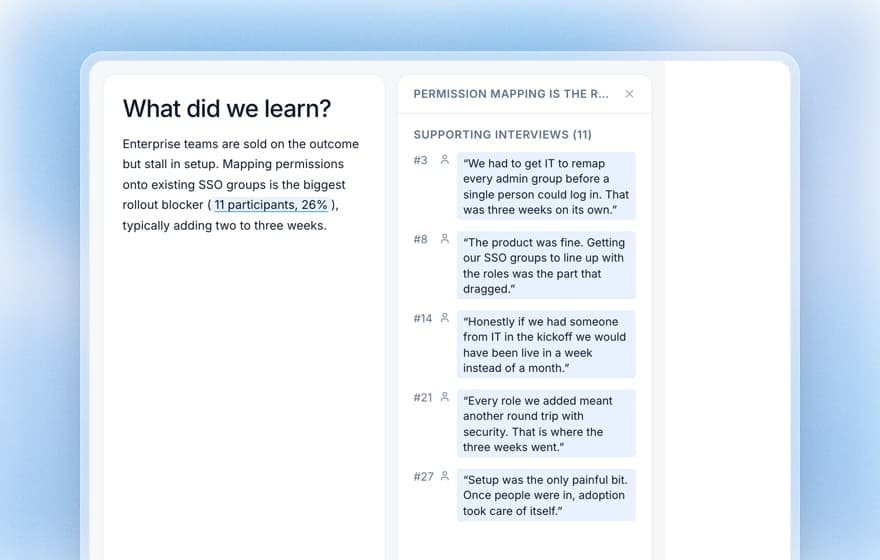
If the client also wants a link they can forward, publish the report and share the public page. See publishing and sharing reports and tracing findings back to the evidence.
The same playbook elsewhere
The Five-Day Debrief Pack works anywhere a researcher hands findings to someone who did not sit in the interviews. In-house UX teams use the same decision-first structure for product reviews, covered in the 7-slide customer research readout. Founders use it for investor updates. Within agency work, it is the natural last step of new-client stakeholder discovery and of multi-market qualitative studies, where one deck has to carry findings from several countries. Koji writes the report in the study's language and keeps quotes verbatim, so a German study gets a German report.
Why Koji for client deliverables
The honest comparison is against how agencies already build deliverables.
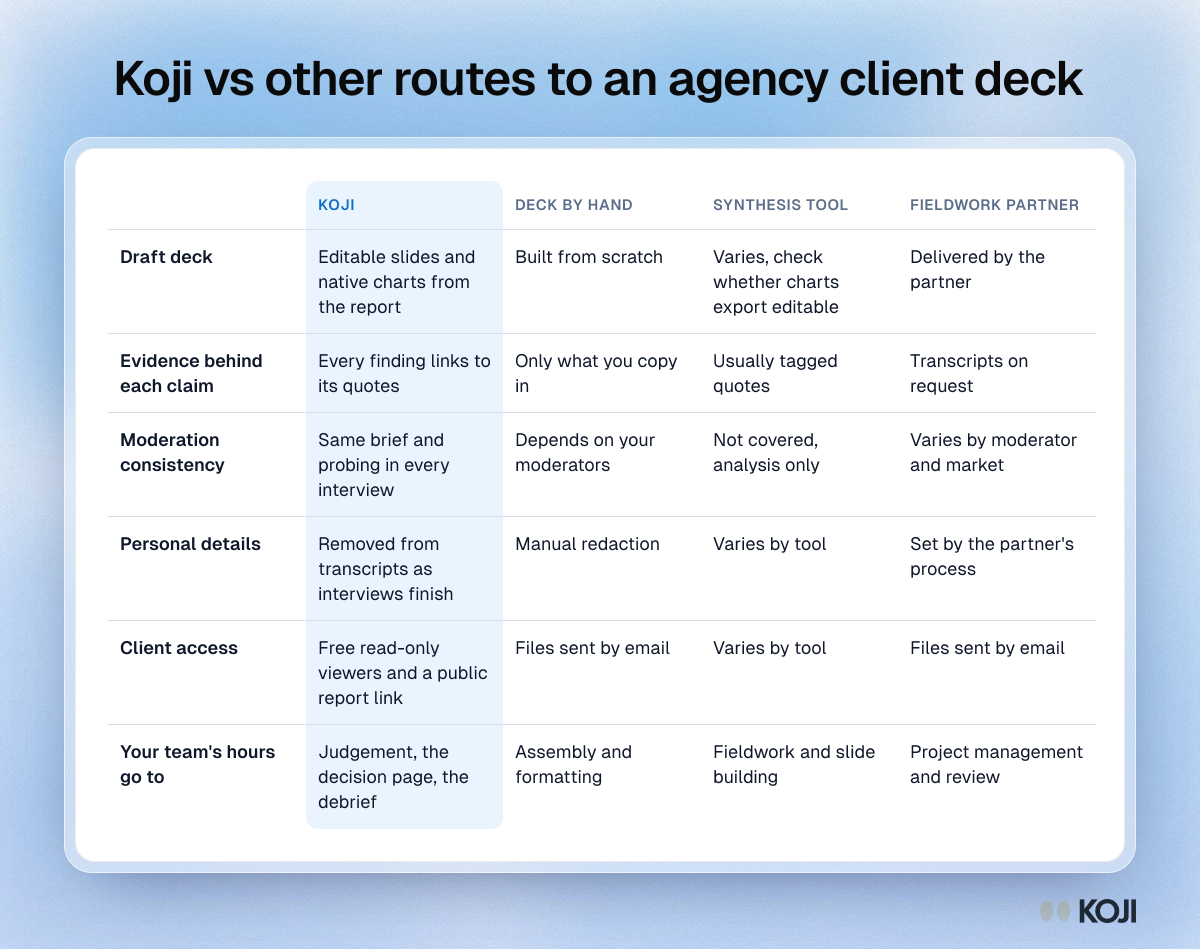
- The deck is a draft from day one. The download turns the report into editable slides with native charts, so your hours go into judgement, not copy and paste. Compare it with other tools in research tools that export to PowerPoint.
- Every claim has its evidence. Findings link to the quotes behind them, which is exactly what the accountability question needs.
- Consistent moderation across every interview. The same brief, the same probing, in every interview and every language.
- Privacy at source. Remove personal details cleans transcripts as each interview finishes, before anything reaches a deck.
- Clients can look without breaking anything. Free read-only viewers let the client team see the work without a seat or edit rights.
Questions agencies ask about AI interviews
Will the client accept it as real qual? It is real people answering open questions with follow-up probes, in their own words, and you can show the quotes behind every finding. What clients reject is opacity. Tell them on the method slide what the AI did (moderation, first-pass analysis) and what your team did (brief design, checking every finding, the recommendation).
How do I know the interviews are good enough to put my name on? The report header shows overall interview quality across the study, and each interview has its own quality score, so you can see weak interviews before they shape a finding. Read the quotes behind each headline yourself before it goes in the deck.
What happens to my client's data? Remove personal details strips direct identifiers from transcripts, and when anything is removed the voice recording is not kept either. For enterprise clients with stricter needs, see anonymising customer interview data.
When Koji may not be the right fit
If your client's deliverable depends on in-person ethnography, observing people in their homes or shops, or on group dynamics you want to watch, Koji does not replace that. If the client requires a deck in a locked corporate template with heavy design, you will still rebuild slides by hand; the export saves the analysis and the charts, not the design pass. And if the study is fewer than five interviews with senior executives you can reach directly, a human moderator may be the better use of the relationship.
Metrics to track
- Working days from last interview to debrief (aim for five)
- Share of headline findings the client acts on within one quarter
- Number of client questions about method after the debrief (fewer is better)
- Hours spent on the deck per study, before and after
- Repeat briefs from the same client within six months
FAQ
Can I put my agency's branding on the deck? Yes. The deck is a normal editable PowerPoint file, so you can move it into your template and change fonts and colours. Replace the closing slide, which credits Koji.
Can participants see my client's brand during the interview? Brand themes put a logo, colours and font on every interview. They are available on Enterprise plans.
Do I have to disclose that an AI moderated the interviews? The 2025 ICC/ESOMAR Code sets transparency duties to clients about AI in collection, analysis and reporting, and MRS and ESOMAR guidance says to tell clients which AI tools were used, at what stage and why. Disclose it on the method slide.
PDF or slides? Slides for the debrief, so you can edit and present. PDF for the archive and for stakeholders who were not in the room.
How many interviews before the deck is worth making? For one audience, plan on 15 to 30. Fewer than that, label findings as early signals.
Start your next client deliverable
Start from the In-Depth Interview (IDI) Template in Koji's template gallery, or paste the brief above into "What do you want to research?". Run your next client study, check the report, download the deck, and spend your time where the client is paying for it: the decision. See how Koji works for research agencies.