Select All That Apply or Pick Your Top 3? How to Cap a Multi-Select Question
When to use select all that apply, a yes/no question per item, or a capped top 3 pick. What Pew and Smyth et al. found about under-counting and order effects, and how to word and read each format.
Short answer: use "select all that apply" only when you want a rough list of everything people recognise, and expect it to under-count. When you need to know how many people have or do each thing, ask a yes/no question per item instead. When you need to know what matters most, cap the question ("pick up to 3", or "pick exactly 3") and ask why straight after. The three formats measure different things, so their numbers can't be compared with each other.
Try it this week: in a Koji study, add a multiple choice question, open its pick-limit menu and choose Exact number (3) or Range (1 to 3), set the option order to Randomize except last 1 so "None of these" stays at the bottom, and keep one follow-up so every person explains their top pick. The rest of this guide explains when each choice is the right one.
Three formats, three different measures
A multi-select question looks like one tool. It's really three, and each answers a different question.
| Format | What it measures | Typical wording | Use it when |
|---|---|---|---|
| Select all that apply | Endorsement: what comes to mind and seems true at a glance | "Which of these tools do you use? Select all that apply." | You want a quick, rough map of a long list and can live with under-counting |
| Yes/no per item (forced choice) | Prevalence: how many people have, do or want each item | "Do you use Slack for this? Yes / No" for each item | The share for each item is the number you'll report |
| Capped pick (top 3, up to 3) | Priority: what matters most when people have to trade off | "Which 3 of these matter most to you?" | You need a ranking you can act on, like a roadmap or a message test |
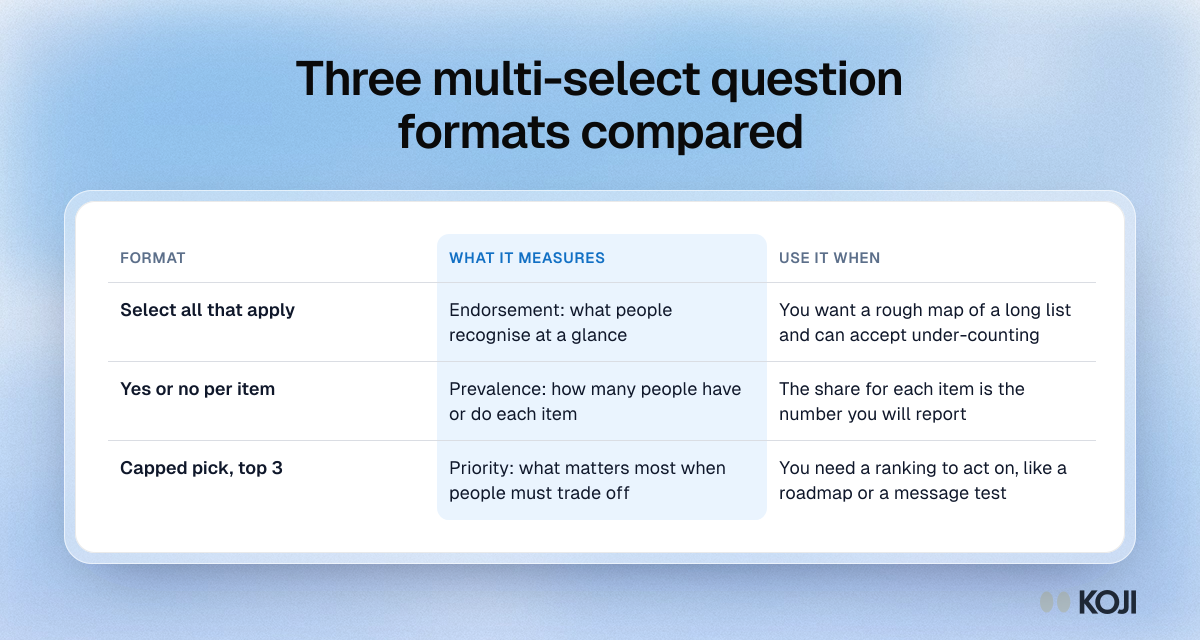
The mistake most teams make is using the first format to answer the second or third question. A select-all list where every option scores between 40% and 70% tells you very little about what to build first.
What the research says about select-all lists
They under-count
The best evidence comes from survey methodologists who ran the same items in both formats, side by side.
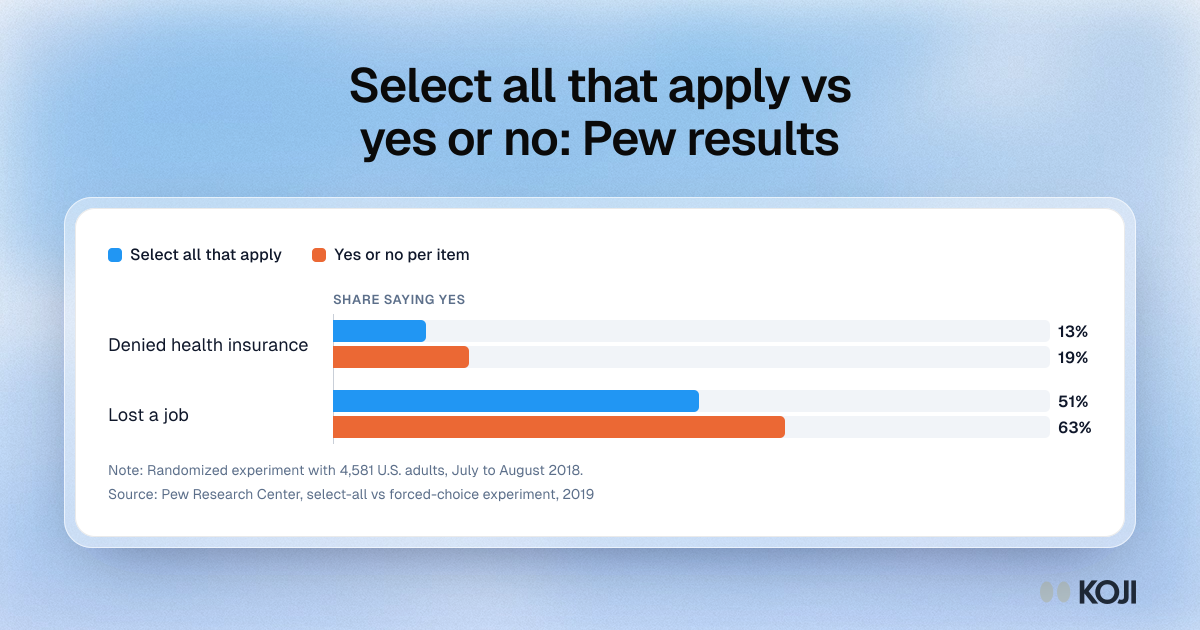
- In a Pew Research Center experiment with 4,581 U.S. adults on its American Trends Panel (fielded July 30 to August 12, 2018), estimates of personal experiences averaged 8 percentage points higher when each item was asked as its own yes/no question than when the same items sat in a select-all checklist (Pew Research Center, "When Online Survey Respondents Only 'Select Some That Apply'", 2019).
- The gaps on single items were large. Being denied health insurance came out at 19% with forced choice and 13% with select-all. Losing a job came out at 63% versus 51% (same Pew report).
- Smyth, Dillman, Christian and Stern ran 16 experimental comparisons across two web surveys and a paper survey in 2002 and 2003. In their results, people who answered yes/no for each item endorsed more options and spent more time answering than people given a check-all list (Public Opinion Quarterly, 2006).
The authors explain the mechanism plainly: the forced-choice format "asks respondents to provide an answer (yes or no) for each response option, a task that should encourage respondents to consider and come to a judgment about each item individually." A blank box in a select-all list can mean "no", "didn't read it" or "couldn't be bothered", and you can't tell which.
They are more sensitive to option order
Pew also looked across 21 of its online surveys and found an average order effect of 3 percentage points for select-all questions and 0 points for forced-choice questions. People skimming a checklist tick what they read first. With 300 respondents a 3-point swing is noise. With the 20 to 30 people most interview studies have, it can decide which item comes out on top.
What they get right
Pew notes that the rank order of items was largely similar across the two formats, with differences mostly inside sampling error. So a select-all list is fine for a rough "which of these are common" read. It's the absolute shares that are off.
That evidence led Pew to a policy: it "has adopted a policy of using a forced-choice format instead of a select-all-that-apply list in its online surveys whenever possible."
What a cap changes, and what nobody has measured
A capped question ("pick your top 3") is a different measure again. It forces a trade-off, so it shows priority rather than prevalence. That makes it the right format for "which problem should we solve first", "which message is clearest" or "which feature would you give up last".
Be honest about the evidence here. The Pew and Smyth studies compare select-all with forced choice. We found no study that isolates the effect of the cap itself, for example comparing "pick up to 3" with "pick exactly 3" on the same items. The advice below on caps is practice, not measured fact.
Rules for capped questions that hold up in practice:
- Pick the cap from the list length. Three is a sensible default for 7 to 12 options. For 5 or fewer options a cap of 3 barely forces a choice, so use a single choice or a ranking question.
- Exact or "up to"? "Exactly 3" gives every person the same weight and makes counts easy to read. "Up to 3" is kinder when some people genuinely care about one thing, but those people then count less in the totals. Use exact when you'll report a ranking, up to when you'll read the answers person by person.
- Always ask why. A capped pick tells you what. The follow-up tells you whether two people who both picked "Integrations" meant the same thing.
- Report capped counts as capped. "48% put pricing in their top 3" is a different claim from "48% care about pricing". Never put a capped result next to a select-all result from another study as if they measured the same thing.
- Shuffle the options. A cap doesn't remove order effects, so randomize when the options have no natural order.
Which format should you use?
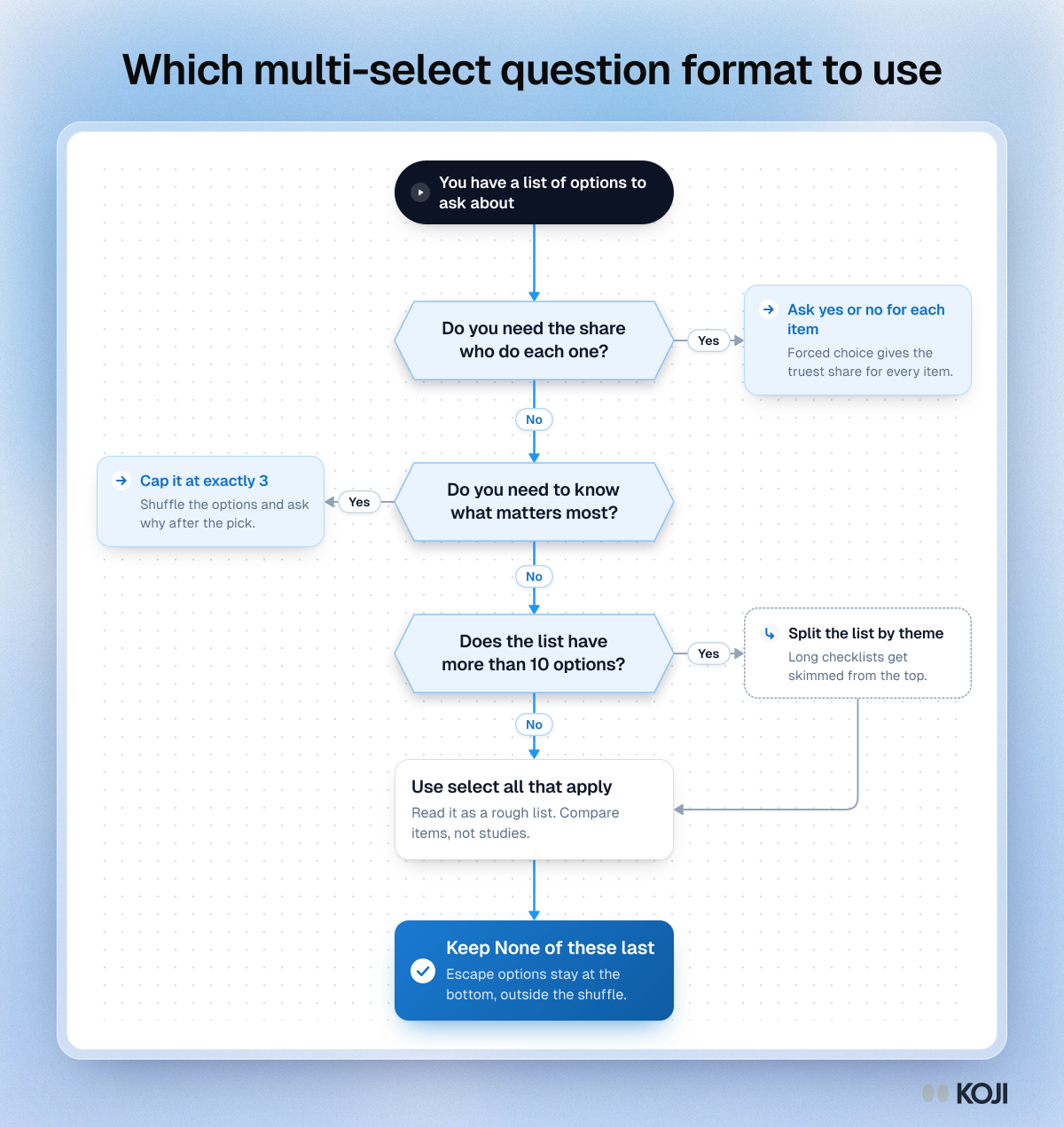
Work from the sentence you'll write in the report:
- "X% of customers use Y" → yes/no per item.
- "The top three reasons were..." → capped pick, with a why follow-up.
- "People mentioned a wide range of tools, mostly A, B and C" → select-all is fine.
If the list has more than about 10 items and you need prevalence, a page of yes/no questions gets long. Split the list by theme, or screen first and only ask the yes/no items that apply.
How to word each format
Select all that apply
- Say it in the question: "Select all that apply."
- Keep it to 10 options or fewer, and put "None of these" last.
- Don't expect absolute shares to hold; compare items with each other, not with other studies.
Yes/no per item
- One short question per item, all with the same stem: "In the last month, have you used...?"
- Use a time window so "yes" means something you can count.
- Allow "Not sure" only when people genuinely might not know.
Capped pick
- Put the cap in the question and the instruction: "Which 3 matter most to you? Pick exactly 3."
- Name the decision the pick feeds: "...when choosing a tool like this."
- Ask the why straight after, while the choice is fresh.
A worked example: 8 options, 25 people
This example is illustrative, to show how the formats read differently. The numbers aren't from a real study.

A product manager wants to know which of 8 onboarding problems to fix first and has 25 customers to ask.
- Select-all version: 6 of the 8 problems get ticked by 9 to 16 people. Everything looks important and the order between neighbours is within a couple of people, so a 3-point order effect could swap them.
- Capped version (exactly 3, shuffled, with a why): each person makes 3 picks, 75 in all. Two problems get 18 and 14 picks, and the rest spread thin. The why answers show that the second problem is two different issues under one label, which no checkbox would have shown.
The capped version gives the manager a decision. The select-all version gives them a list.
How Koji helps
Koji runs these formats inside an AI-moderated interview, so every answer can come with its reason. What you can set today:
- Pick limits on multiple choice. Choose Any number, an Exact number or a Range. In text interviews the answer widget enforces it and shows the hint ("Choose 3", "Choose up to 3", "Choose 2 to 4"). In voice interviews Koji asks the person to adjust when they give too many or too few.
- Option order per person. Order as shown, Randomize order, or Randomize except the last 1 to 3 options, so "Other" or "None of these" stays at the bottom. Each participant keeps their own order if they refresh, and reports always list options in your original order.
- A why after the pick. Each question has a follow-up setting (none, or 1 to 3 follow-ups) with optional guidance, so Koji asks why someone picked what they picked and the report shows the quotes next to the counts.
- Yes/no and single choice questions for the forced-choice version, and ranking questions when you need a full order.
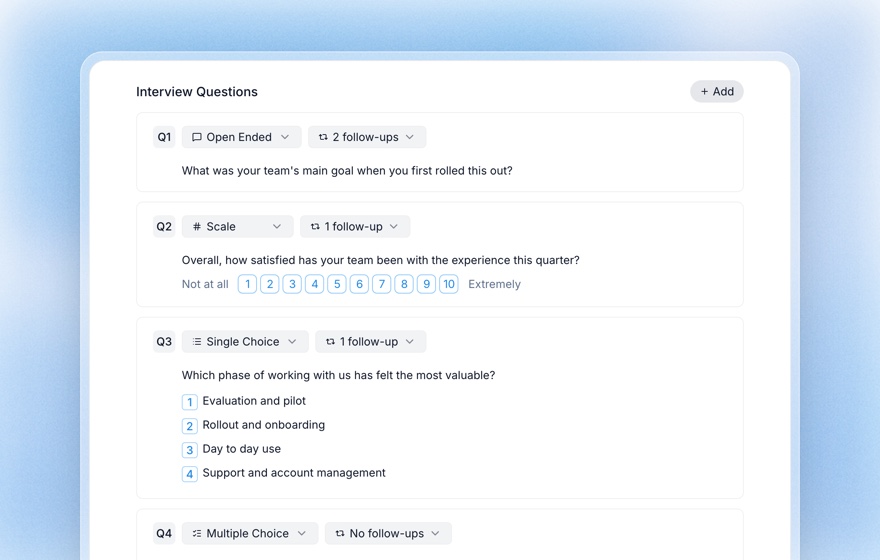
A survey tool can randomize and cap too. The difference is the follow-up: you see why people chose, not only what. You can also ask the research assistant in plain words ("make question 4 pick exactly three and shuffle the options, keep the last one in place") and it sets the same options.
Common mistakes
- Reporting select-all shares as prevalence. They under-count. If the share is the headline, ask yes/no.
- Comparing a capped count with an uncapped one. They measure different things.
- Putting "None of these" in the shuffle. Keep escape options last.
- A cap of 3 on a list of 4. That's barely a choice. Use single choice or ranking.
- No follow-up. A pick without a reason is easy to misread.
Related Resources
- Structured Questions Guide
- Survey Randomization Guide
- Forced-Choice Survey Questions
- Multiple Choice Questions in AI Interviews
- Question Order Bias
- Choice and Ranking Questions
For founders deciding which customer problem to tackle first, the playbook Which problem to solve first applies the capped-pick method end to end.
Sources
- Pew Research Center, "When Online Survey Respondents Only 'Select Some That Apply'", May 2019 (American Trends Panel, 4,581 U.S. adults, July 30 to August 12, 2018).
- Jolene D. Smyth, Don A. Dillman, Leah Melani Christian and Michael J. Stern, "Comparing Check-All and Forced-Choice Question Formats in Web Surveys", Public Opinion Quarterly 70(1), 66 to 77, 2006.
Related Articles
Choice and Ranking Questions in AI Interviews: Capture Preference Data at Scale
Learn how to use single choice, multiple choice, ranking, and yes/no questions in Koji AI interviews — with automatic report charts that show preference distributions across all your participants.
Forced-Choice Questions: How to Eliminate Fence-Sitting and Get Decisive Data
Forced-choice questions remove the neutral or "no opinion" escape hatch so respondents have to commit to a real preference. Learn when to use them, how to write them without bias, and how AI interviews recover the reasoning you would otherwise lose.
Multiple Choice Questions in AI Interviews: Capture Multi-Select Data With Conversational Depth
Learn how Koji's multiple_choice question type captures multi-select data in AI interviews — with automatic AI follow-up on each selection, stacked frequency charts, and a free-form "Other" option that gets thematically coded.
Question Order Bias: How Survey & Interview Sequencing Skews Your Data (2026)
Why the sequence of your questions changes the answers — the classic Pew and Schwarz findings, the four main order effects, a practical sequencing checklist, and how AI moderation neutralizes the risk.
Structured Questions in AI Interviews
Mix quantitative data collection — scales, ratings, multiple choice, ranking — with AI-powered conversational follow-up in a single interview.
Survey Randomization: How to Rotate Questions and Answer Options Without Wrecking Your Data (2026)
Randomizing answer order cancels primacy and recency bias — but randomize the wrong thing and you break your tracker, your skip logic and your comparability. The rules for what to rotate, what to anchor, and what to leave alone.