Interview Snapshots: How to Summarise Every Customer Interview on One Page
What an interview snapshot is, the six parts of Teresa Torres's template, how to fill one in after each interview, and how snapshots feed an opportunity solution tree.
Short answer: An interview snapshot is a one-page summary of a single customer interview, popularised by Teresa Torres in Continuous Discovery Habits. It has six parts: a photo of the participant (or a stand-in), a memorable quote, quick facts, insights, opportunities and an experience map of the story they told. You fill one in straight after each interview, as a team, while the conversation is fresh. Over time the snapshots become a library you can search, compare and use to build an opportunity solution tree. They work because they force synthesis one interview at a time, instead of leaving a pile of recordings to analyse "later".
This guide covers what goes in each part, how to fill a snapshot in, how snapshots connect to the opportunity solution tree, worked examples, common mistakes and how Koji helps.
What an interview snapshot is
Torres sums the idea up herself: "The interview snapshot summarizes what you learned from a single customer interview. Teams should create an interview snapshot for each interview that they conduct." It is not a transcript and not a full report. It is the minimum record that lets someone who wasn't in the room understand who this person is, what story they told and what it means for the product.
The snapshot belongs to continuous discovery, where a product team talks to customers every week rather than in occasional large studies. That cadence is still the exception. In Product Talk's 2022 Continuous Discovery Habits benchmark survey of 1,999 people, 45.3% said they had last talked to a customer in the past week, and 7.8% said they never had. Teams that do interview often hit a different problem: the interviews pile up faster than anyone can analyse them. Typing up one recorded hour by hand takes around four to seven hours, according to the University of Manchester's transcription toolkit hosted by the National Centre for Research Methods. Weekly interviews can't wait for that. A snapshot takes minutes.
There is a cost to skipping synthesis, too. Pendo's 2019 Feature Adoption Report, based on usage data from 615 of its customers' products, found that 80% of features are rarely or never used, and that 12% of features generate 80% of average daily usage. Better feature selection starts with understanding customers' real needs, and a snapshot is how each interview's learning gets captured before it fades.
The six parts of an interview snapshot
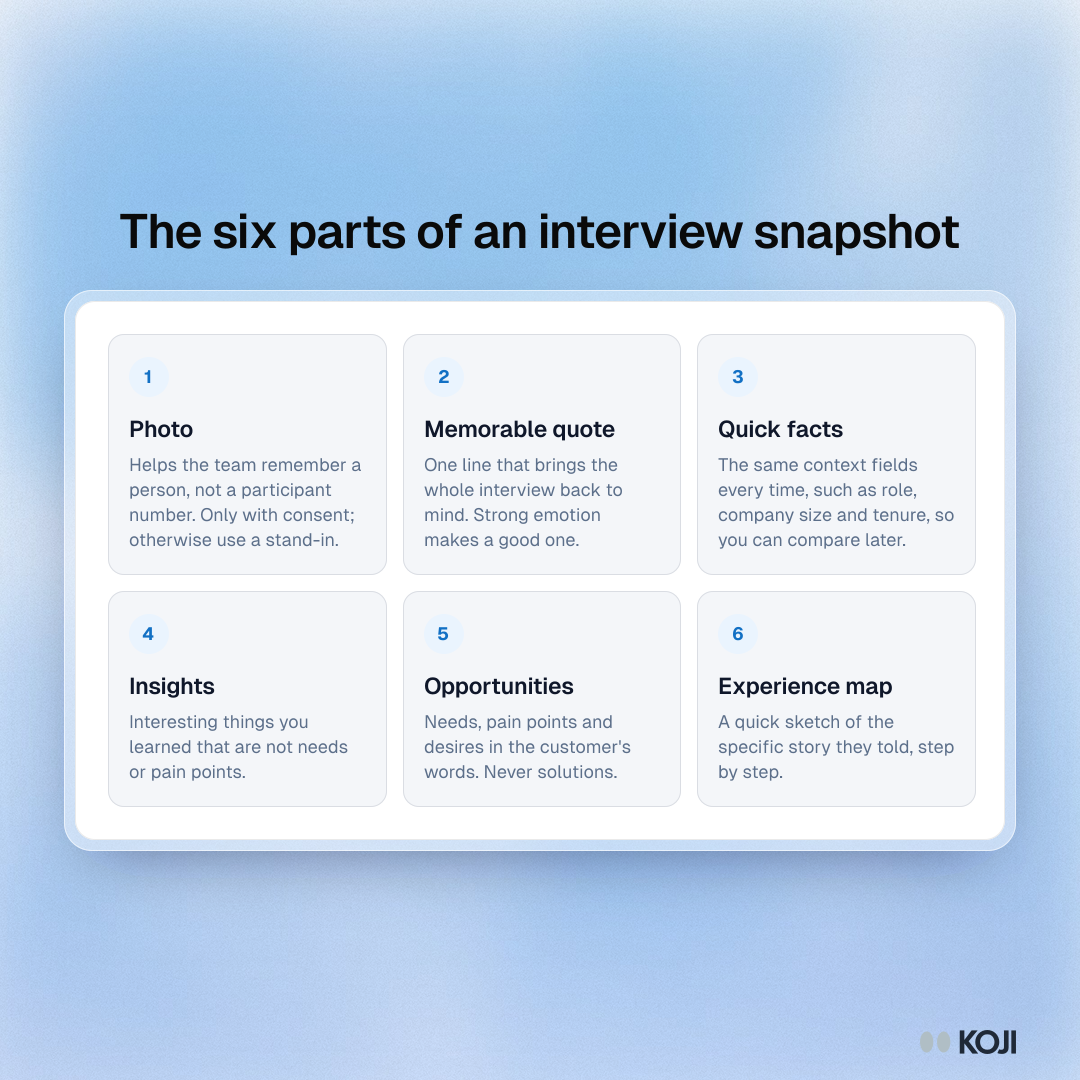
1. Photo
A photo of the participant helps the team remember them as a person, not as "P07". Only use a real photo with the participant's consent. If you don't have one, use a simple avatar or a picture of their setting (with permission), and never put real photos in decks that leave the team.
2. Memorable quote
One line that brings the whole interview back to mind. Strong emotion usually makes a good quote: "I literally keep a sticky note on my monitor with the workaround." Pick it for recall, not for proof. It is the hook that lets the team say "oh, the sticky-note person".
3. Quick facts
Short context about the participant that you will later use to compare and segment: role, company size, plan or tenure, how often they use the product, which tools they use alongside it. Decide your quick facts in advance so every snapshot has the same fields. That makes it possible to sort snapshots later, for example to see which opportunities come up only for admins.
4. Insights
Interesting things you learned that are not needs or pain points. "Their team has an unofficial product champion who trains everyone else" is an insight. It may not point to a feature, but it changes how you think about the customer.
5. Opportunities
Needs, pain points and desires you heard, written from the customer's point of view and never as solutions. "I can't tell which report is the latest version" is an opportunity. "Add version numbers to reports" is a solution, and it belongs somewhere else. Keeping this distinction is the single most useful habit in snapshot writing, because it keeps the solution space open.
6. Experience map
A quick sketch of the specific story the participant told, step by step: what triggered it, what they did, where they got stuck and how it ended. It comes from story-based interviewing, where you ask about a real past event ("Tell me about the last time you...") rather than general opinions. The map is usually a row of boxes and arrows, not a polished diagram.
How to fill in a snapshot
- Schedule ten minutes straight after the interview. Block it in the calendar together with the call itself.
- Do it together. The product trio (product manager, designer, engineer) or whoever joined the call. Each person heard different things.
- Start with the experience map. Rebuilding the story first brings back details for the other sections.
- Pull the opportunities from the map. Look at each step: where was the friction, the workaround, the emotion?
- Add insights, quick facts and the quote. Check the quote against the recording if you can.
- File it where the team can find it. One shared folder, board or repository, named consistently with date and participant ID.
Torres describes this rhythm in an interview with User Interviews: "I have teams synthesize each interview one at a time." The discipline is the point. A snapshot done the same day is worth more than a perfect analysis done three weeks later.
Filling in the snapshot right after the call
The first few snapshots feel slow. A few habits speed them up:

Photo by Kaleidico on Unsplash
- Use a fixed template. The same six boxes, the same quick-facts fields, every time.
- Write short. Bullet points, a handful of opportunities, one quote.
- Disagree in the room. If two people heard the same moment differently, write both down and check the recording later.
- Don't solve yet. When someone suggests a feature, park it in a separate list and rewrite the underlying need as an opportunity.
- Revisit old snapshots. Before planning a new project, read the snapshots of the people it affects.
From snapshots to an opportunity solution tree
Snapshots are the raw material for an opportunity solution tree. Every couple of weeks, the team looks across recent snapshots and asks which opportunities keep coming up and which matter most for the outcome they are working towards. Those go onto the tree, grouped under broader parent opportunities. The experience maps from individual snapshots can also be merged into a single map of the wider customer journey.
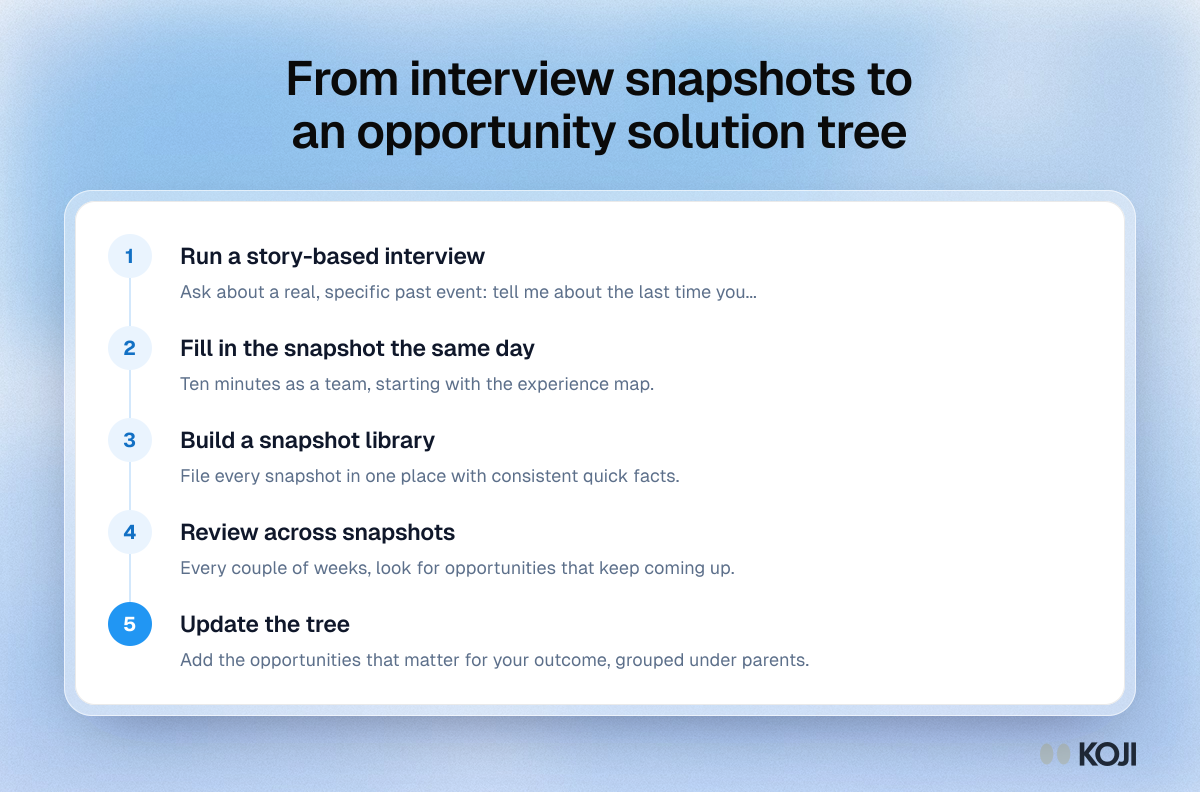
Because each opportunity is traced back to a snapshot, anyone on the team can ask "who said this?" and find the person, their quick facts and their story.
A worked example
Quick facts: Operations manager, 40-person logistics company, customer for eight months, uses the product daily alongside spreadsheets and a shared inbox.
Memorable quote: "Every Monday I rebuild the same report from scratch."
Experience map: Monday morning, manager needs weekly delivery figures for leadership, exports three reports, merges them in a spreadsheet, fixes date formats by hand, emails the result, gets questions back about a number that didn't match.
Opportunities:
- "I need the weekly numbers in one place without merging exports."
- "I can't explain why my numbers differ from finance's."
- "I'm not confident the export includes last-minute changes."
Insights:
- Leadership reads the email on their phone, not the dashboard.
- The manager feels responsible for data accuracy, even for figures from other teams.
Notice that none of the opportunities is a feature. "A scheduled weekly report" might be a good solution later, but the snapshot keeps the need open so the team can consider other options.
Common mistakes
Writing solutions as opportunities. The most common slip. If it describes something you would build, rewrite it as the need behind it.
Waiting until the end of a round. Snapshots done weeks later turn into guesswork. Do them the same day.
Inconsistent quick facts. If every snapshot records different context, you can't compare or segment them.
Generalising from one person. A snapshot is one story. Patterns come from looking across many.
Leading with opinions. Snapshots built from "What do you think of...?" questions have thin experience maps. Ask about real, specific past events.
Treating it as a transcript. The snapshot is synthesis. Keep the recording and transcript for detail, and the snapshot for the meaning.
How Koji helps
Continuous discovery stalls when someone has to schedule, run, record and write up every call by hand. Survey tools can collect answers every week, but they don't tell stories or ask follow-up questions, so there is no experience map to build. Koji runs AI-moderated interviews by voice or text that you can leave open, so new conversations come in every week, and it does the first pass of each write-up for you.
- Story-based interviews with follow-up. Koji's AI interviewer asks your open-ended questions and probes for specifics, which gives you the kind of concrete story an experience map needs.
- A per-interview summary to start from. Each interview opens in a panel with a Key Findings summary, Key Insights, Pain Points, Positive Highlights, Feature Requests and Notable Quotes, plus a quality rating and sentiment. That is most of a snapshot's raw material, ready when you sit down to discuss it.
- Quick facts captured up front. Screening questions and structured questions (scales, single and multiple choice) give you consistent context for every participant, shown above each conversation.
- Quotes you can trust. Every finding and quote is tied to the participant's exact words in the transcript, so your memorable quote is accurate.
- Patterns across interviews. The study report groups themes and findings across all interviews, with supporting quotes, which helps when you look across snapshots to update your opportunity solution tree.
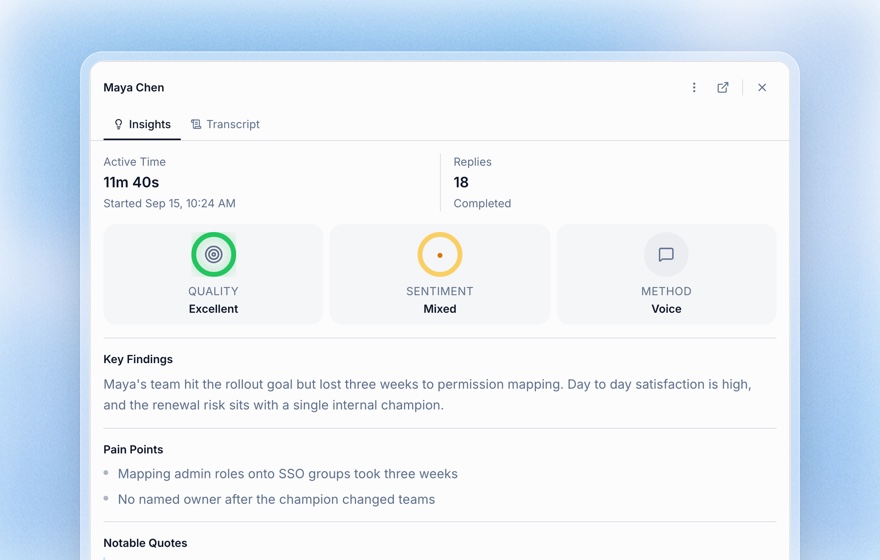
Koji doesn't draw the experience map or write opportunities for you, and that part is worth keeping as a team habit. Use Koji's summary as the first draft, then turn pain points and feature requests into customer-centred opportunities together.
Related Resources
- Continuous Discovery for User Research
- Opportunity Solution Tree
- Customer Interview Cadence
- Turning Interviews into Insights
- Research Debrief Guide
- Structured Questions Guide
FAQ
What is an interview snapshot? A one-page summary of a single customer interview, popularised by Teresa Torres. It captures who the person is, the story they told and the opportunities it points to.
What goes in an interview snapshot? Six parts: a photo (or stand-in), a memorable quote, quick facts, insights, opportunities and an experience map of the specific story the participant told.
When should you fill in an interview snapshot? Straight after the interview, ideally as a team, while the conversation is fresh. Same-day snapshots are far more accurate than ones written weeks later.
What is the difference between an insight and an opportunity in a snapshot? An opportunity is a customer need, pain point or desire. An insight is something interesting you learned that isn't a need, such as how the team around the customer works.
How do interview snapshots relate to the opportunity solution tree? Every couple of weeks, the team reviews recent snapshots, picks the opportunities that keep coming up and matter for the target outcome, and adds them to the tree.
Can I make interview snapshots from AI-moderated interviews? Yes. Use the AI-generated per-interview summary and transcript as the starting point, then build the experience map and write opportunities as a team.
Sources
- Torres, T. (2021). Continuous Discovery Habits: Discover Products that Create Customer Value and Business Value. Product Talk LLC.
- Torres, T. Product Talk, "The Interview Snapshot" and posts on X (2024).
- Product Talk (2023). Insights from the CDH Benchmark Survey: How are teams adopting discovery habits? (survey run September to November 2022).
- User Interviews. How to interview customers continuously with Teresa Torres of Product Talk.
- Pendo (2019). The 2019 Feature Adoption Report.
- Burke, H., Jenkins, L., & Higham, V. (2010). Transcribing your own qualitative data. Realities Toolkit 08, University of Manchester. NCRM ePrints.
Related Articles
Opportunity Solution Tree: The Complete Guide to Continuous Product Discovery
Learn how to build and use the Opportunity Solution Tree (OST) framework — Teresa Torres' visual map for connecting business outcomes to validated customer solutions through continuous discovery. Includes step-by-step instructions, templates, and how Koji automates the evidence-collection process.
Research Debrief: How to Synthesize and Share Findings After Every Study
A complete guide to running research debriefs — turning raw interview data into stakeholder-ready insights. Includes a debrief template, synthesis techniques, and how Koji automates the hardest parts.
Structured Questions in AI Interviews
Mix quantitative data collection — scales, ratings, multiple choice, ranking — with AI-powered conversational follow-up in a single interview.
Turning Interviews Into Insights: From Raw Data to Action
A complete guide to transforming raw interview transcripts into structured, actionable insights — covering manual analysis, AI-assisted workflows, and frameworks for prioritizing findings.
5-Point vs 7-Point Likert Scale: How Many Scale Points Should You Use? (2026)
A decision guide for rating-scale length — what the reliability research actually says about 5 vs 7 points, the odd-vs-even and neutral-midpoint debates, when each fits, and how AI follow-ups make any scale richer.
The 5-Second Test: How to Measure First Impressions and Visual Hierarchy (2026 Guide)
A complete guide to the 5-second test — the lightweight UX research method that measures gut reactions, message clarity, and visual hierarchy. Learn how to design questions, recruit participants, analyze results, and combine 5-second tests with AI interviews.