The Echo, Boomerang and Columbo: Answering Participant Questions Without Leading
When participants ask you questions mid-session, answer with a question. How the Echo, Boomerang and Columbo techniques work, with examples, a reply table and the mistakes to avoid.
When a participant asks you a question in the middle of an interview or usability test ("Is this the right button?", "What does this do?", "Is that what you wanted?"), the safest reply is usually a question back. Three techniques, named by the Nielsen Norman Group, cover most situations. The Echo repeats the participant's last words with a slight questioning tone. The Boomerang sends their question back to them ("What would you do if you were on your own?"). The Columbo has you play a little less expert than you are, often by trailing off and letting them finish the thought. All three keep the participant talking in their own words and keep your opinion out of the data.
This guide explains why answering participants is risky, how each technique works, when to use which, mistakes to avoid and how the same ideas carry over to AI-moderated interviews.
Why answering participants is risky
Participants ask questions for good reasons. They want to do well, they feel unsure, or they think you know the answer, which you usually do. But the moment you answer, you have changed the session. Your explanation is now part of what they know, and anything they say afterwards is partly about your words rather than their experience.
Small wording choices are enough to move people. In Elizabeth Loftus and John Palmer's 1974 study, participants watched a film of a car accident and were asked how fast the cars were going when they "smashed" into or "contacted" each other. The "smashed" group estimated an average of 40.8 mph; the "contacted" group, 31.8 mph. A week later, 32% of the "smashed" group said they had seen broken glass, against 14% of the group asked with "hit" and 12% of a control group. There was no broken glass in the film.
Even a single article can do it. Loftus and Guido Zanni (1975) asked people who had watched another accident film either "Did you see a broken headlight?" or "Did you see the broken headlight?" About 7% of the first group said yes. About 17% of the second group did. Again, there was no broken headlight.
Your expectations leak out in other ways too. Robert Rosenthal and Donald Rubin's 1978 review of 345 experiments on interpersonal expectancy effects found that what researchers expected measurably shaped how their subjects behaved, with an average effect equivalent to a correlation of .33. When you answer a participant's question, explain what a feature is for, or confirm they did it "right", you hand them your expectations directly.
That is why moderators learn to answer questions with questions. As the Nielsen Norman Group puts it when describing the Echo: "Using the exact word(s) that the participant used ensures that the facilitator does not bias the participant."
The three techniques at a glance
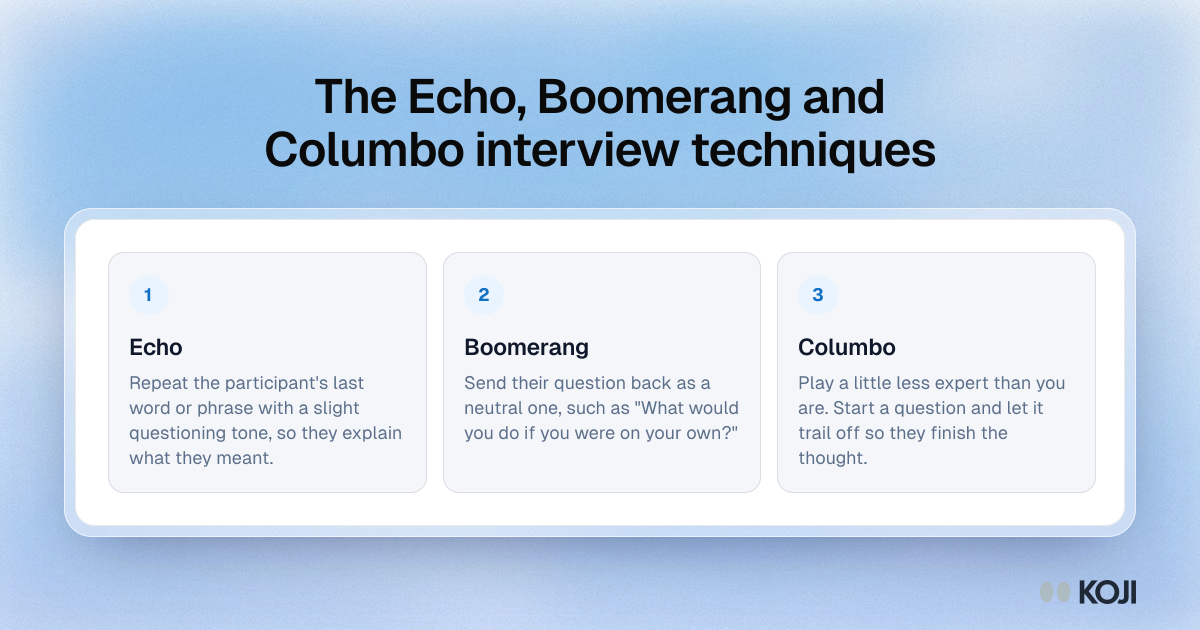
The Echo
What it is. You repeat the last word or phrase the participant said, with a slight rise in your voice, as if it were a question.
Example.
Participant: "This filter is kind of weird."
You: "Weird?"
Participant: "Yeah, I expected it to keep my last search, but it reset everything."
Why it works. You add nothing of your own. The participant hears their word handed back and explains what they meant by it, which is the part you needed. You also avoid guessing: if you had said "Weird because it's confusing?", you would have offered them a reason they might simply accept.
When to use it. When the participant uses a vague or loaded word ("weird", "annoying", "fine", "a bit much"), when they trail off mid-thought, or when they make a short remark and stop.
Watch out for. Echoing every sentence. Two or three echoes in a row sound like a parrot and start to feel like a test. Mix the Echo with silence and with open prompts such as "Tell me more about that."
The Boomerang
What it is. The participant asks you something, and you send it back to them as a neutral question.
Examples.
Participant: "Should I click Save first?"
You: "What would you do if you were on your own?"
Participant: "Is this what it's supposed to look like?"
You: "What did you expect it to look like?"
Participant: "Do other people find this confusing?"
You: "What made you wonder about that?"
Why it works. Most participant questions are really statements in disguise. "Should I click Save first?" often means "I'm not sure my changes are kept." The Boomerang turns the question into a chance for them to tell you their expectation, which is usually more useful than whatever the correct answer is.
When to use it. Any time a participant asks how something works, whether they are doing it right, or what you think. It is the standard reply in a usability test, and it works just as well in discovery interviews ("What would you recommend?" back to "What would you want it to do?").
Watch out for. Boomeranging a question that genuinely blocks the session. If a participant can't continue without an answer (a broken prototype, a login that won't work), help them, note that you did, and move on. Also watch your tone: a Boomerang should sound curious, never like a dodge.
The Columbo
What it is. Named after the TV detective played by Peter Falk, who solved cases by seeming slightly lost. The Nielsen Norman Group sums it up as "be smart but don't act that way." In practice you play down your own expertise, often by starting a question and letting it trail off so the participant fills the gap.
Examples.
You: "And this part over here is...?"
You: "Sorry, I'm not sure I followed. You said the report goes to your manager, and then...?"
Why it works. People explain more to someone who seems not to know. If you show expertise, participants assume you already understand and skip the details, or they defer to you. A half-finished sentence leaves room for them to describe the thing in their own vocabulary, which is exactly what you want to hear.
When to use it. When you want the participant to describe something you already understand, when they assume shared knowledge ("you know how the export works"), or when they seem anxious about getting it wrong.
Watch out for. Overdoing the act. Playing dumb about something obvious can feel patronising, and participants notice. Keep it light and honest: you really do want to hear how they see it.
Choosing the right reply
Most moments in a session fall into a few patterns. The table below pairs common participant remarks with a reply that leads and a neutral one that doesn't.
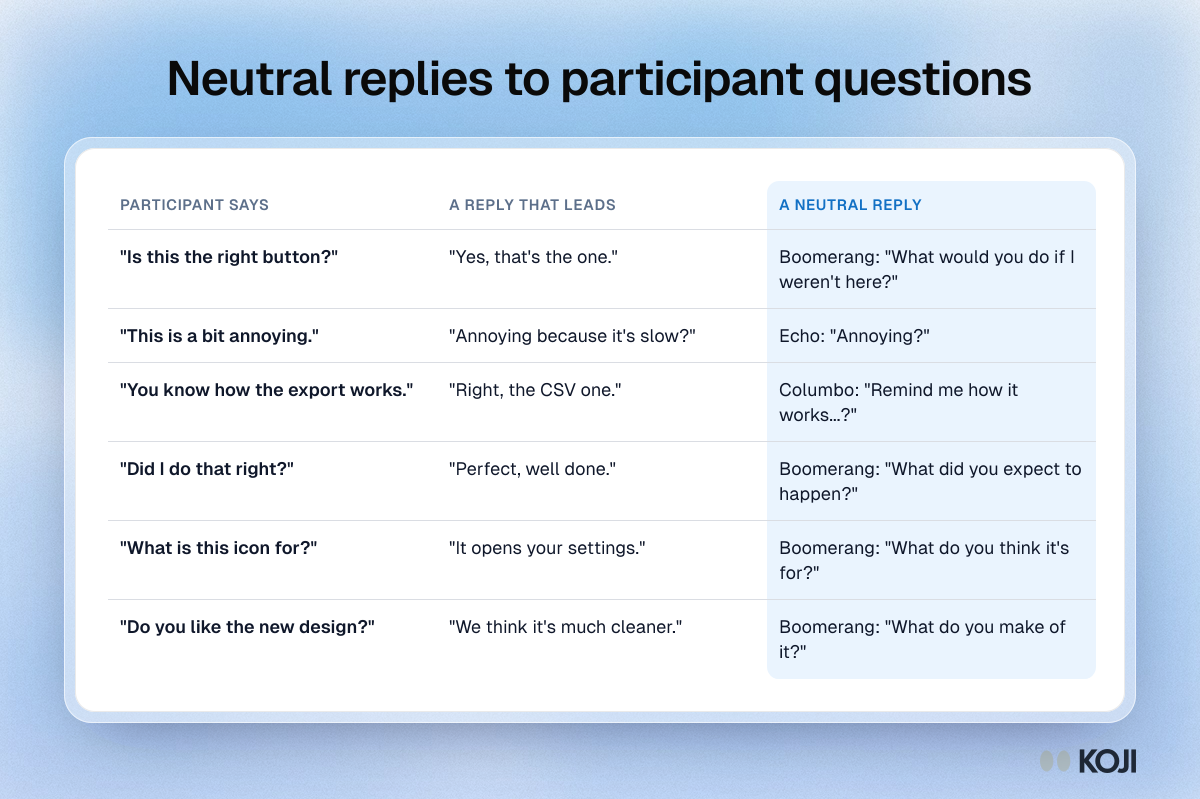
| Participant says | A reply that leads | A neutral reply |
|---|---|---|
| "Is this the right button?" | "Yes, that's the one." | Boomerang: "What would you do if I weren't here?" |
| "This is a bit annoying." | "Annoying because it's slow?" | Echo: "Annoying?" |
| "You know how the export works." | "Right, the CSV one." | Columbo: "Remind me how it works...?" |
| "Did I do that right?" | "Perfect, well done." | Boomerang: "What did you expect to happen?" |
| "What is this icon for?" | "It opens your settings." | Boomerang: "What do you think it's for?" |
| "Do you like the new design?" | "We think it's much cleaner." | Boomerang: "What do you make of it?" |
A simple rule of thumb: if the participant made a remark, Echo it. If they asked you a question, Boomerang it. If they assumed you know something, Columbo it.
Using the techniques in a live session
The techniques work best when they feel like part of a normal conversation rather than a script.

Photo by Francis Odeyemi on Unsplash
- Set expectations at the start. Tell participants you may not answer some questions during the session because you want to see how they would get on without you, and that you'll answer anything they like at the end. Then they won't take a Boomerang personally.
- Pause before you reply. A short silence often gets you the explanation without any prompt at all. If it doesn't, then Echo or Boomerang. See using silence in interviews.
- Use their words, not yours. If they called it "the little arrow thing", so do you. Swapping in your product's name for a feature teaches them the vocabulary you hoped to hear.
- Keep your voice and face neutral. A Boomerang said with a smile reads as curious. Said flatly, it can sound evasive. Nodding as they answer is fine; praising the answer is not.
- Keep a parking lot. Write down the questions you deflected and answer them in the last few minutes. It's honest, and the answers sometimes prompt useful last remarks.
- Note where you intervened. If you had to help, mark it in your notes, so you know which later findings were shaped by your help.
Common mistakes
- Answering "just this once". The first answer teaches the participant that asking works, and the questions keep coming.
- Boomeranging with a hint. "What do you think, is it the settings icon?" is still an answer, just phrased as a question.
- Turning every reply into a technique. Participants should feel heard. Short acknowledgments, silence and open prompts like "Tell me more" are still your main tools.
- Leading with praise. "Great, that's exactly right" tells the participant what the right answer was, and they'll start looking for it. See avoiding leading questions.
- Forgetting the end of the session. If you never answer the parked questions, participants leave confused, and the next recruit hears about it.
How Koji helps
Koji runs AI-moderated interviews by voice, text or phone, and the interviewer is set up to keep its own views out of the conversation in the same way a trained moderator does.
It stays neutral by design. Koji's interviewer asks one question at a time, doesn't share its own opinions, doesn't praise answers and avoids leading questions and hypotheticals, asking about what people actually did instead. Rather than echoing a participant word for word, it gives a short acknowledgment and builds the next question from what they just said, which does the same job as an Echo without sounding repetitive.
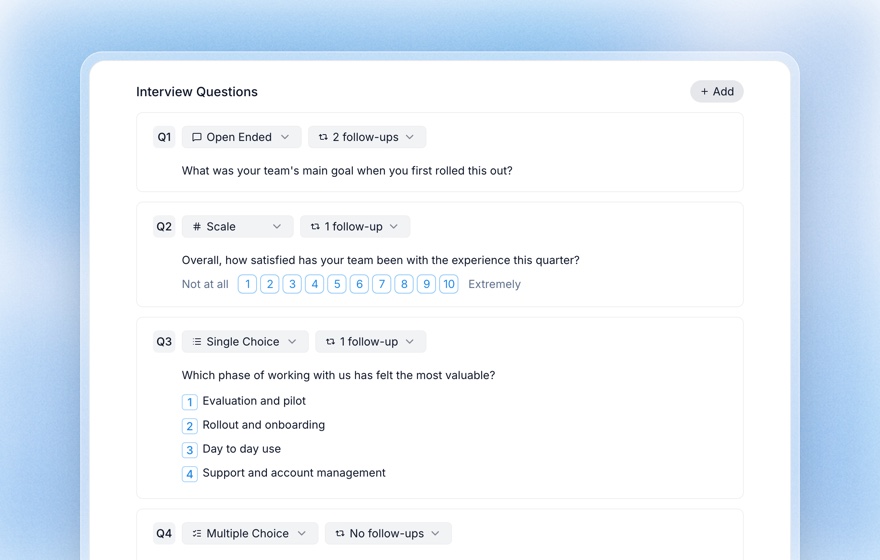
You decide how hard it probes. For every question you can set how many follow-ups the interviewer may ask, from none up to three, and add instructions for what to probe for. That's where you write your Boomerang rules, for example: "If they ask how the feature works, ask what they expected it to do."
Guardrails keep it out of trouble. In the brief you can list topics the interviewer must avoid, such as quoting prices or naming other customers, so a participant's question never pulls it into territory you'd rather a human handled.
Check it before anyone else hears it. The Preview tab lets you take your own interview by voice or text and try to trip it up with the questions real participants ask. Previews are free and never count as responses.
Every claim traces back to their words. In the report, clicking a finding opens the participants' own quotes beside it, so you can see that the language in your insights came from them, not from the interviewer.
Compared with a legacy survey tool, where a confused respondent has no one to ask and simply picks an option or drops out, an AI interviewer can respond to the confusion with a neutral follow-up and record what caused it. Compared with a human moderator, it won't get tired at the eighth session and start answering questions to keep things moving. It also can't read a participant's face, so for in-person usability tests where you need to see what people are doing, a human moderator using these techniques is still the right call.
Related Resources
- Using silence in user interviews
- Avoiding leading questions
- Probing questions for user interviews
- The think-aloud protocol
- How to moderate user interviews
- Structured questions guide
Sources
- Loftus, E. F., & Palmer, J. C. (1974). Reconstruction of automobile destruction: An example of the interaction between language and memory. Journal of Verbal Learning and Verbal Behavior, 13(5), 585-589.
- Loftus, E. F., & Zanni, G. (1975). Eyewitness testimony: The influence of the wording of a question. Bulletin of the Psychonomic Society, 5(1), 86-88.
- Nielsen Norman Group. Talking with participants during a usability test. nngroup.com/articles/talking-to-users/
- Rosenthal, R., & Rubin, D. B. (1978). Interpersonal expectancy effects: The first 345 studies. Behavioral and Brain Sciences, 1(3), 377-386.
Related Articles
How to Avoid Leading Questions in Surveys and Interviews
Leading questions quietly bias your research data. Learn how to spot and rewrite leading, loaded, and double-barreled questions — and how Koji's AI writes neutral questions and probes without steering respondents.
How to Moderate User Interviews: Skills, Probes, and the Question Flow That Surfaces Real Insights
A practical guide to moderating user interviews — rapport building, listening ratios, probing techniques, and how AI-moderated interviews remove the human variability that limits research quality.
Probing Questions for User Interviews: 40+ Examples to Get Deeper Answers
A practical guide to probing questions in user interviews — the six types of probes, 40+ ready-to-use examples, common mistakes, and how Koji's AI interviewer probes every answer automatically and consistently.
Using Silence in User Interviews: How Pauses Get Better Answers
Waiting a few seconds before you speak often gets you the part of the answer the participant hadn't said yet. Why silence works, where to pause, how long to wait and when not to.
Structured Questions in AI Interviews
Mix quantitative data collection — scales, ratings, multiple choice, ranking — with AI-powered conversational follow-up in a single interview.
Think-Aloud Protocol: How to Run and Analyze Think-Aloud Sessions
A complete guide to the think-aloud protocol — the most widely used usability testing method. Learn how to set up sessions, moderate effectively, analyze verbal data, and run remote think-aloud studies.